
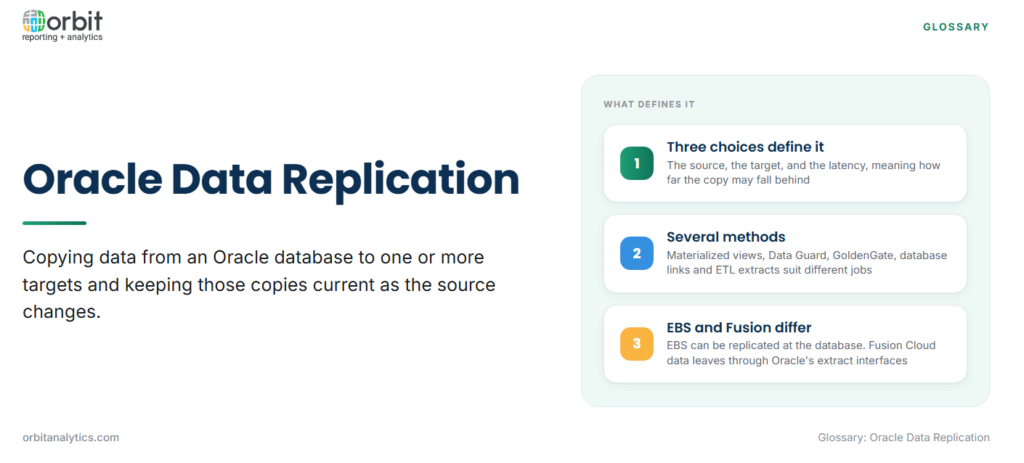
Oracle data replication is the process of copying data from an Oracle database to one or more targets and keeping those copies current as the source changes. The target can be another Oracle database, a standby system, a reporting replica, or a different platform altogether, such as a cloud data warehouse.
Every replication setup is defined by three choices: the source, the target and the latency, meaning how far the copy may fall behind. A nightly refresh and a feed that lags by seconds are both replication; they suit different jobs.
Why Organisations Replicate Oracle Data
- Offloading reporting from the production database: heavy queries run against a copy, so order entry, posting and month-end close do not compete with reports for the same resources.
- Disaster recovery and high availability: a standby copy of the database can take over if the primary site fails.
- Feeding cloud warehouses and lakehouses: Oracle data is combined with data from CRM, HR and other systems on platforms such as Snowflake or Databricks.
- Migration with minimal downtime: a new database stays in sync with the old one until cutover.
For ERP teams, reporting is usually the driver. Orbit Analytics lets finance and operations teams report on Oracle Fusion Cloud and EBS data without running heavy queries against the production system.
Oracle Data Replication Methods
Each method trades scope, latency and target differently.
| Method | What it copies | Typical latency | Main use |
|---|---|---|---|
| Materialized views | Full or partial tables (selected rows and columns) | Set by the refresh schedule | Distributing subsets, local reporting copies |
| Oracle GoldenGate | Committed changes read from transaction logs | Seconds | Real-time feeds, migrations, non-Oracle targets |
| Oracle Data Guard | The whole database, as a standby | Near real time | Disaster recovery and high availability |
| Database links and scheduled jobs | Tables or query results copied over a database link | Set by the job schedule | Simple, small copies between Oracle databases |
| ETL and batch extracts | Query results, often reshaped on the way | Hourly to nightly | Loading data warehouses |
Materialized views store the result of a query as a table on the target. A complete refresh rebuilds the whole copy, while a fast refresh applies only the changes recorded in a materialized view log on the source table.
Oracle Data Guard maintains one or more standby databases by shipping and applying redo from the primary. Its job is protection: the standby can take over after a failure, and with Active Data Guard it can also serve read-only queries while it keeps applying changes.
Oracle GoldenGate is the main option when the target must stay within seconds of the source or is not an Oracle database at all. It captures committed changes from the redo logs and replicates them to heterogeneous targets, including other databases, warehouses and streaming platforms.
Database links with scheduled jobs are the do-it-yourself route for small copies. ETL tools extract on a schedule and transform the data before loading it, which makes them replication with a modelling step attached.
Full Copy vs Incremental Replication
A full load copies the entire table every run. It is simple and consistent, but its cost grows with the table, so it suits small reference tables.
Incremental replication copies only what changed, an approach known as change data capture (CDC). Oracle teams generally choose between three ways to find those changes:
- Timestamp queries: select rows whose last-updated date is later than the previous run. Easy to build, but deleted rows are missed.
- Trigger-based capture: triggers on the source tables write each change to a change table. Deletes are caught, but every transaction on the source does extra work.
- Log-based capture: read the redo logs the database already writes for recovery. Deletes are caught with little load on the source, but the method needs privileges on the database and its logs.
Replicating Oracle Data to Other Platforms
Cloud platforms such as Snowflake, Databricks and Redshift are a frequent destination for replicated Oracle data. The copy usually lands in cloud storage or a staging schema and is then merged into target tables, and many lakehouse teams refine it in stages following the medallion architecture.
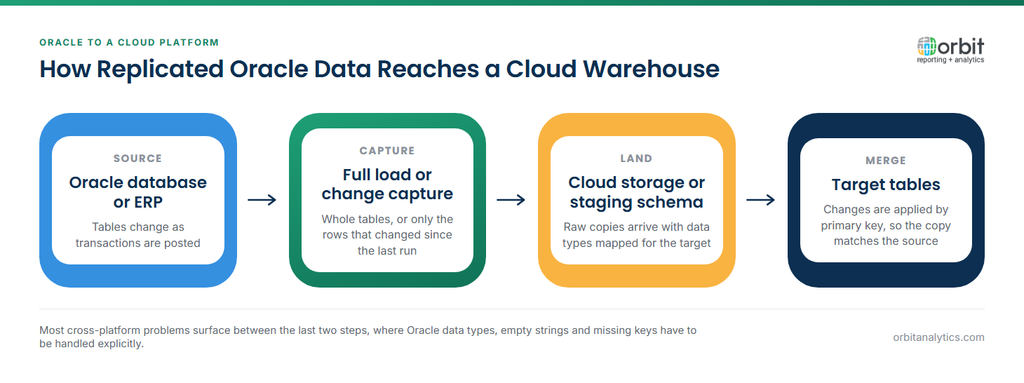
Moving between platforms introduces conversion problems that an Oracle-to-Oracle copy never meets:
- Data types: Oracle NUMBER columns without declared precision, and DATE values that carry a time component, need explicit mapping on the target.
- Empty strings: Oracle treats an empty string as NULL, while most other platforms do not, which affects joins and filters.
- Keys: incremental merges depend on primary keys. Tables without them must be given a reliable key before changes can be applied correctly.
Replicating Oracle ERP Data
Oracle E-Business Suite is a database problem. EBS runs on an Oracle database that the customer or its hosting partner administers, so materialized views, Data Guard and GoldenGate are all available, subject to Oracle’s support guidance for EBS.
Oracle Fusion Cloud is an extract problem. It is SaaS, and Oracle does not give customers direct access to the database or its logs, so none of the database-level methods apply. Fusion data leaves through Oracle’s extract interfaces instead, such as BI Cloud Connector for bulk and incremental extracts and REST APIs.
In both cases a raw copy of ERP tables loses business context: lookup codes without their meanings, flexfield segments without labels, and transactions without the ledger and business unit security that governed them. Orbit Analytics provides a data pipeline that moves Oracle Fusion Cloud and EBS data to cloud warehouses such as Snowflake, Databricks, Redshift and Azure with that business context intact.
Common Oracle Data Replication Problems
- Lag between source and target: batch jobs or network delays let the copy fall behind, and reports show stale numbers without saying so.
- Schema changes breaking the feed: a new column, a widened field or an ERP patch can stop replication or silently drop data until the mapping is updated.
- Load on the source system: frequent full loads or trigger-based capture compete with production work.
- Reconciling the copy with the source: row counts and control totals, such as GL balances by period, must match before anyone trusts the replica.
Data Replication vs Backup vs ETL
The three terms overlap, but each answers a different question.
| Data replication | Backup | ETL | |
|---|---|---|---|
| Purpose | Keep a usable copy current | Restore data after loss or corruption | Reshape data for analysis |
| Target structure | Same as the source | Backup format, not queried directly | Modelled for reporting |
| Point-in-time recovery | No: errors replicate too | Yes | No |
A replica copies mistakes too, so it never replaces a backup. ETL often uses replication or CDC as its extract step.
Frequently Asked Questions
Q1. What is the difference between Oracle GoldenGate and Data Guard?
Data Guard keeps a standby copy of an entire Oracle database, mainly for disaster recovery and high availability. GoldenGate uses log-based change data capture to replicate selected tables, in real time, to Oracle and non-Oracle targets.
Q2. Can Oracle Fusion Cloud data be replicated directly?
Not at the database level. Fusion Cloud is SaaS and customers have no access to its database or logs, so data is extracted through Oracle’s interfaces, such as BI Cloud Connector and REST APIs, and then loaded into a target.
Q3. What is change data capture in Oracle?
Change data capture identifies the rows that changed since the last load so only those are copied. In Oracle it is done with timestamp queries, triggers, materialized view logs or log-based tools that read the redo logs.
Q4. Is replication the same as backup?
No. Replication keeps a current, usable copy, so an accidental delete or corrupt update is copied to the target too. A backup preserves earlier states so data can be restored to a point in time.
Q5. Does replication slow down the source database?
It can. Full loads and trigger-based capture add work to the source, while log-based capture reads redo logs the database already writes and adds much less load.
Oracle data replication gives teams a usable copy, but reporting also needs that copy to carry ERP business context and to reach Fusion Cloud data through supported interfaces. Orbit Analytics delivers curated Oracle Fusion Cloud and EBS data to reporting and cloud warehouses. Request a demo to see how it fits your data architecture.
