
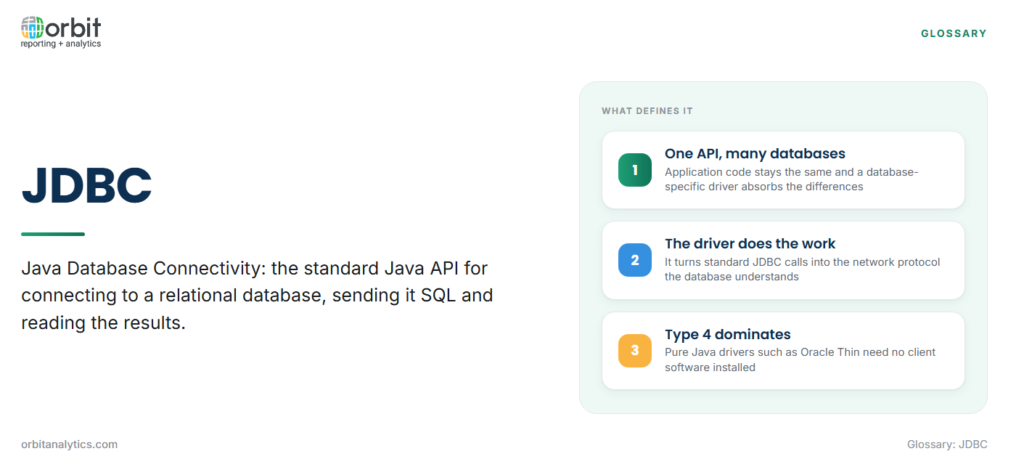
JDBC (Java Database Connectivity) is the standard Java API for connecting to a relational database, sending it SQL and reading the results. A Java program codes against one set of interfaces, and a database-specific JDBC driver turns those calls into the protocol the database understands.
Sun Microsystems released JDBC in 1997 with JDK 1.1, and it ships with every Java platform today in the java.sql and javax.sql packages. It solved a practical problem: without a common API, every Java application would need separate code for each database it talks to. With JDBC, the application code stays the same and the driver absorbs the differences.
How JDBC Works
Every JDBC query follows the same path from the application to the database and back.
- The application calls the JDBC API. Java code requests a connection by supplying a connection URL and credentials, then works only with standard JDBC interfaces.
- The driver manager picks a driver. DriverManager offers the URL to each registered driver until one accepts it. Since JDBC 4.0, drivers on the classpath register themselves, so the old Class.forName() call is no longer needed.
- The driver speaks the database’s protocol. The driver opens a session, sends the SQL and handles the database-specific work, such as network messages and data type conversion.
- Results return as a ResultSet. Rows come back in a ResultSet object, which the application reads row by row through standard getter methods.
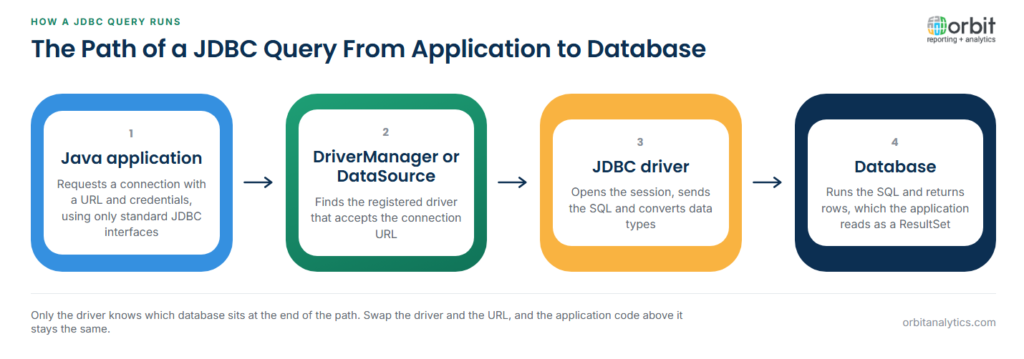
In application servers, a DataSource usually takes the place of DriverManager. It adds connection pooling, so connections are reused instead of opened for every request.
The Main JDBC Components
- Driver and DriverManager: the driver implements JDBC for one database, and DriverManager is the class that matches a connection URL to the driver that can handle it.
- Connection: an open session with the database. It controls transactions (commit, rollback, auto-commit) and creates statements.
- Statement and PreparedStatement: a Statement runs a SQL string exactly as written. A PreparedStatement is precompiled with ? placeholders for parameters, which lets the database reuse the execution plan and protects against SQL injection. CallableStatement extends it to call stored procedures, including PL/SQL.
- ResultSet: a cursor over the rows a query returned, with methods such as getString() and getBigDecimal() that read each column as a Java type.
The Four JDBC Driver Types
The JDBC specification groups drivers into four types according to how they reach the database.
| Type | Name | How it works | Status today |
|---|---|---|---|
| 1 | JDBC-ODBC bridge | Translates JDBC calls into ODBC calls, so an ODBC driver does the work | Removed from the JDK in Java 8 |
| 2 | Native API | Calls the database vendor’s native client libraries, for example the Oracle OCI driver | Needs client software on each machine |
| 3 | Network protocol | Sends calls to a middleware server, which then talks to the database | Rare; used where a middle tier is required |
| 4 | Pure Java (thin) | Implements the database’s wire protocol entirely in Java, for example Oracle Thin | The most common type |
Type 4 drivers dominate because each one is a single JAR file with no native installation, so it runs anywhere Java runs.
The JDBC Connection URL
A JDBC connection URL tells DriverManager which driver to use and where the database is. It has three parts: the jdbc prefix, a subprotocol that names the driver, and a database-specific address.
For the Oracle Thin driver, a URL in the service-name form looks like this:
jdbc:oracle:thin:@//dbhost:1521/ORCLPDB1
Here oracle:thin selects the Thin driver, dbhost is the database server, 1521 is the listener’s default port and ORCLPDB1 is the service name, in this case a pluggable database. Credentials are normally passed separately or as connection properties rather than written into the URL.
JDBC and Oracle Databases
Oracle ships its JDBC drivers in the ojdbc JAR files. Two of them matter for most teams:
- Oracle Thin driver (Type 4): pure Java, connects over Oracle Net and needs no Oracle client installation. Oracle recommends it as the default choice, because it deploys as one file and works the same on every platform.
- Oracle OCI driver (Type 2): calls the Oracle Call Interface libraries from an Oracle Client or Instant Client installation, so those libraries must be present on every machine that runs it. Teams pick it only when they need a feature that depends on the native client.
Reporting tools can use JDBC only where a database is reachable. Oracle E-Business Suite runs on an Oracle ERP database the customer administers, so a Java-based tool can connect over JDBC, subject to database security and read-only accounts. Oracle Fusion Cloud is SaaS: Oracle does not give customers direct database access, so there is no Fusion database to point a JDBC URL at, and data leaves through Oracle’s extract interfaces such as BI Cloud Connector and REST APIs.
Orbit Analytics connects to Oracle EBS and Fusion Cloud data for reporting without hand-built database connections. Its Oracle Fusion SQL queries capability gives analysts and developers SQL access to Fusion Cloud data without direct database access.
Common JDBC Uses
- Application back ends: Java web applications and services use JDBC to read and write their databases, either directly or through frameworks such as Hibernate and Spring. Those frameworks generate SQL, but they still run it through a JDBC driver.
- Reporting and BI tools: many reporting tools, BI platforms and SQL clients are written in Java and connect to Oracle through JDBC. An administrator adds the vendor’s driver JAR and enters a connection URL.
- Data pipelines and integration: ETL and integration tools use JDBC to extract from source databases and load into warehouses, tuning fetch sizes and batch updates to move large volumes.
Writing and maintaining that extraction code for Oracle ERP data is a project in itself. Orbit Analytics provides a data pipeline with 200+ pre-built connectors that moves Oracle Fusion Cloud and EBS data to cloud warehouses such as Snowflake, Databricks and Redshift.
JDBC vs ODBC
Both standards share one idea: a common API with database-specific drivers underneath. The difference is language. JDBC is a Java API used by Java applications, while ODBC is a C-based, language-neutral interface used by spreadsheets, BI tools and scripts written in many languages.
In practice the tool decides. Java applications and Java-based tools use JDBC, while Windows desktop tools such as Excel usually connect through ODBC.
Frequently Asked Questions
Q1. What does JDBC stand for?
JDBC stands for Java Database Connectivity. It is the standard Java API for connecting to relational databases, running SQL and reading the results through database-specific drivers.
Q2. Which JDBC driver type is most common today?
Type 4, the pure Java driver. It is a single JAR file that implements the database’s protocol directly, so it needs no native client software and runs on any platform with Java.
Q3. What is the Oracle JDBC Thin driver?
It is Oracle’s Type 4 JDBC driver, written entirely in Java. It connects to Oracle Database over Oracle Net without an Oracle client installation, and Oracle recommends it as the default driver for most applications.
Q4. What is the difference between Statement and PreparedStatement?
A Statement sends a SQL string to the database exactly as written. A PreparedStatement is precompiled with placeholders for parameter values, which makes repeated queries more efficient and protects against SQL injection.
Q5. Does JDBC work with cloud databases?
Yes. Cloud databases such as Oracle Autonomous Database and Snowflake provide JDBC drivers, usually with encrypted connections. SaaS applications such as Oracle Fusion Cloud are different, because they do not expose their database to customers at all.
JDBC connects Java code to databases, but Oracle ERP reporting also needs governed access and a route into Fusion Cloud, where there is no database to connect to. Orbit Analytics delivers live Oracle Fusion Cloud and EBS data to reporting users and cloud warehouses without hand-built connections. Request a demo to see it with your own Oracle data.
