
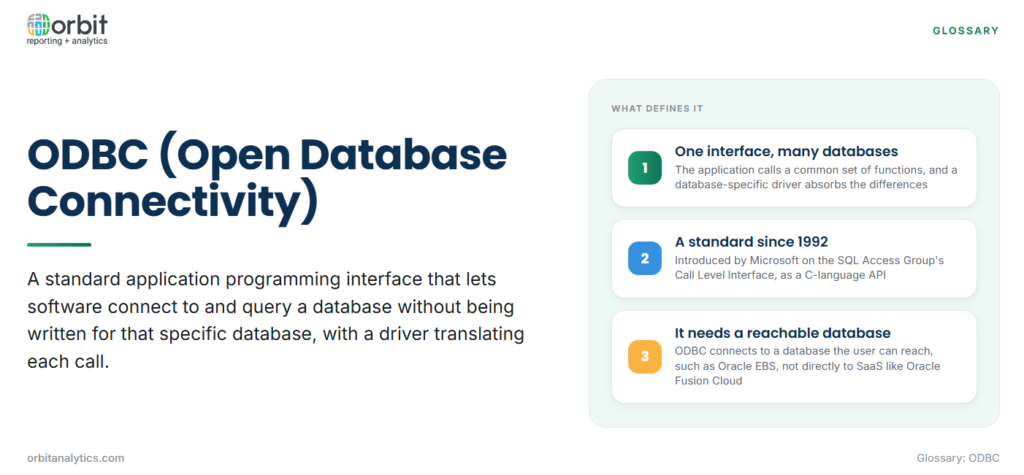
ODBC (Open Database Connectivity) is a standard application programming interface (API) that lets software connect to and query a database without being written for that specific database. An application calls one common set of functions, and a database-specific driver translates those calls into whatever the database understands.
Microsoft introduced ODBC in 1992, building on the Call Level Interface specification developed with the SQL Access Group. It is a C-language API, and it solved a practical problem: before it, every application needed separate code for every database it wanted to talk to. With ODBC, the application targets one interface and the driver absorbs the differences.
How ODBC Works
A single ODBC query follows a fixed path from the application to the database and back.
- The application requests a connection. It names a data source (a DSN) or supplies a connection string with the driver, server and credentials.
- The driver manager loads the driver. It looks up which driver the data source uses and loads it on the application’s behalf.
- The driver connects to the data source. The driver opens a session with the database using the database’s own network protocol.
- SQL is sent and translated. The application submits SQL through standard ODBC functions; the driver converts it, where needed, into the database’s dialect.
- Results return through the same path. Rows come back from the database through the driver, which presents them to the application in ODBC’s standard data types.
The application never needs to know which database is on the other end, which is the whole point of the standard.
The Four Layers of ODBC Architecture
ODBC separates the work into four layers, each with one responsibility.
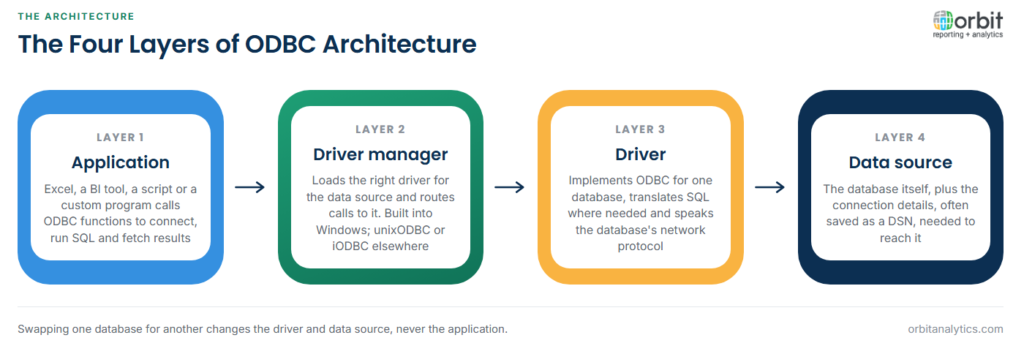
- The application: Excel, a BI tool, a script or a custom program. It calls ODBC functions to connect, run SQL and fetch results.
- The driver manager: a library that loads the right driver and routes calls to it. Windows includes one; on Linux and macOS, unixODBC and iODBC fill the same role.
- The driver: the database-specific component that implements the ODBC functions, translates SQL where necessary and speaks the database’s protocol.
- The data source: the database itself, plus the connection details needed to reach it.
Swapping one database for another means changing the driver and data source, not rewriting the application.
What a DSN Is
A Data Source Name (DSN) is a saved, named set of connection details: which driver to use, the server or service to reach, and default options. Applications refer to the DSN by name instead of repeating those details.
| DSN type | Where it lives | Who can use it |
|---|---|---|
| User DSN | The current user’s profile | Only that user |
| System DSN | The machine’s configuration | Every user and service on the machine |
| File DSN | A text file | Anyone who has the file and the driver |
A DSN-less connection puts the same details directly into a connection string, which is common in scripts and deployed applications.
ODBC Drivers and Why Bitness Matters
Drivers are supplied by database vendors or by third parties. Oracle, for example, provides an ODBC driver as part of Oracle Instant Client.
Bitness catches many people out. A 64-bit application needs a 64-bit driver, and a 32-bit application needs a 32-bit one. Windows even keeps separate 32-bit and 64-bit versions of the ODBC Data Source Administrator, so a DSN created in one is invisible to applications of the other bitness.
How BI and Excel Tools Connect to Oracle Through ODBC
Excel reaches ODBC sources through Power Query (Data, Get Data, From Other Sources, From ODBC), and most BI tools, including Power BI and Tableau, offer an ODBC connector alongside their native ones. The user picks a DSN or enters a connection string, writes or builds a query, and the results land in a sheet or data model.
Against Oracle, the right approach depends on the application:
- Oracle EBS and self-managed databases: the Oracle ERP database is reachable, so an Oracle ODBC driver can query it directly, subject to database security.
- Oracle Fusion Cloud: a SaaS application that does not give customers direct database access. ODBC to Fusion depends on a layer in between, such as a replicated copy of the data or a driver built on Oracle’s supported interfaces.
Each desktop still needs its driver installed, its DSN configured and its credentials managed. Orbit Analytics provides Excel reporting that brings live Oracle Fusion Cloud and EBS data into Excel with role-based security, without per-desktop driver setup.
Common ODBC Problems
- Driver not found: the DSN names a driver that is not installed, or not installed for the application’s bitness.
- Bitness mismatch: a DSN was created in the 32-bit administrator and a 64-bit application cannot see it, or the reverse.
- Network and listener errors: for Oracle, an incorrect host, port or service name, or a listener that is not reachable through the firewall.
- Timeouts on large queries: the driver or application gives up before a heavy query finishes, which is common when desktop tools query production ERP tables.
- Dialect differences: SQL that works in one database fails in another, because the driver passes most SQL through unchanged.
ODBC in Oracle Reporting Today
ODBC remains a dependable way for desktop tools and scripts to reach databases, and almost every analytics product supports it. It works best where the database is reachable and the queries are modest.
It fits less well where users should not see raw tables, where queries are heavy enough to affect production, or where there is no database to connect to, as with Fusion Cloud. Orbit Analytics offers SQL queries against Oracle Fusion data from Excel, giving developers and analysts SQL access to Fusion Cloud without direct database access.
ODBC Compared With JDBC, OLE DB and Native Drivers
ODBC is one of several ways an application can reach a database, and the alternatives are easy to confuse.
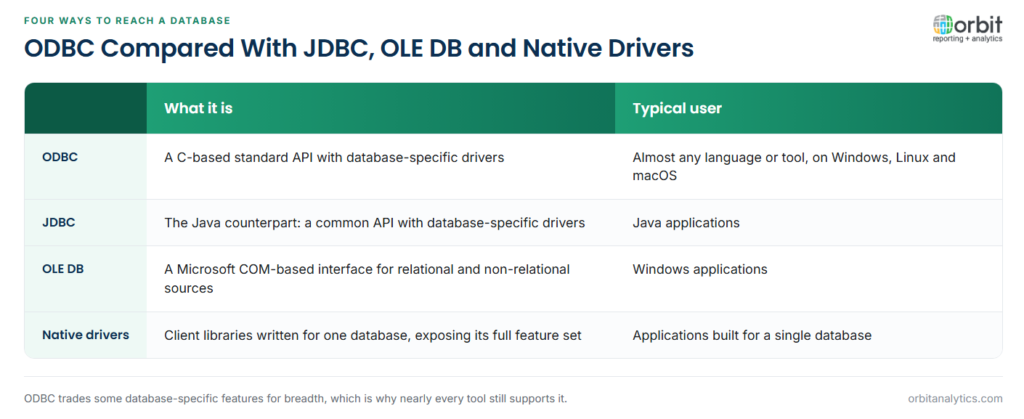
JDBC (Java Database Connectivity) is the Java counterpart: the same idea of a common API with database-specific drivers, used by Java applications. OLE DB is a Microsoft COM-based interface that was designed to reach relational and non-relational sources on Windows. Native drivers, such as Oracle’s own client libraries, are written for one database and expose its full feature set, at the cost of portability.
ODBC’s advantage is breadth: nearly every language and tool can use it, which is why it persists more than three decades after it was introduced.
Frequently Asked Questions
Q1. What does ODBC stand for?
ODBC stands for Open Database Connectivity. It is a standard API that applications use to connect to databases through database-specific drivers.
Q2. What is an ODBC driver?
An ODBC driver is the database-specific component that implements the ODBC functions for one database. It translates the application’s calls and SQL into the database’s protocol and returns results in ODBC’s standard format.
Q3. What is the difference between ODBC and JDBC?
Both provide a common API with database-specific drivers. ODBC is a C-based interface usable from most languages and tools, while JDBC is designed for Java applications.
Q4. Can Excel connect to Oracle using ODBC?
Yes. With an Oracle ODBC driver installed and a DSN or connection string configured, Excel can query an Oracle database through Power Query’s ODBC option. This works for databases the user can reach, such as Oracle EBS, but not directly for Oracle Fusion Cloud.
Q5. Is ODBC still used today?
Yes. ODBC remains one of the most widely supported database interfaces, used by spreadsheets, BI tools, scripts and integration software across Windows, Linux and macOS.
ODBC connects tools to databases, but Oracle reporting also needs governed access, security and a route into Fusion Cloud. Orbit Analytics delivers live Oracle Fusion Cloud and EBS data to Excel and BI users without per-desktop driver management. Request a demo to see it with your own Oracle data.
