
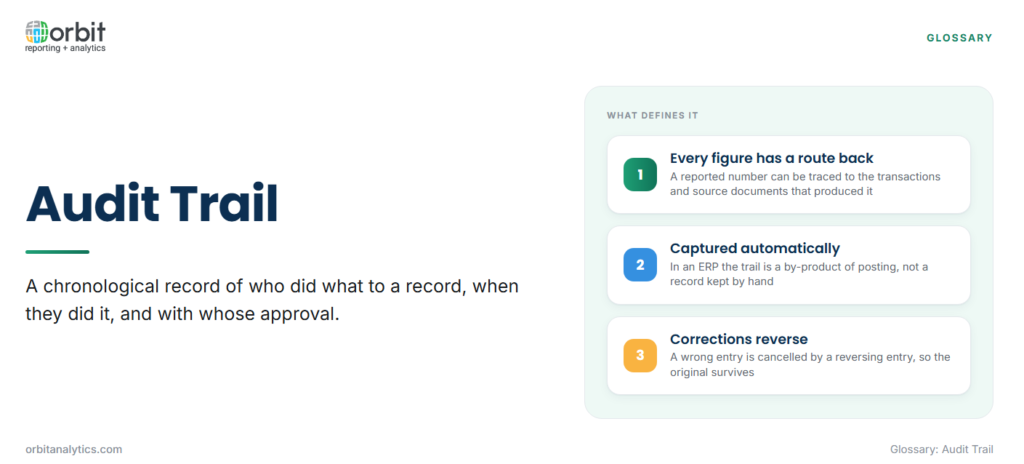
An audit trail is a chronological record of who did what to a record, when they did it, and with whose approval. In finance and ERP systems it links every reported figure back to the transactions, journal entries and source documents that produced it, so any number can be traced to its origin and any change can be attributed to a person.
The terms audit trail and audit log are often used interchangeably. Strictly, an audit log is the raw, system-generated list of events, such as logins, edits and approvals, while an audit trail is the connected path those events form around a transaction or a figure. The log is the evidence; the trail is the account it gives.
What an Audit Trail Records
A complete trail answers four questions about every change:
| Element | What is captured | Example |
|---|---|---|
| Who made the change | The user ID of the person or system process | The accounts payable clerk who entered an invoice |
| What changed, before and after | The field, its old value and its new value | A supplier’s bank account number replaced with a new one |
| When and from where | Date and time stamp, often with the device, network address or application | An edit made late in the evening from a remote session |
| Approvals along the way | Who reviewed, approved or rejected the change, and when | A manual journal approved by the controller before posting |
The before and after values are the element most often missing from weaker systems. Without them, a change can be detected but not understood.
Why Audit Trails Matter
An audit trail does several jobs at once:
- Internal control and SOX compliance: the Sarbanes-Oxley Act requires US public companies to maintain effective internal control over financial reporting. Audit trails are the evidence that controls such as approvals and segregation of duties actually operated.
- Fraud detection: unusual patterns, such as a supplier’s bank details changed shortly before a payment run, or journals posted at odd hours by an unexpected user, are visible only when changes are recorded and reviewed.
- Supporting external auditors: auditors sample transactions and trace them in both directions, from the financial statements down to source documents and from source documents up to the statements. A clear trail shortens that work.
- Reconstructing a number after the fact: months later, when a figure is questioned, the trail shows how it was built and what changed along the way.
Audit trails sit within a wider data governance framework, which sets the ownership and policies that the trail provides evidence for.
Types of Audit Trail
Most organizations keep several kinds of trail, each covering a different risk:
- Financial transaction trails: the path from a source document, such as an invoice or receipt, through subledger entries and journals to the general ledger balance.
- System and access logs: records of logins, failed sign-in attempts, role changes and permission grants.
- Data change histories: field-level histories of master data such as suppliers, customers, items and bank accounts.
- Report and document versions: saved versions of reports, reconciliations and supporting files, showing what was presented to whom and when.
How an Audit Trail Works in an ERP System
In an ERP, the trail is captured automatically as a by-product of normal work. Every journal, invoice and payment carries the user, date and source that created it, without anyone keeping a separate record by hand.
The second principle is that corrections reverse; they do not overwrite. A wrong posted journal is not edited in place: a reversing entry cancels it and a correct entry is posted, so both stay in the ledger and the history of what was reported survives.
Together, these let an auditor follow a figure from the statement to its source document:
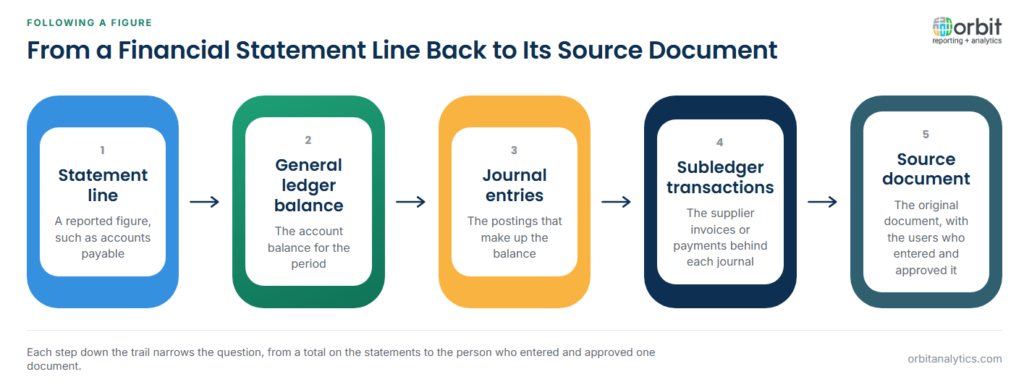
- Start from a line on the financial statements, such as accounts payable.
- Drill into the ERP general ledger balance for that account and period.
- Open the journal entries that make up the balance.
- Follow each journal to its subledger transactions, such as supplier invoices.
- Reach the source document and the users who entered and approved it.
Audit Trails in Oracle Fusion Cloud and EBS
In Oracle Fusion Cloud and Oracle EBS, the trail is spread across several places. Journal headers and lines carry the creator, source and posting date; subledger accounting links journals back to the invoices, receipts and payments behind them; and audit settings can be enabled to record changes to selected business objects and fields. User sign-ins and role assignments are recorded separately.
The records exist, but reporting on them is harder. Teams often export journals and subledger detail into spreadsheets to answer an auditor, which breaks the trail where it is needed most.
Orbit Analytics provides general ledger reporting that works directly on Oracle Fusion Cloud and EBS data, with drill-down from a balance to the journals behind it. The walk from statement to source then happens inside a governed report rather than across a chain of manual exports.
Weak Audit Trails and How They Fail
The weak points are rarely inside the ERP. They sit around it.
- Spreadsheets edited outside the system: once data is exported and adjusted in a workbook, nothing records who changed which cell or why. Orbit Analytics addresses this with Excel-based reporting that stays connected to the source, so a figure in a workbook keeps its route back to the ledger.
- Shared logins: when several people use one account, the trail records the account rather than the person, and the “who” question has no answer.
- Logs nobody reviews: a trail that is captured but never examined detects nothing. Regular review of sensitive changes, such as supplier bank details and manual journals, is what turns a record into a control.
- Retention that runs out too early: logs purged before audits, disputes or investigations are complete leave gaps exactly where evidence is needed. Retention periods depend on law and company policy, so they should be set with legal and audit advice.
Audit Trail vs Data Lineage
Both trace a figure to its origin, but they follow different things:
| Aspect | Audit trail | Data lineage |
|---|---|---|
| Follows | People and changes | Data moving through systems |
| Answers | Who changed this, when, and was it approved? | Which sources and transformations produced this figure? |
| Typical evidence | User IDs, time stamps, before and after values, approvals | Source tables, jobs, mappings and calculations |
An audit of a reported figure often needs both: data lineage to show how a report or warehouse number derives from the ledger, and the audit trail to show who created and changed the ledger entries behind it.
Frequently Asked Questions
Q1. What is an audit trail in accounting?
It is the record that links each figure in the financial statements to the journals, transactions and source documents behind it, along with who entered and approved each one. It lets anyone trace a balance back to its origin.
Q2. What information does an audit trail contain?
It records who made each change, what changed with the before and after values, when and from where it was made, and who approved it. Together these make every change attributable and explainable.
Q3. Why is an audit trail important for SOX compliance?
SOX requires companies to show that their internal controls over financial reporting operate effectively. The audit trail is the evidence that approvals, reviews and segregation of duties actually happened.
Q4. Can an audit trail be edited or deleted?
In a well-controlled system, ordinary users cannot change or delete audit records, and accounting corrections are made by reversing entries rather than edits. Access to purge or alter logs should be restricted and itself recorded.
Q5. Do spreadsheets have an audit trail?
Not in any reliable sense. Version history may show that a file changed, but it rarely records why, by whose approval, or how a figure relates to the ledger, which is why spreadsheet adjustments are a common audit finding.
An audit trail is only useful if the route from a balance to its source can be walked quickly. Orbit Analytics reports on Oracle Fusion Cloud and EBS data with drill-down from statement to journal, without the exports that break the trail. Request a demo to see it on your own ledger.
