
Data lineage is the record of where a piece of data came from, every system and transformation it passed through, and everywhere it is used downstream. It answers two questions about any number in a report: what produced it, and what would change if its source changed.
A lineage record links sources, jobs and targets as a graph. Each node is a dataset, table or column, and each edge is a transformation such as a filter, join, aggregation or calculated field, together with when it ran and which code ran it. Read end to end, the graph shows the full path from a transaction in the ERP to a figure on a dashboard.
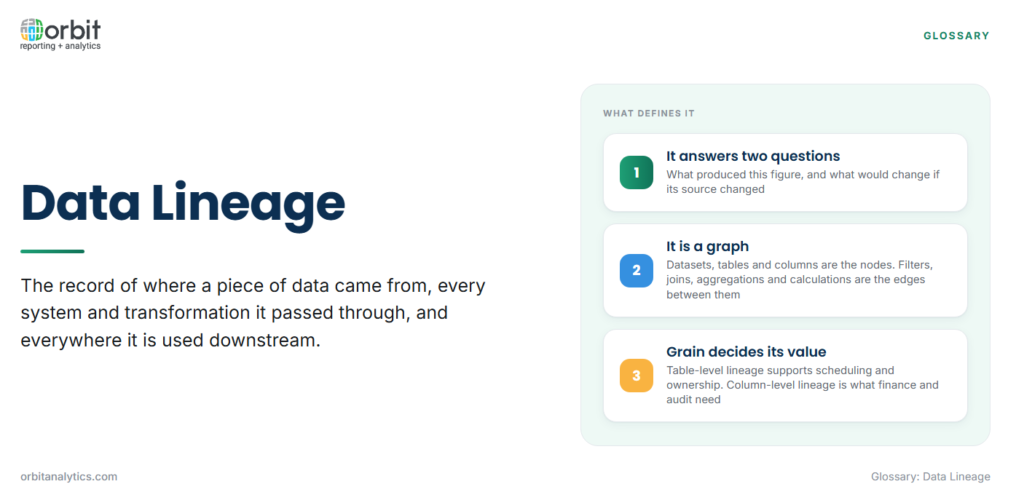
Table-Level vs. Column-Level Lineage
Lineage can be recorded at different grains, and the grain decides which questions it can answer.
| Grain | What it tracks | Question it answers |
|---|---|---|
| System-level | Which applications feed which | Which platforms depend on the ERP? |
| Table-level | Which tables are read to build which tables | Which jobs load this warehouse table? |
| Column-level | Which source columns feed each target column, and through what logic | Which fields make up this revenue figure, and how is it calculated? |
Table-level lineage is easier to capture and is enough for scheduling and ownership. Column-level lineage is what finance and audit usually need, because a single report column can combine several source fields, a currency conversion and a filter, and only field-level detail shows that. System-level lineage is mostly useful for architecture planning and for spotting which platforms a retirement would affect.
Backward and Forward Lineage
Lineage is read in two directions, and each direction serves a different person.
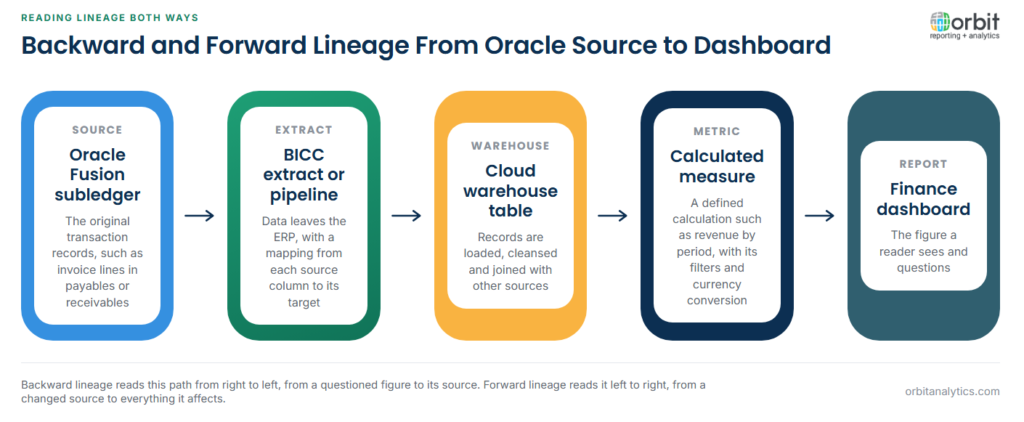
Backward lineage (upstream) starts from a report figure and traces back to the source records and transformations that produced it. It is how an analyst answers “why does this number look wrong?” and how an auditor confirms a reported balance is derived from the ledger.
Forward lineage (downstream) starts from a source table or column and follows it to every dataset, report and model that depends on it. It is how an engineer finds out what a schema change will break before making it. Both directions use the same graph; only the starting point differs.
How Lineage Is Captured
- Parsing transformation code: SQL, ETL job definitions and transformation models are parsed to work out which inputs produce which outputs. This is the most common automated method.
- Runtime capture: pipelines and query engines emit lineage events as jobs run, often in the open OpenLineage format, recording what actually executed rather than what the code says should happen.
- BI tool metadata: report definitions and semantic models reveal which warehouse fields feed each chart and table.
- Manual documentation: spreadsheets and wiki pages that describe flows. Cheap to start, but out of date as soon as a pipeline changes.
Most organizations combine methods, because no single one sees every hop from the ERP to the dashboard. Runtime capture is usually the more accurate automated method, but it only records jobs that have actually run.
Impact Analysis: Using Lineage Before a Change
Impact analysis is forward lineage applied to a planned change, and it is where lineage most often pays for itself.
- Identify the change: a renamed column, a new chart of accounts segment, a retired source table or a revised calculation.
- Trace downstream dependencies: list every table, metric, report and extract that reads the affected field, directly or indirectly.
- Assess each dependency: decide whether it breaks, returns different numbers or is unaffected.
- Notify owners: tell the report and dataset owners what will change and when.
- Test and release: validate the affected outputs after the change and before the next reporting cycle.
Without lineage, step 2 is guesswork. That is why changes that look minor in the source often surface weeks later as a wrong figure in a management pack.
Lineage for Audit, Compliance and Trust in Reports
Lineage is a core control within data governance, because it turns “trust the report” into something that can be demonstrated.
- Financial reporting controls: internal control reviews, such as those under SOX, expect companies to show how reported figures derive from the general ledger and which transformations touched them.
- Privacy regulation: GDPR and similar laws require knowing where personal data flows, so it can be located, restricted or deleted on request.
- Root-cause analysis: when a figure is disputed, backward lineage narrows the investigation to the specific transformation or load that went wrong. Orbit Analytics supports this with drill-down from a summarized report figure to the underlying Oracle transactions, a working form of backward lineage for finance users.
- Reconciling two reports: when two dashboards show different revenue, lineage shows whether they read different sources, apply different filters or calculate differently.
Lineage Across an Oracle Reporting Stack
Oracle ERP environments make lineage harder than it looks. A figure in a finance dashboard may start in an Oracle Fusion subledger, pass through a BI Cloud Connector (BICC) extract or an OTBI subject area, land in a cloud warehouse, and then be reshaped again in a BI tool, with each hop owned by a different team. EBS adds custom views and flexfields whose meaning lives in configuration rather than in the column name.
Migration adds another layer. Companies moving from EBS to Fusion often report on both for a period, so the same metric can have two lineage paths that must agree, and any difference has to be explained by the mapping between them rather than by guesswork.
The practical fix is to reduce the number of hops that nobody records. Orbit Analytics provides a data pipeline that moves Oracle Fusion and EBS data into Snowflake, Databricks, Redshift or Oracle ADW with defined, repeatable mappings, so the path from ERP table to warehouse column is documented by the pipeline itself rather than reconstructed afterwards.
Data Lineage vs. Data Provenance vs. Metadata
The three terms overlap and are often used interchangeably, but each describes something different.
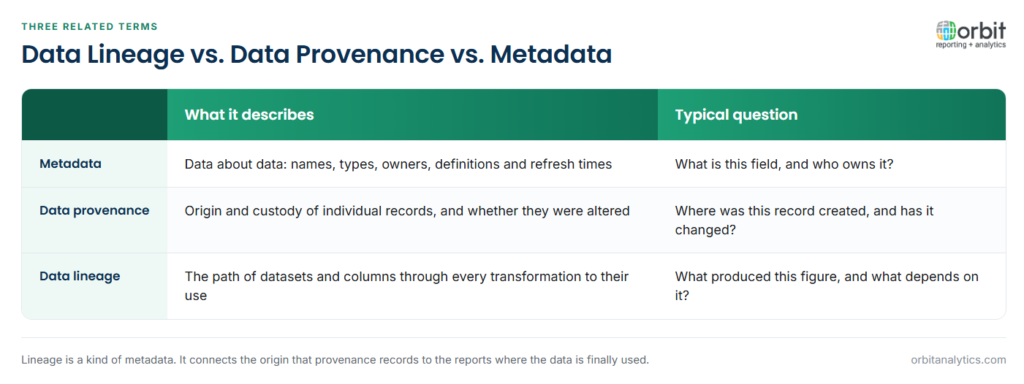
Metadata is data about data: names, types, owners, definitions and refresh times. Lineage is one kind of metadata, the kind that records relationships and movement between datasets.
Data provenance is origin and custody: where a record was first created, by whom, and whether it has been altered since. It works like a chain-of-custody record for individual records.
Data lineage connects the two. It uses metadata to describe the path between the origin that provenance records and the reports where the data is finally used, mapping whole datasets and columns through each step of processing.
Frequently Asked Questions
Q1. What is data lineage in simple terms?
It is a map of where data comes from, how it is changed along the way and where it ends up. It lets anyone trace a report figure back to its source or follow a source field forward to every report that uses it.
Q2. What is the difference between forward and backward lineage?
Backward lineage traces a figure upstream to the sources and logic that produced it. Forward lineage traces a source downstream to everything that depends on it, which is what impact analysis relies on.
Q3. Why is column-level lineage important?
Most errors and audit questions concern a specific field, not a whole table. Column-level lineage shows exactly which source fields and calculations make up a reported number.
Q4. How does data lineage support compliance?
It documents how reported figures derive from source records and where personal data travels. Auditors and regulators can then see the evidence rather than relying on a team’s assurance.
Q5. Is data lineage the same as data governance?
No. Data governance is the wider framework of ownership, policies and controls over data. Lineage is one of the tools governance depends on, because a policy cannot be enforced on data whose path nobody knows.
Trusting a finance report means being able to show where every figure came from. Orbit Analytics moves and reports Oracle Fusion Cloud and EBS data with that path kept visible from ledger to dashboard. Request a demo to see it traced on your own data.
