
XBRL (eXtensible Business Reporting Language) is an open, XML-based standard for tagging each figure in a business report with a defined meaning, period and unit, so software can read the report without anyone retyping it. A revenue figure in an XBRL filing is not just the number 4,200,000: it is labelled as revenue, for a stated fiscal year, in a stated currency, for a named company.
Before XBRL, regulators and analysts received financial statements as printed pages, PDFs or plain HTML. Every figure had to be rekeyed or scraped before it could be compared across companies, which was slow and error-prone. XBRL makes the data in financial reporting machine-readable at the source. The standard is maintained by XBRL International, a not-for-profit consortium.
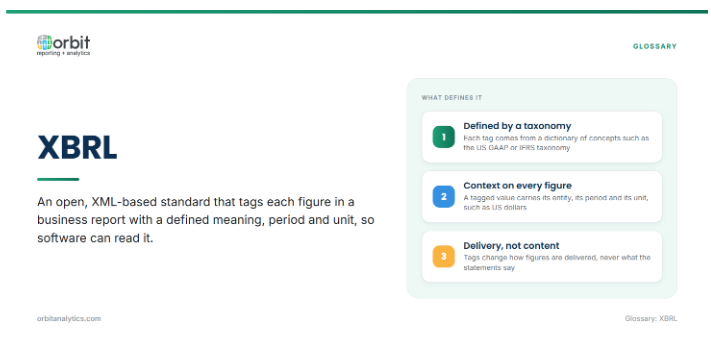
The tags do not change what the statements say. They change how the figures are delivered, so the same balance sheet can be read by a person and processed by software.
Key Components of XBRL
An XBRL filing is built from a small set of parts:
- Taxonomy: the dictionary of reportable concepts, with their definitions and relationships. Common examples are the US GAAP Financial Reporting Taxonomy and the IFRS Taxonomy.
- Elements and tags: each concept in the taxonomy is an element, such as cash and cash equivalents. Tagging attaches an element to a figure in the report.
- Contexts and units: every tagged value carries a context (the reporting entity and the period, either a date or a duration) and a unit, such as US dollars or shares.
- Instance document: the file that holds the tagged facts for one report. It is what the filer actually submits.
- Linkbases: supporting files that describe how elements relate. The calculation linkbase defines which figures sum to a total, the presentation linkbase sets the order in which they appear, and the label linkbase holds human-readable names.
When a company reports a figure the standard taxonomy does not cover, it can create an extension: a company-specific element added to its own filing.
How an XBRL Filing Is Produced
XBRL tagging is the last stretch of the reporting process, and it depends on everything before it:
- Final figures from the close: the reporting cycle starts with closed books and approved financial statements.
- Mapping line items to the taxonomy: each line in the statements and notes is matched to the closest standard element.
- Tagging and extensions: figures are tagged with their elements, contexts and units, and extensions are created only where no standard element fits.
- Validation: software checks the filing against the taxonomy and the regulator’s rules, such as calculation totals and required elements.
- Review and submission: finance and legal review the rendered filing before it is submitted to the regulator.
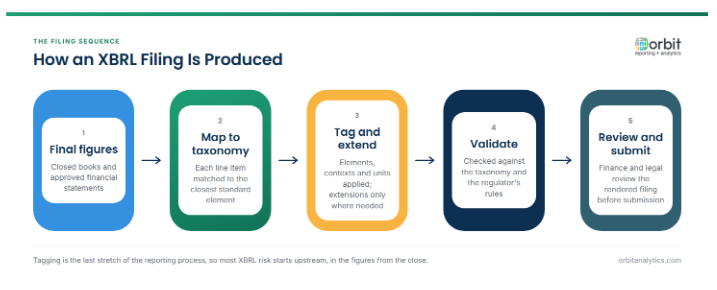
The first step is where most of the risk sits. Orbit Analytics provides financial statements with live ledger data in Excel, refreshed from Oracle Fusion Cloud and EBS, so a late adjustment flows into the figures instead of being rekeyed before tagging.
Inline XBRL (iXBRL)
Early XBRL filings were separate files submitted alongside a human-readable document, so a reader and a machine could be looking at two different versions of the same report. Inline XBRL removes that gap. The tags are embedded directly in an HTML document, which displays like a normal annual report in a browser while carrying machine-readable data underneath.
Inline XBRL is now the usual format. The US SEC phased it in for operating company filings from 2019, and the European Single Electronic Format (ESEF) requires it for annual financial reports of issuers listed on EU regulated markets. Because one document carries both the figures and the surrounding text, iXBRL brings narrative reporting, such as notes and management commentary, into the same file as the tagged numbers.
Who Requires XBRL
XBRL is mandated by regulators in many jurisdictions. The main groups are:
| Regulator type | Example | What is filed |
|---|---|---|
| Securities regulators | US SEC; ESMA through ESEF in the EU; Japan’s FSA through EDINET | Periodic financial statements of listed companies |
| Tax authorities | HM Revenue and Customs in the UK | Accounts and tax computations filed with company tax returns, in iXBRL |
| Company registries | India’s Ministry of Corporate Affairs, for companies in scope; Companies House in the UK, which accepts iXBRL accounts | Annual financial statements |
| Banking supervisors | US FFIEC for bank Call Reports; European banking supervisors | Regulatory returns from banks |
Requirements, thresholds and formats differ by jurisdiction and change over time, so the current rules of each regulator are the reference for any filing.
Benefits of XBRL
The benefits fall on both sides of the filing:
- For regulators and analysts: filings arrive as structured data, so thousands of companies can be screened, compared and checked for anomalies automatically.
- For investors: data providers can publish standardized figures soon after a filing, without manual extraction.
- For the reporting company: validation catches calculation errors and missing disclosures before submission, and a consistent tagging structure carries forward from one period to the next.
Common XBRL Challenges
XBRL problems usually come from judgment and timing, not the technology:
- Choosing the right element: large taxonomies contain many similar concepts, and a wrong choice makes the company’s figure incomparable with its peers.
- Too many custom extensions: extensions are allowed, but each one reduces comparability, and regulators discourage them where a standard element fits.
- Late changes to the numbers: an adjustment after tagging has started means the statements, the tags and the validation all have to be redone.
- Figures that do not tie back to the ledger: when statements are assembled from spreadsheets, a tagged figure can be correct in the filing and still differ from the books.
Orbit Analytics supports the last point with drill-down from a statement line to its general ledger balance and subledger detail, so each figure can be traced to the ledger before it is filed. The tagging itself still happens in a disclosure or filing tool.
XBRL vs PDF and HTML Financial Reports
The three formats serve different readers:
| Format | Read by | Strength | Limitation |
|---|---|---|---|
| People | Fixed, print-ready layout | Figures must be extracted before analysis | |
| HTML | People, in a browser | Searchable and accessible | No defined meaning attached to each figure |
| XBRL and iXBRL | Software, and people for iXBRL | Every figure has a defined meaning, period and unit | Needs tagging, validation and review |
Most listed companies still produce a designed PDF annual report for shareholders and an XBRL filing for regulators. With Inline XBRL the regulatory filing is readable too, but the design version usually remains.
Frequently Asked Questions
Q1. What does XBRL stand for?
XBRL stands for eXtensible Business Reporting Language. “Extensible” refers to the ability to add company-specific elements, called extensions, to a standard taxonomy.
Q2. Is XBRL the same as XML?
No. XBRL is built on XML, which is a general-purpose markup language. XBRL adds the rules, taxonomies and linkbases needed to describe business and financial facts.
Q3. What is an XBRL taxonomy?
A taxonomy is the dictionary of concepts a filer can tag, such as revenue or total assets, with definitions and relationships between them. Regulators specify which taxonomy each filer must use.
Q4. What is the difference between XBRL and Inline XBRL?
Traditional XBRL is a separate machine-readable file submitted alongside the report. Inline XBRL embeds the same tags inside an HTML document, so one file serves both people and software.
Q5. Does XBRL change the financial statements themselves?
No. XBRL changes how the figures are delivered, not what they are. The numbers still come from the close and the ledger, which is why tagging accuracy depends on clean source figures.
XBRL filings are only as reliable as the ledger figures behind them. Orbit Analytics gives finance teams live financial statements from Oracle Fusion Cloud and EBS, with drill-down to subledger detail before anything is tagged. Request a demo to see it on your own ledger.
