
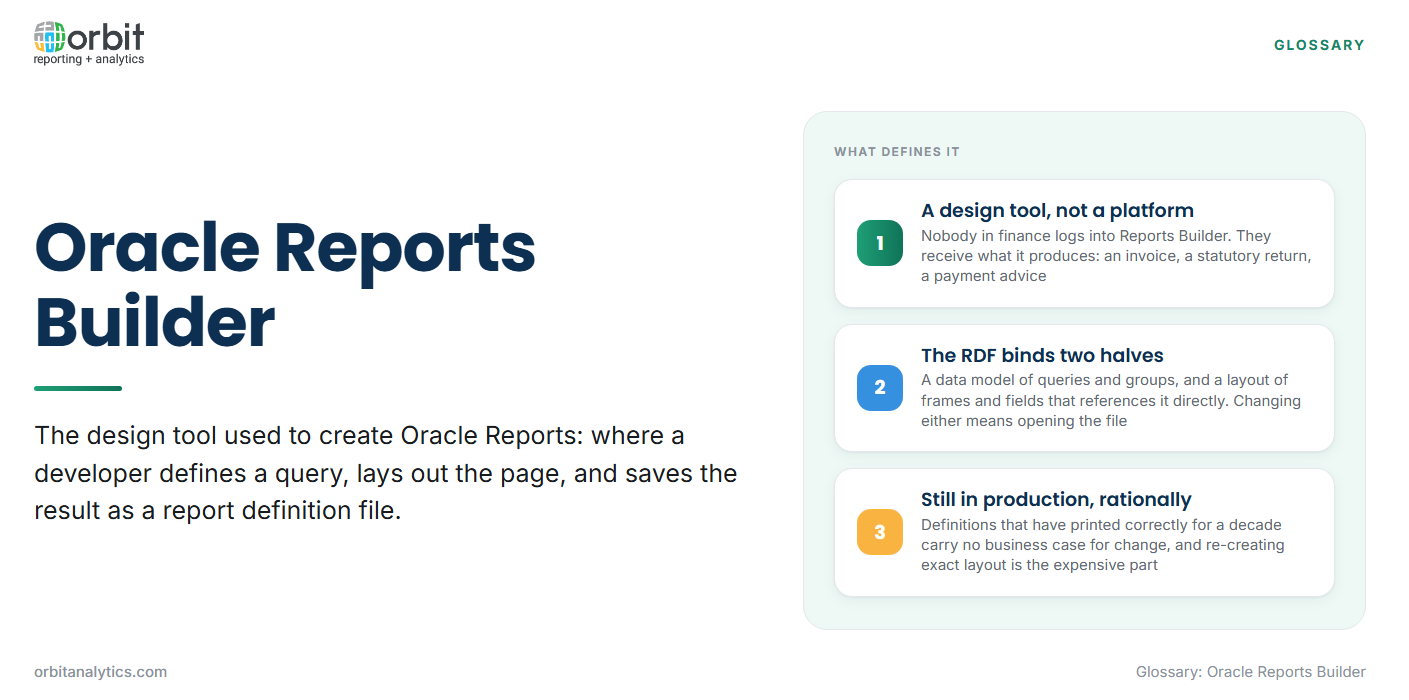
Oracle Reports Builder is the design tool used to create Oracle Reports: the component a developer opens to define a query, lay out the page, and save the result as a report definition file. It is a development tool, not a reporting platform. Nobody in finance logs into Reports Builder; they receive what it produces.
It is the authoring half of Oracle Reports, paired with a runtime engine that executes what the tool defines. In an Oracle E-Business Suite estate that execution is usually triggered through the concurrent manager, which is why most users only ever meet the output: an invoice, a statutory return, a payment advice.
Who still uses it is the part that surprises people. Reports designed years ago run in production EBS estates every day, and the teams that own them are rarely planning to rewrite them.
What an RDF Report Actually Is
An Oracle Report is saved as an RDF, a report definition file. It is not the output and not the data. It is the instructions for producing one from the other, and it holds two things bound together.
- The data model: The queries that fetch the rows, the groups that nest them into a parent and child structure, and the columns and formulas derived from them.
- The layout: The frames, repeating regions, fields and boilerplate that decide where each value prints and what the page looks like.
- The binding between them: Layout objects reference the data model’s columns and groups directly, so a repeating frame knows which group it iterates over.
That binding is what makes an RDF powerful and awkward at once. The report is self-contained and predictable, and changing either half means opening the file in the design tool.
How a Report Gets Built
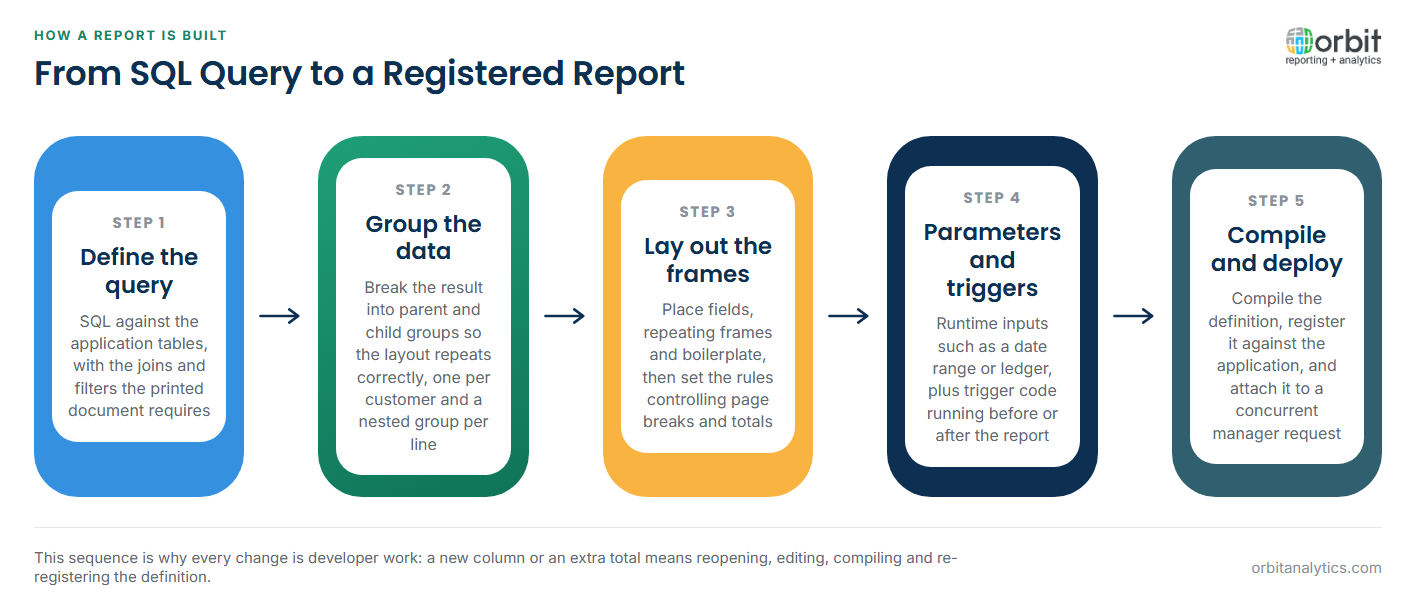
The build sequence has barely changed, and it explains why this is developer work.
- Define the query. SQL against the application tables, usually with the joins and filters the printed document requires.
- Group the data. Break the result into parent and child groups so the layout repeats correctly, for example one group per customer and a nested group per invoice line.
- Lay out the frames. Place fields, repeating frames and boilerplate on the page, then set the formatting rules that control page breaks and totals.
- Add parameters and triggers. Runtime inputs such as a date range or ledger, plus trigger code that runs before or after the report to apply conditional formatting or validation.
- Compile and deploy. Compile the definition, register it against the application, and attach it to a request the concurrent manager runs.
Output Formats and Delivery
Oracle Reports was built for documents rather than screens, and the format list reflects that: PDF and PostScript for print, HTML for a browser, delimited text for downstream systems, and direct printer output.
Delivery is indirect. A user submits a request, the concurrent manager runs it, and the output is collected from the request, printed, or written to a file for another process. This is a batch pattern, not an interactive one.
Formatting fidelity was the whole point. A remittance advice, a tax form or a cheque has to print in an exact position, every time, which is precisely what a paginated report is for. Tools that render approximately were never candidates for this work.
Why It Is Still Running in EBS Estates
The persistence is rational, and dismissing it as legacy inertia misreads the situation.
- The reports work. A definition that has produced a correct document every month for a decade presents no business case for change.
- Statutory and regulatory output. Where a layout is prescribed by a tax authority or regulator, disturbing a tested document carries real risk.
- Re-creating layout is expensive. Rebuilding the query is straightforward; reproducing pixel positions, page breaks and totalling behaviour is the part that consumes the budget.
- The skills are still in the building. Teams that maintain EBS usually retain people who can open an RDF, and that capability lowers the cost of leaving things alone.
The practical result is a split estate. Documents keep coming out of Oracle Reports while analysis moves elsewhere, and Orbit Analytics supports Oracle EBS reporting against the same data without requiring those definitions to be rewritten first.
The Limits Teams Run Into
The constraints show up when a business question changes faster than a report can be modified.
- Every change is a developer job. A new column, a different grouping or an extra total means opening the definition, editing, compiling and re-registering it.
- One report, one purpose. The data model and layout are built for a specific document, so a related question usually becomes a new RDF rather than a variation of an existing one.
- No interactivity or drill-down. The output is a finished document. A reader who wants the detail behind a total requests another report.
- The source can move. When transactional data moves to a cloud application, queries written against EBS tables no longer reach it, and the data model is the part that breaks.
What Oracle Positions in Its Place
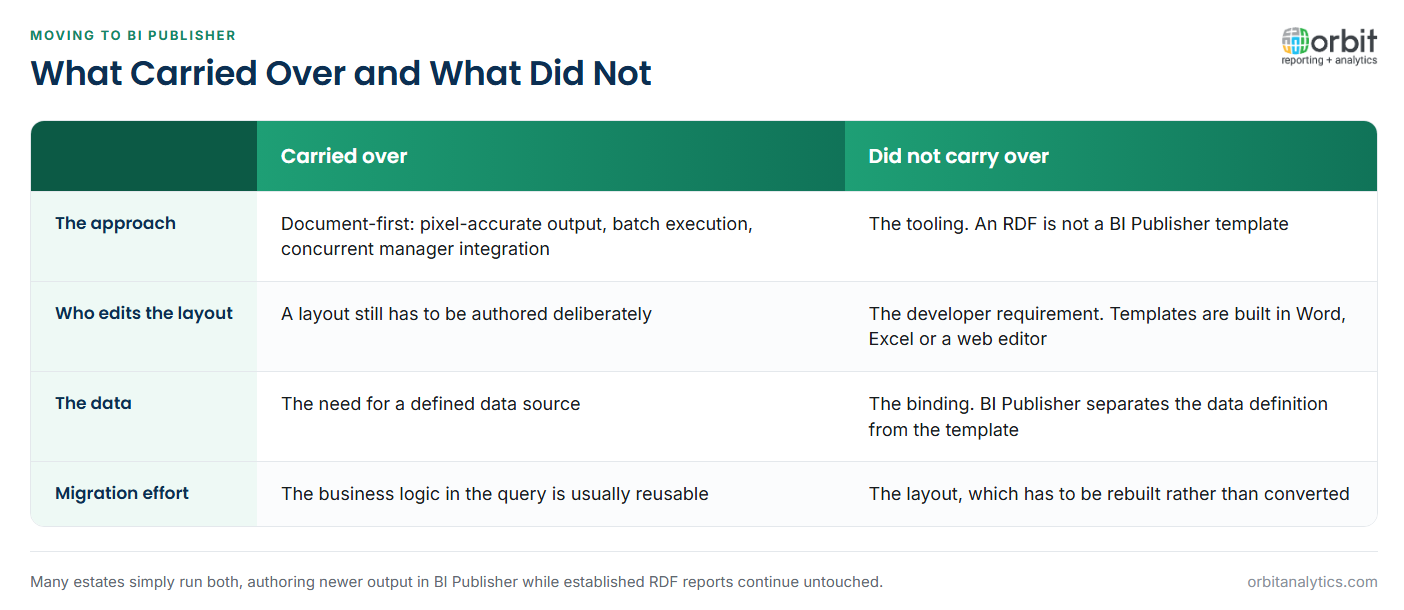
Oracle’s direction of travel has been toward BI Publisher, which separates the data from the template. A data definition supplies XML, and a template built in Word, Excel or a web editor formats it, so a layout change no longer requires a developer to recompile a definition.
What carried over is the document-first mindset: pixel-accurate output, batch execution, and integration with the concurrent manager. What did not is the tooling. An RDF is not a BI Publisher template, and moving one means rebuilding both the data source and the layout.
In practice many estates run both, authoring newer output in BI Publisher while established RDF reports continue untouched.
Where It Fits Alongside Modern Reporting
The clearest way to think about it is by output type. A document that must print identically every time is one job; understanding why a number moved is another, and one tool has never been good at both.
The pixel-perfect reporting requirement has not gone away, so the document layer stays. What changes is everything around it: teams want to ask questions of the same data without filing a development request. Orbit Analytics provides self-service reporting across EBS and Oracle Fusion Cloud data, which lets the printed documents stay where they are while analysis moves to the people who need it.
Reports Builder, BI Publisher and Discoverer Compared
Three tools from three eras still turn up in the same estate, each built to produce something different.
| Oracle Reports Builder | BI Publisher | Discoverer | |
| Built to produce | Fixed-layout documents | Fixed-layout documents from templates | Ad hoc queries and analysis |
| Built for | Developers | Developers plus template authors | Business analysts |
| Layout editing | In the design tool | In Word, Excel or a web editor | Minimal, the output is a result set |
Running all three at once is common rather than exceptional, and each covers a gap the others were never designed to fill.
Frequently Asked Questions
Q1. What is an RDF file in Oracle Reports?
An RDF is a report definition file: the saved output of Oracle Reports Builder. It contains the data model (queries, groups and columns) and the layout (frames, fields and boilerplate) bound together, and it is executed by the Oracle Reports runtime.
Q2. What is the difference between Oracle Reports and BI Publisher?
Oracle Reports keeps the data model and the layout inside one definition edited in a developer tool. BI Publisher separates them, pairing a data definition that produces XML with a template authored in Word, Excel or a web editor.
Q3. Why do EBS estates still run Oracle Reports?
Because the reports work, many produce statutory documents whose layout is prescribed, and re-creating exact layout is expensive. Where the skills to maintain them are still in the team, leaving them alone is usually the cheaper decision.
Q4. Can Oracle Reports run against Oracle Fusion Cloud?
Not in the way it runs against EBS. The reports are built on direct queries against application tables, and a cloud application does not expose its database that way, so the data model has to be rebuilt against supported interfaces.
Q5. Who builds an Oracle Report?
A developer, or an analyst comfortable with SQL and the design tool. Defining queries, nesting groups and positioning layout objects is technical work, which is why change requests queue behind development capacity.
Oracle Reports Builder earned its place producing documents, and that job has not disappeared. What has changed is the expectation that the same data should also answer questions on demand. Request a demo to see how Orbit Analytics reports across EBS and Fusion Cloud with drill-down to the transactions behind every figure.
