
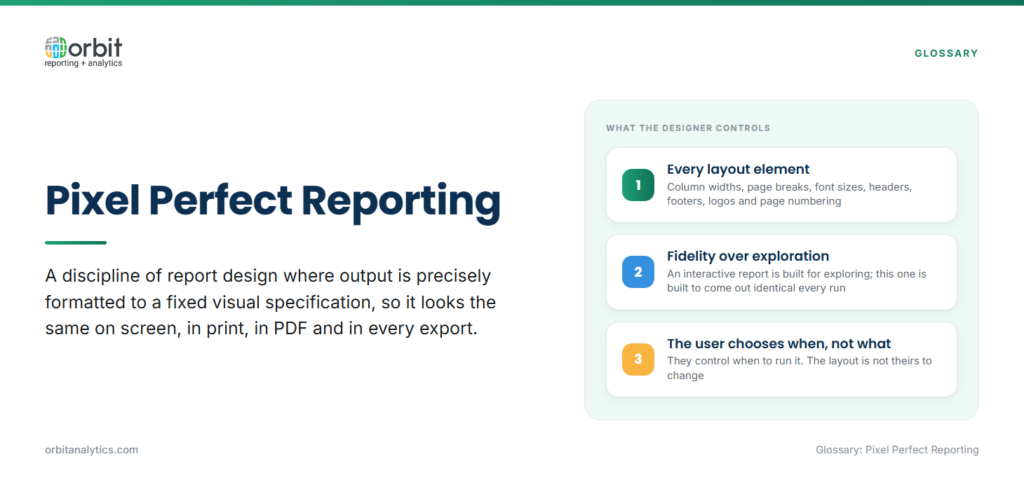
Pixel perfect reporting is a discipline of report design where the output is precisely formatted to a fixed visual specification, column widths, page breaks, font sizes, headers, footers, logos, and page numbering are all controlled by the designer rather than the rendering tool. The result looks the same on screen, in print, in PDF, and in archive, regardless of who runs it or when.
The contrast with interactive reports grounds the definition. An interactive report is built for exploration: layout is fluid, filters change what’s visible, the user controls what’s on screen. A pixel perfect report is built for fidelity: the layout is locked, the output is the same every time, and the user controls when to run it but not how it looks.
Exact formatting matters when the document is the deliverable. Financial statements follow a prescribed structure. Invoices have to carry the correct legal entity, tax IDs, and remittance details in fixed positions. Compliance filings have to match regulator templates down to the field. “Close enough” is not acceptable.
Why is Pixel Perfect Reporting Important?
Four use case categories explain why pixel perfect reporting hasn’t been displaced by dashboards:
- Regulatory and compliance reporting: SEC filings, tax authority submissions, statutory financial statements, and industry-specific compliance reports all have prescribed formats. Auditors and regulators reject documents that drift from the spec.
- Print-ready document generation: Customer invoices, purchase orders, packing slips, remittance advices, and shipping labels get printed, mailed, or attached to physical goods. They have to render the same on every printer, in every region.
- Brand consistency: Customer-facing statements, contracts, proposals, and policy documents represent the company. A consistent template enforces the brand across every document the company sends out.
- Legal and contractual documentation: The document that gets signed has to be the document that gets archived, with no rendering differences.
What Are the Key Features of Pixel Perfect Reports?
Four features separate pixel perfect tools from interactive ones.
- Precise layout control. Designers position every element, table, image, text block, to an exact coordinate, with absolute control over column widths, row heights, fonts, and spacing.
- Fixed page breaks and pagination. The report engine respects the designer’s page break rules, keep-with-next, page-before, repeating headers, so a 200-page financial statement always paginates the same way.
- Embedded images, logos, and headers. Letterheads, signatures, regulatory stamps, and barcodes are embedded into the template and render identically on every output.
- Multi-format output. A single template produces PDF for distribution, print-ready PostScript for high-volume print runs, archive-grade PDF/A for long-term retention, and sometimes Word or Excel for downstream editing.
With Orbit Analytics, finance and operations teams build pixel perfect operational reports from the same templates that drive their interactive dashboards, a single platform handles both modes against live Oracle Fusion Cloud and EBS data, so the underlying numbers are consistent regardless of how the output is rendered.
What Are Common Pixel Perfect Reporting Use Cases?
The same patterns repeat across industries:
| Use Case | Typical Documents | What’s Fixed |
| Financial statements and SEC filings | Balance sheet, income statement, cash flow, 10-K/10-Q exhibits | Regulator-prescribed layouts |
| Invoices, purchase orders, remittance advices | Customer billing, supplier POs, payment notices | Legal entity, tax IDs, brand template |
| Regulatory compliance reports | Tax filings, environmental disclosures, healthcare submissions | Agency-specific templates |
| Customer-facing statements and contracts | Account statements, signed agreements, policy documents | Legal requirements plus brand standards |
Invoices, purchase orders, and remittance advices are the highest-volume category, millions of customer-facing documents that integrate with Oracle Fusion financial reporting workflows. In every case, the data is dynamic but the layout is fixed. The template handles the layout; the data binding handles the variability.
How Does Pixel Perfect Differ from Dashboard Reporting?
The differences read as four clean contrasts:
| Dimension | Pixel Perfect | Dashboard |
| Output behavior | Static: same input, same output | Interactive: users change filters and drill in |
| Layout target | Print-optimized, fixed page size | Screen-optimized, viewport adapts |
| Primary driver | Compliance and document fidelity | Exploration and analysis |
| Typical consumer | Auditor, regulator, customer, archive | Analyst, manager, executive |
The two modes complement rather than compete. Use pixel perfect for documents that get filed, signed, mailed, or audited. Use dashboards for the analysis that leads up to those documents. Most Oracle ERP teams run both from the same data layer.
What Challenges Come with Pixel Perfect Reporting?
Three operational challenges show up repeatedly:
- Design complexity: Fixed layouts are harder to build than fluid ones, and template maintenance grows with the report inventory.
- Data integration: Pixel perfect reports often pull from multiple ERP modules and reference tables, so the data layer has to be unified before templates render reliably.
- Localization: Multi-language reports need templates that handle right-to-left text, varying string lengths, and locale-specific number and date formatting without breaking the layout.
Mature teams handle these with reusable template libraries, a unified data layer that consolidates Oracle ERP sources, and a localization framework that handles language and format variations from data rather than separate templates.
What Are Pixel Perfect Reporting Best Practices?
Four habits make pixel perfect deployments sustainable:
- Define templates and the data contract before building: Get the legal, finance, or compliance owner to sign off on the layout spec first.
- Separate data from presentation: Templates should be updatable without re-engineering the data model behind them.
- Plan for multiple output formats from day one: PDF, PDF/A, print, and sometimes Excel, so the template doesn’t have to be rebuilt when a new channel is added.
- Build in versioning and audit trails: Every template change is logged and every report execution links back to the version that produced it.
How Do You Implement Pixel Perfect Reporting?
A realistic rollout has four steps:
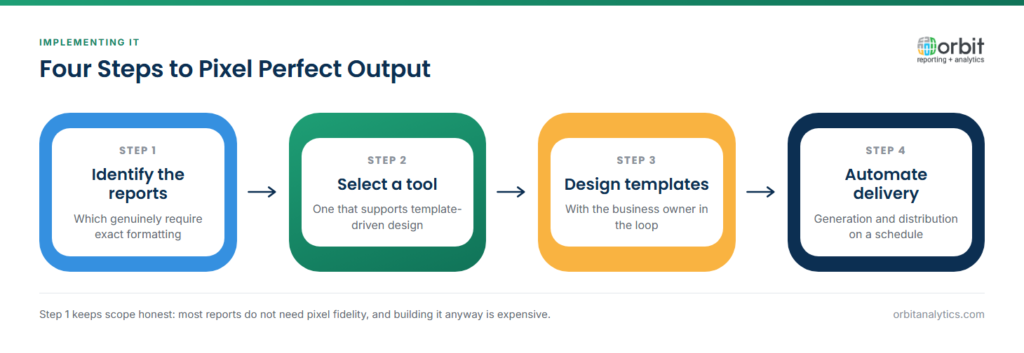
- Identify which reports require exact formatting. Typically anything customer-facing, regulatory, or print-bound.
- Select a tool that supports template-driven design. Look for paginated output and the specific formats your distribution channels need.
- Design templates with the business owner in the loop. Version them in source control so layout changes are reviewable.
- Automate generation and distribution. Schedule the runs, route outputs to the right destinations, and add bursting if the same template needs to reach many recipients.
Orbit Analytics covers both modes on one platform: pre-built connectors for Oracle Fusion Cloud, EBS, PeopleSoft, and NetSuite, template-driven pixel perfect reporting, automated bursting, and full business intelligence for the interactive side, so teams don’t stitch together separate tools for compliance documents and analytics.
Frequently Asked Questions
Q1. What is pixel perfect reporting in simple terms?
Pixel perfect reporting produces documents where every element, layout, fonts, page breaks, logos, and pagination, is positioned exactly the way the designer specified, every time. It’s used when the document itself is the deliverable, like an invoice, financial statement, or compliance filing.
Q2. When do I need pixel perfect reports vs. dashboards?
Use pixel perfect when the document has to be filed, signed, mailed, archived, or shown to a regulator. Use dashboards when users need to explore data interactively. Most enterprise teams run both side by side.
Q3. What tools create pixel perfect reports?
Common tools include Oracle BI Publisher, SAP Crystal Reports, Microsoft SSRS, and modern cloud platforms that combine pixel perfect with interactive reporting in one stack. The right choice depends on data sources, output formats, distribution requirements, and ERP integration.
Q4. Can pixel perfect reports pull from Oracle ERP?
Yes. Pixel perfect platforms connect directly to Oracle Fusion Cloud, EBS, PeopleSoft, and NetSuite to pull live data into fixed templates. Pre-built connectors and unified data models reduce the integration work that used to dominate these projects.
Q5. What is paginated reporting vs. pixel perfect?
The terms overlap. “Paginated” emphasizes flow across a fixed number of pages with controlled page breaks. “Pixel perfect” emphasizes layout precision down to the pixel. Most paginated reporting tools are also pixel perfect tools, and the terms are used interchangeably.
Q6. Is pixel perfect reporting still relevant with modern BI?
Yes. Dashboards replaced many internal analytical reports, but pixel perfect is still required wherever the document itself has legal, regulatory, or operational standing, invoices, statements, compliance filings, contracts, audit documentation. Modern BI platforms typically support both modes.
Ready to consolidate your invoices, statements, and compliance reports onto one platform alongside your Oracle ERP analytics? Request a demo to see how Orbit Analytics handles pixel perfect and interactive reporting from a single connection to Fusion, EBS, and NetSuite.
