
An Oracle Fusion user report lists user accounts alongside the roles they hold and the access those roles grant. It is the report an internal auditor asks for, the one a security review starts from, and the one most Fusion administrators end up assembling by hand more often than they would like.
The term is ambiguous and worth resolving before going further. Some people mean a user-defined report, meaning any report a business user built themselves. Most people searching for it mean the security artefact: a list of who has access to what. This page covers the second.
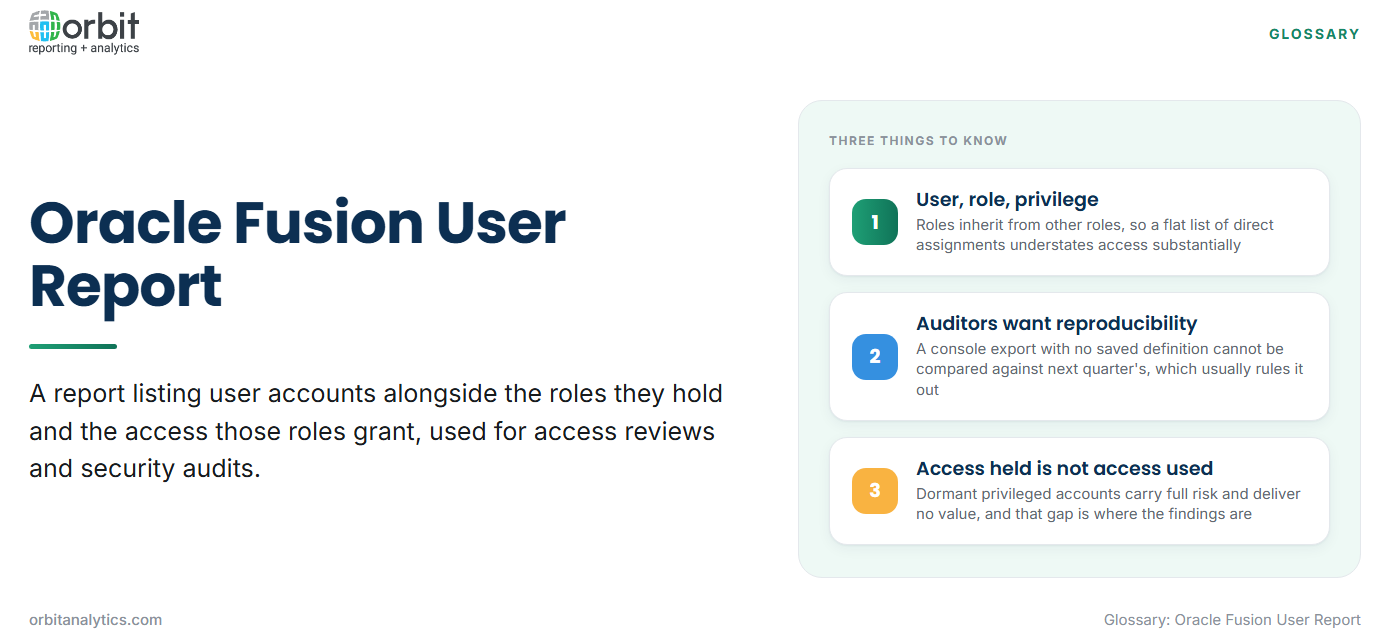
The chain that matters is user, role, privilege. A user is assigned roles; roles carry privileges; privileges grant the ability to see or do something. A report listing users and their directly assigned roles looks complete and can miss most of the actual access, because roles inherit from other roles.
Auditors want reproducibility as well as accuracy. A report produced by clicking through a console and exporting to Excel cannot be reproduced identically next quarter, which is what disqualifies the quickest approach.
What belongs in a user access report
- User account and person record. The login, the person it maps to, and their organization. A user with no active person record is an immediate flag.
- Roles assigned, and how they were assigned. Direct assignment and role-mapping assignment behave differently at review time, so the provisioning method belongs on the report.
- Data security context. Which business unit, ledger or organization the user’s roles apply to. Two users with the same role can legitimately see entirely different data.
- Status, dates and last sign-in. Active or inactive, effective dates, and when the account was last used.
How a role arrived matters more than it appears. Directly assigned roles persist until someone removes them. Roles granted through role mapping are recalculated as attributes change, so a role can appear or disappear without anyone acting. Autoprovisioning rules based on job or department are convenient and are the usual reason access drifts after a transfer.
The built-in options in Oracle Fusion
The Security Console is the interactive tool. It shows a user’s roles, visualizes role hierarchies and searches by role or privilege. It is the fastest way to answer a question about one person and the slowest way to report on a population.
Prebuilt security reports cover common requests such as users and roles, and role-privilege listings. They are reproducible, which the console is not, and correspondingly rigid.
OTBI security subject areas allow analysis across the user population with the filtering and grouping OTBI provides. This is the practical route for a recurring access report.
BI Publisher against the security tables offers the most control and the most effort, and is the route when the required output does not fit a subject area.
How to build a user role report in OTBI
- Open the security subject area. Start from the roles-and-users subject area rather than a functional one.
- Add user, role and assignment columns. Include the user name, person name, role name, role type and the provisioning method.
- Filter to active users and real roles. Exclude inactive accounts and the abstract roles every user holds, or the output is dominated by noise.
- Group by role to expose concentration. Grouping by role rather than by user shows how many people hold each privileged role, which is the view a reviewer actually wants.
- Schedule it for the audit cycle. Save and schedule it to run on the same cadence as the access review, so the evidence exists before it is requested.
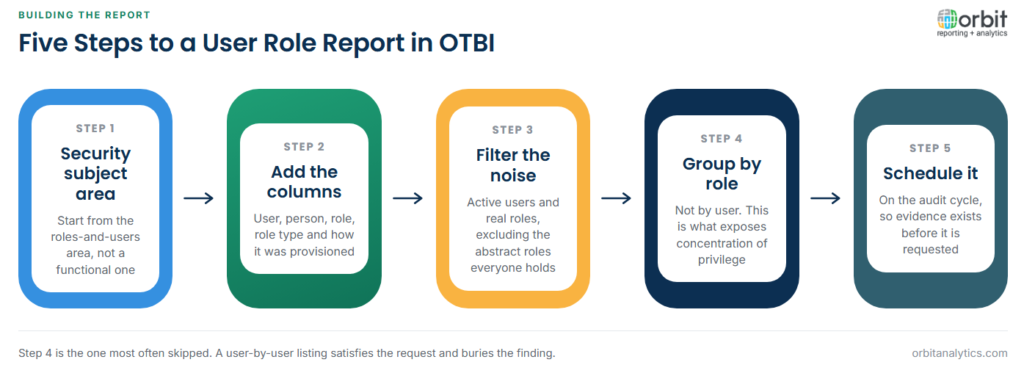
Step 4 is the one most often skipped. A user-by-user listing satisfies the literal request and buries the finding; a role-by-role listing surfaces the twelve people who can create suppliers.
Segregation of duties reporting
A segregation of duties conflict exists where one person can complete a sequence that should require two. Creating a supplier and approving a payment is the standard example, because together they permit payment to an entity the individual controls.
Building the conflict matrix is the real work: listing the sensitive actions, deciding which combinations are unacceptable, and mapping those actions to the roles that grant them. The matrix is organization-specific, and a generic one imported from elsewhere will not match how roles were configured locally.
Report exceptions rather than everything. A report listing every user against every conflict rule is unreadable; a report listing only the users who actually hold a conflicting combination is a work queue.
Common problems with Fusion user reports
Role names that do not say what they grant. Custom roles copied and modified over the years end up named for their origin rather than their permissions.
Inherited roles missing from a flat list. This is the most consequential error. A user assigned one job role may inherit dozens of duty roles beneath it, and a report showing only top-level assignments understates access substantially.
Inactive users still holding access. Accounts disabled at the person level while role assignments persist, so a re-enabled account returns with its old access intact.
Reports that cannot be reproduced next quarter. A console export with no saved definition means the next review starts from scratch and the two cannot be compared. Orbit Analytics runs access reporting on a saved, scheduled definition, so each cycle produces evidence comparable with the last.
Combining user data with activity
Who has access and who uses it are different questions, and the gap between them is where risk concentrates. A user holding a privileged role they have not exercised in a year is a candidate for removal, and identifying them needs access data joined to sign-in and audit activity.
Dormant privileged accounts are the specific case worth reporting on every cycle: accounts with sensitive roles and no recent use. They carry full risk and deliver no value, which makes them the easiest access to remove without argument.
Reporting across Fusion and E-Business Suite compounds this, because most organizations run both and a user often exists in each with different roles. Orbit Analytics reads security and activity data from both into one view through its Fusion Cloud reporting, so a review covers the whole estate at once. Broad access is only safe when it is visible, which is the governance half of data democratization.
Security Console, OTBI and BI Publisher compared
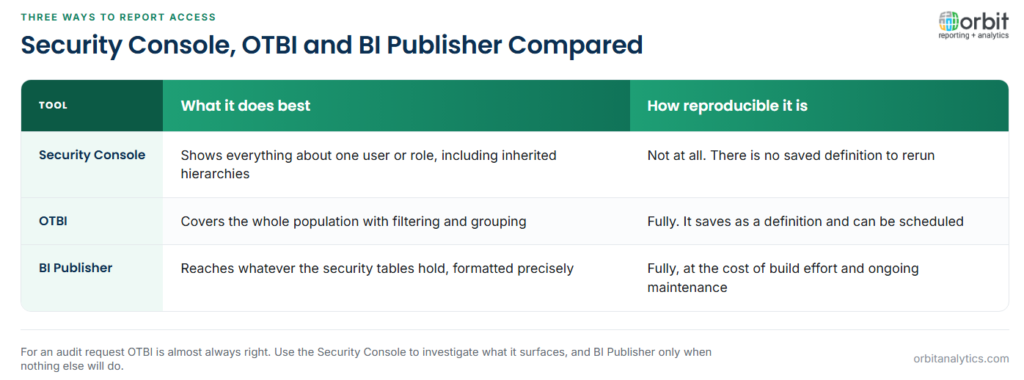
The Security Console shows the most detail about one user or role, including inherited hierarchies, and is unmatched for investigating a single case. It produces nothing reproducible.
OTBI covers the whole population with filtering and grouping, and saves as a definition that can be rerun and scheduled. It is limited to what the security subject areas expose.
BI Publisher reaches whatever the underlying security tables hold and formats output precisely, at the cost of build effort and ongoing maintenance.
For an audit request, OTBI is almost always the right answer: reproducible, schedulable, and broad enough. Use the Security Console to investigate what the OTBI report surfaces, and BI Publisher only when the required output genuinely cannot be produced otherwise. Scheduling it so the evidence exists before it is requested is ordinary automated reporting practice.
Frequently Asked Questions
Q1. What is an Oracle Fusion user report?
It is a report listing user accounts with the roles they hold and the access those roles grant. It is the standard artefact for access reviews and security audits.
Q2. How do you list all users and their roles in Oracle Fusion?
The practical route is an OTBI analysis against the security subject areas, filtered to active users and grouped by role. The Security Console answers questions about individuals but produces nothing reproducible.
Q3. What is the difference between a job role and a data role?
A job role grants functional access, meaning what a user can do. A data role scopes that access to specific data, meaning which business units or ledgers it applies to.
Q4. How do you report on inherited roles?
Expand the role hierarchy rather than listing direct assignments. A user assigned one job role may inherit many duty roles, and a flat list of top-level assignments substantially understates their access.
Q5. What is segregation of duties reporting?
It reports users who hold combinations of access that should be separated, such as creating a supplier and approving a payment. It requires an organization-specific conflict matrix mapped to local roles.
Q6. How do you find inactive users who still have access?
Join user status and last sign-in against role assignments, then report accounts that are inactive or dormant while still holding roles, prioritising those with privileged access.
Access reviews get harder when the estate spans Fusion and E-Business Suite and each is reviewed separately. Orbit Analytics reports user, role and activity data across both in one place. Request a demo to see it against your own access model.
