
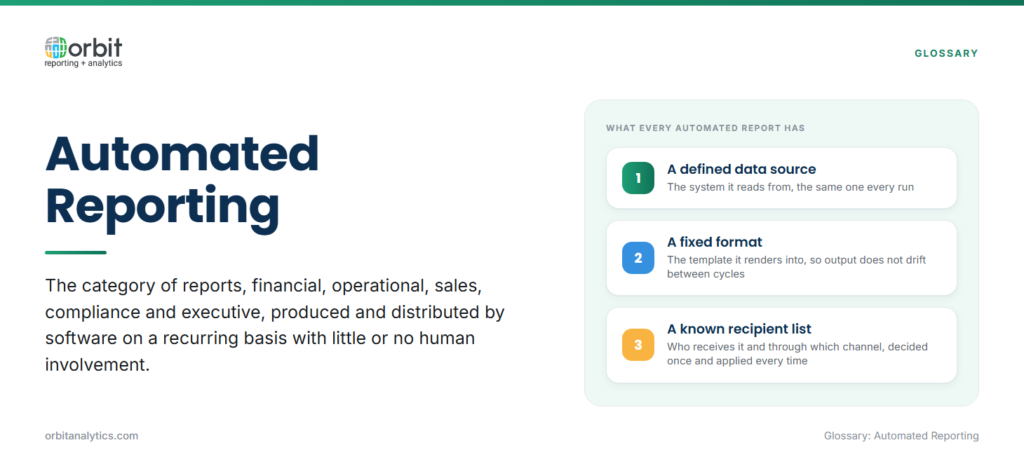
Automated reporting is the category of reports, financial, operational, sales, compliance, executive, produced and distributed by software on a recurring basis with little or no human involvement. Each report has a defined data source, a fixed format, and a known list of recipients. The system runs it on schedule, formats it, applies any personalization, and delivers it through the configured channel.
A manually produced report requires someone to extract data, build the file, and send it. An automated report runs end-to-end on its own; the analyst’s role shifts to monitoring, exception handling, and designing the next set of reports.
Automated reporting overlaps with business intelligence but is not the same thing. BI is the broader category that includes ad-hoc exploration and strategic dashboards. Automated reporting is specifically the subset where the deliverable is a recurring, standardized output that has to arrive on time, every time.
Why Do Organizations Need Automated Reporting?
The honest answer is that manual reporting at enterprise scale does not work. Once an organization has more than a handful of recurring reports, the human cost outweighs the flexibility the manual process provides. The visible costs include:
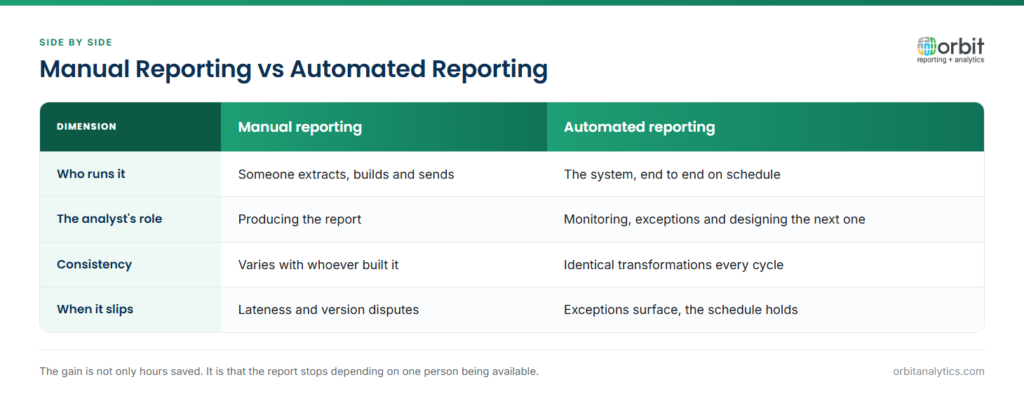
- Analyst hours: Senior analysts spend most of the reporting day on extraction and formatting, not analysis.
- Errors: Manual transposition, missed tabs, and stale refreshes show up in finished reports.
- Lateness: Reports arrive on the cadence an analyst can sustain, not the cadence the business needs.
- Version disputes: Multiple copies in circulation, with no single source of truth.
Automation eliminates the data-collection step that consumes most of an analyst’s reporting day. It ensures consistency, enables faster decisions because reports arrive on the cadence the business needs, and reduces the IT bottleneck of one-off report requests.
What Are the Key Features of Automated Reporting?
A platform that delivers genuine automated reporting at enterprise scale needs four capabilities:
- Scheduled report generation: Time-based triggers (daily, weekly, monthly, fiscal-period-end) plus event-based triggers for situations like “run when month-end close is confirmed.”
- Multi-source data integration: Most enterprise reports pull from more than one system. Native Oracle ERP connectors plus the ability to blend in NetSuite, third-party SaaS, and on-prem databases is the difference between a report that fully automates and one that always needs a final human merge step. Orbit Analytics provides automated reporting solutions with 200+ pre-built Oracle connectors and a unified data model across Fusion Cloud, EBS, NetSuite, and PeopleSoft, so reports span modules without manual stitching.
- Customizable templates and formats: Output in Excel, PDF, HTML, or Word, with consistent branding and structure across the report portfolio. For finance teams that live in spreadsheets, Excel reporting keeps the familiar interface while removing the manual refresh step.
- Automated distribution and delivery: Email, FTP, secure cloud folders, embedded portals, and Slack channels. Document bursting is essential at scale: a single report definition produces hundreds of personalized PDFs (one per region, supplier, or business unit) each containing only that recipient’s data.
What Are the Benefits of Automated Reporting?
The benefits land in four categories:
- Time savings: Most enterprises report 40-70% reduction in time spent producing recurring reports, freeing analyst capacity for actual analysis.
- Data accuracy: Automated outputs do not transpose digits, miss tabs, or forget to refresh sources.
- Scalability across departments: Once finance has automated its month-end pack, the same platform delivers operations dashboards, sales scorecards, and compliance reports without a new tool for each.
- Audit trail strength: Every run is logged, every transformation is versioned, and every distribution is traceable, exactly what auditors expect for SOX and regulatory filings.
What Are Common Automated Reporting Use Cases?
A few categories dominate the typical enterprise’s automated portfolio:
- Financial close and month-end reports: trial balances, P&L variance, balance-sheet rollforwards, and consolidated statements, often paired with tools like GL Sense for general-ledger inquiry and reconciliation.
- Sales performance and pipeline analysis: daily booking trends, weekly forecast rollups, and personalized rep scorecards.
- Operational KPI dashboards: daily production, fulfillment, inventory, and quality reports for ops leadership.
- Regulatory and compliance reporting: SOX evidence, tax filings, segment reporting, and internal audit packs with full lineage and approval workflow.
These four categories typically account for 70-80% of an enterprise’s reporting volume and are the right place to start any automation program.
What Challenges Come with Automated Reporting?
Three challenges show up on most rollouts:
- Data quality: Automation amplifies whatever is in the source, so a mapping error that an analyst would have caught by eye will run silently for months. Clean the data and reconcile definitions before scaling.
- Implementation complexity: Initial setup is more involved than it looks. Data has to be cleaned, definitions reconciled, and templates standardized before automation is reliable.
- Change management: People who built reports manually for years sometimes resist a job they cannot tweak mid-cycle. The way through is to have report owners co-design the automated version, validate against their manual output for one or two cycles, then cut over.
What Are Automated Reporting Best Practices?
Four habits make automated reporting programs sustainable:
- Start with high-impact, recurring reports. Pick the ones that consume the most analyst hours and have stable definitions. Skip reports that change layout every cycle, they are not yet candidates.
- Ensure data quality before automation. Run cleanup, definition reconciliation, and reference-data alignment first.
- Build in exception handling. Define what happens if the source extract fails, if a value falls outside an expected range, or if a recipient bounces.
- Monitor every run and iterate. Retire reports no one opens, add the ones that recipients keep requesting.
How Do You Get Started with Automated Reporting?
A staged rollout works better than a big-bang switch. Four steps:
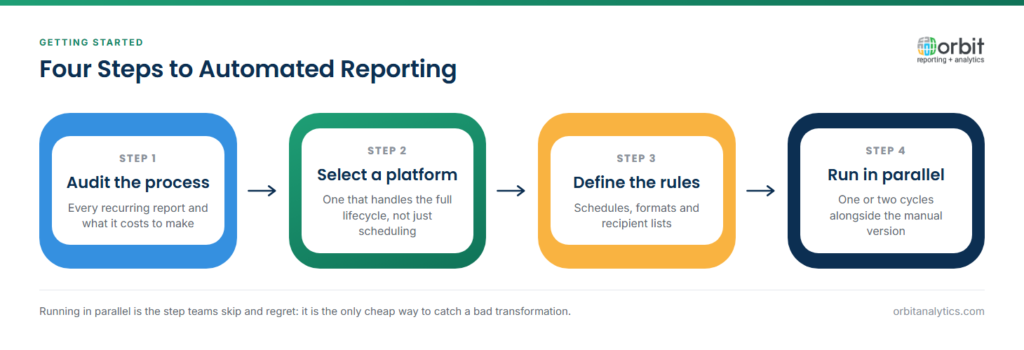
- Audit the current reporting process. Inventory every recurring report, who builds it, how often, and how long it takes. Most enterprises find that 20% of their reports consume 80% of analyst time, those are the starting candidates.
- Select an automation platform that handles the full lifecycle. Look for native connectors to your operational systems. Orbit Analytics is positioned as an enterprise automated reporting platform purpose-built for Oracle ERP, with 1,000+ pre-built reports, multi-channel distribution, and document bursting that scales from a single finance team to a 50,000-user deployment.
- Define schedules, formats, and recipient lists. Document the cadence and channel for each report so the platform configuration matches the business rhythm.
- Run in parallel for one or two cycles. Validate the automated output against the manual version, then cut over. Measure success in analyst hours reclaimed, error rates, and on-time delivery.
Frequently Asked Questions
Q1. What is automated reporting in simple terms?
Automated reporting is the category of business reports, financial, operational, sales, compliance, that are produced and distributed by software on a recurring basis with no human intervention. Once configured, the system pulls the data, formats the report, and delivers it on schedule.
Q2. How does automated reporting differ from manual reporting?
Manual reporting requires an analyst to extract data, build the file, and send it each cycle. Automated reporting runs end-to-end on its own, so the analyst’s role shifts to monitoring exceptions and designing new reports rather than producing the same outputs repeatedly.
Q3. What types of reports can be automated?
Most recurring reports with stable definitions are good candidates, month-end financials, daily operational dashboards, sales scorecards, regulatory filings, and personalized partner or supplier reports.
Q4. Can automated reporting work with ERP systems like Oracle?
Yes. Platforms with native Oracle connectors automate reporting across Fusion Cloud, EBS, NetSuite, and PeopleSoft, including cross-module reports that pull from finance, supply chain, and HR simultaneously.
Q5. What is report scheduling vs. report automation?
Report scheduling is one feature of automation, the trigger that decides when a report runs. Full automation includes the scheduler plus extraction, transformation, rendering, multi-channel delivery, and exception handling.
Q6. Can automated reports be customized per recipient?
Yes. Through document bursting, a single report definition produces personalized outputs for each recipient, one branch, region, supplier, or customer per PDF, each containing only that recipient’s data.
Automated reporting transforms how enterprises produce their standing portfolio of financial, operational, and compliance reports. Orbit Analytics delivers Oracle-native automated reporting at enterprise scale, with pre-built connectors, multi-channel distribution, and document bursting that handle the entire reporting program from one platform. Request a demo to see it on your reports.
