
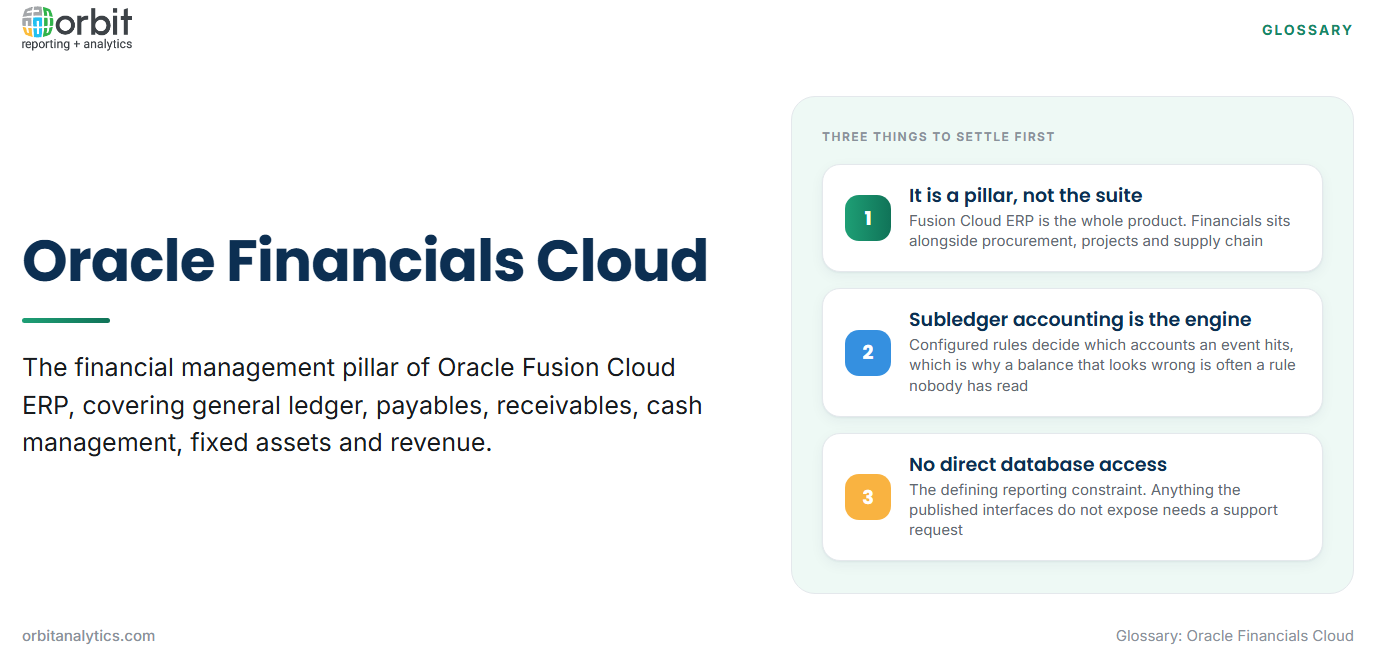
Oracle Financials Cloud is the financial management pillar of Oracle Fusion Cloud ERP, covering the general ledger, payables, receivables, cash management, fixed assets and related accounting functions as a software-as-a-service application.
The naming causes genuine confusion, so it is worth settling first. Oracle Fusion Cloud ERP is the whole suite. Financials Cloud is the finance pillar within it, sitting alongside procurement, project management and supply chain. “Oracle Fusion Financials”, “Oracle Cloud Financials” and “Oracle Financials Cloud” all refer to the same thing, and none of them is Oracle E-Business Suite, which is the older on-premises product many organizations still run.
The modules Oracle Financials Cloud covers
- General Ledger holds the chart of accounts, the ledgers and the posted balances, and is the record everything else feeds.
- Payables and Receivables manage supplier invoices and customer billing respectively, each posting to the ledger through the accounting engine.
- Cash Management handles bank accounts, statements and reconciliation, tying banking activity to the ledger.
- Fixed Assets tracks asset lifecycle from acquisition through depreciation to retirement.
- Expenses and Revenue Management cover employee expense claims and revenue recognition, the latter carrying the accounting-standard logic that used to be handled in spreadsheets.
The wider suite adds procurement, projects and supply chain; those are separate pillars and their data lives outside Financials. That boundary matters as soon as a report needs both, which is covered under Oracle Cloud ERP modules in more detail.
The accounting engine underneath
Subledger accounting is the layer that turns a business event into an accounting entry. When payables validates an invoice, subledger accounting decides which account combination each side of the entry hits, using configured rules rather than hard-coded logic.
This matters for reporting because it explains why the ledger looks the way it does. A balance that seems wrong is often a correct result of an accounting rule nobody has read. Tracing a figure means going back through subledger accounting to the rule, not just to the transaction.
Ledgers, ledger sets and legal entities determine what reports together: a ledger carries one chart of accounts, one calendar, one currency and one accounting method. Multi-currency handling adds reporting currency ledgers holding the same balances restated, and the difference between translation at period end and revaluation of open balances is a distinction worth keeping straight.
How reporting works in Oracle Financials Cloud
Four tools cover most requirements, and picking the wrong one is the usual cause of frustration.
| Tool | What it is for | Where it fits |
| OTBI | Ad hoc analysis against curated subject areas | Operational questions and interactive exploration |
| Financial Reporting Studio | Formatted statements from GL balances | Statutory output where the format must not vary |
| Smart View | Ledger balances inside Excel | Analyst modelling, at the cost of governance |
| BI Publisher | Pixel-controlled formatted documents | Anything printed or sent externally |
All four respect application security, so the tool choice never widens what a user can see.
What the reporting stack handles well
Statutory statements built from balances are handled properly, which is what most finance organizations need first. Standard operational enquiries such as open invoices or account activity are well served by OTBI without any build effort.
The most underrated strength is that security is inherited from the application. A user querying through OTBI sees exactly what their roles permit, with no separate reporting security model to maintain and no risk that the reporting layer exposes something the application would not.
Where reporting gets difficult
Joining Financials with other pillars is the most common request and the least well served. Cost against headcount, or spend against project, crosses a boundary the delivered subject areas do not span.
History beyond the retention window is limited, so multi-year trend analysis needs data extracted and kept elsewhere.
No direct database access is the defining constraint. Anything the published interfaces do not expose requires a support request rather than a query, which is a fundamentally different working method from EBS.
Quarterly updates can change underlying objects and subject areas, so extractions need revalidating on Oracle’s release cycle rather than on yours. Orbit Analytics maintains those interface models centrally, so reporting survives the release cycle rather than being rebuilt around it.
Oracle Financials Cloud and Oracle EBS together
Most organizations that have moved to Financials Cloud have not moved everything. Acquired entities, regional operations and specialised business units stay on E-Business Suite for years, because a phased transition is safer and cheaper than a single cutover.
That produces a reporting problem no single system solves. The two have different chart of accounts structures, different access models and different reporting stacks, yet the group still needs one set of numbers. Orbit Analytics reads both platforms into a single reporting layer, so group figures can be produced across Financials Cloud and EBS entities without waiting for the migration to finish. Its Fusion financial reporting capability preserves drill-down from a group figure back to the entity and transaction that produced it. Where entities must also be consolidated rather than simply combined, that is the subject of consolidated financial reporting.
Who uses Oracle Financials Cloud and for what
Controllers run the close: opening and closing periods, reviewing subledger transfers, producing statements. FP&A works on variance rather than transactions, comparing actuals against budget and explaining the gap. Shared service centres process high volumes of payables and receivables and care most about exception queues. Auditors care about one thing the others take for granted, which is whether any reported figure can be traced back to a source document.
Those four audiences want genuinely different reports from the same data, and the delivered tooling serves the first and last better than the middle two.
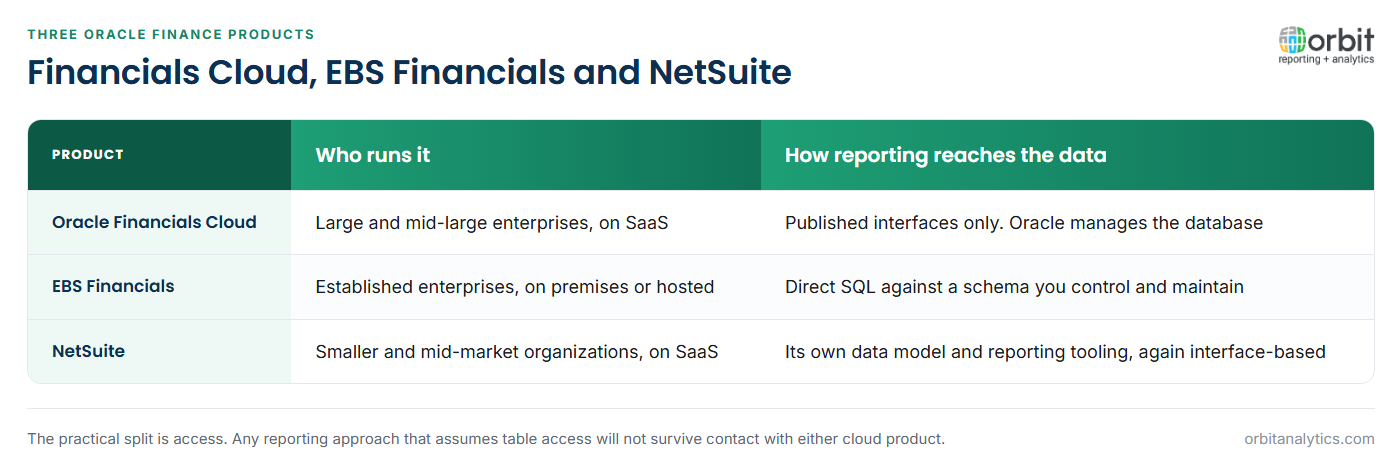
Oracle Financials Cloud vs. EBS Financials vs. NetSuite
All three are Oracle finance products and they suit different organizations.
Oracle Financials Cloud is the modern SaaS suite for large and mid-large enterprises. Oracle manages the database; you reach data through published interfaces.
EBS Financials is the older on-premises or hosted product, still widely run. You control the schema and can query it directly, which makes reporting flexible and maintenance yours.
NetSuite is Oracle’s SaaS suite for smaller and mid-market organizations, with a different data model and its own reporting tooling.
For reporting the practical split is access. EBS gives you the tables; Financials Cloud and NetSuite give you interfaces. Any reporting approach that assumes table access will not survive contact with the two cloud products.
Frequently Asked Questions
Q1. What is Oracle Financials Cloud?
It is the financial management pillar of Oracle Fusion Cloud ERP, delivered as software as a service, covering general ledger, payables, receivables, cash management, fixed assets, expenses and revenue management.
Q2. What is the difference between Oracle Financials Cloud and Oracle Fusion Cloud ERP?
Fusion Cloud ERP is the whole suite. Financials Cloud is the finance pillar within it, sitting alongside procurement, projects and supply chain.
Q3. What is the difference between Oracle Financials Cloud and Oracle EBS?
EBS is the older on-premises product with direct database access. Financials Cloud is SaaS, Oracle manages the database, and data is reachable only through published interfaces.
Q4. What is subledger accounting?
It is the engine that converts a business event into an accounting entry, using configured rules to decide which account combination each side of the entry hits.
Q5. Can you access the Oracle Financials Cloud database directly?
No. Access is through OTBI subject areas, BI Publisher data models, BI Cloud Connector extracts and REST or SOAP services.
Q6. What happens to reporting during a quarterly update?
Underlying objects and subject areas can change, so extractions and custom reports need revalidating against Oracle’s release cycle rather than on your own schedule.
Running Financials Cloud alongside EBS makes group reporting a two-system problem that neither system solves. Orbit Analytics reads both into one reporting layer with drill-down to source. Request a demo to see it across your entity structure.
