
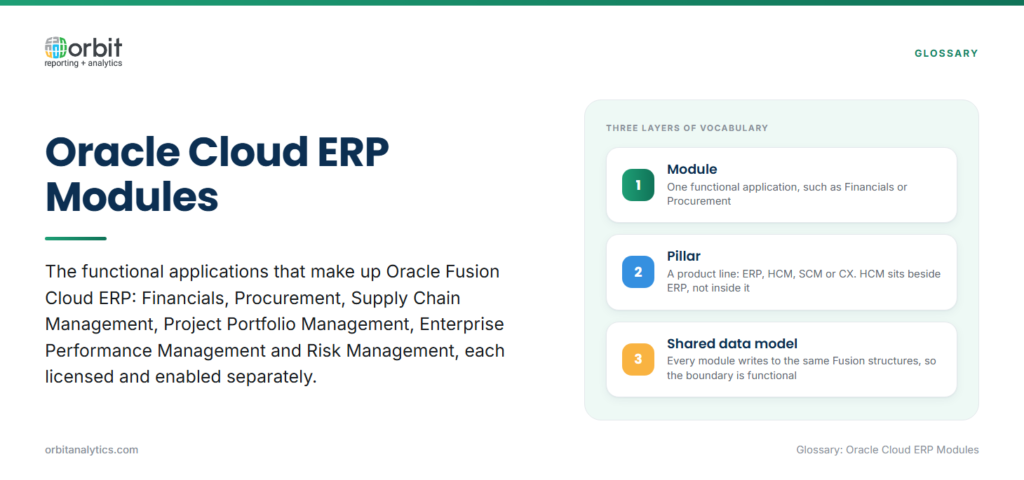
Oracle Cloud ERP modules are the functional applications that make up Oracle Fusion Cloud ERP: Financials, Procurement, Supply Chain Management, Project Portfolio Management, Enterprise Performance Management, and Risk Management. Each covers a distinct business process, and each is licensed and enabled separately.
Oracle Fusion Cloud ERP is the suite those modules belong to. It is Oracle’s SaaS ERP, run and upgraded by Oracle on a fixed release cadence, and it is what “Oracle Cloud ERP software” refers to in practice.
The vocabulary is layered and the layers get conflated. Modules are functional applications. Pillars are the broad product lines: ERP, HCM, SCM, and CX. Applications is Oracle’s own umbrella term, as in Oracle Fusion Cloud Applications. So Oracle HCM sits alongside ERP as a separate pillar, not inside it, even though the two share a technology platform.
Who runs it: organizations that have moved to SaaS ERP or are moving pillar by pillar, which frequently means running Fusion Cloud and Oracle E-Business Suite side by side for years.
Why Oracle Cloud ERP Is Organized Into Modules
- Functional ownership. Each module maps to a team that owns its process, so finance configures Financials and procurement configures Procurement.
- Phased adoption. Modules can be enabled in sequence, which is why most programmes start with Financials and add Procurement, SCM, or PPM later.
- One shared data model behind all of them. Every module writes to the same Fusion Cloud structures, so a module boundary is a functional boundary rather than a data boundary.
- What that means for reporting. Because the data model is shared, cross-module reporting is theoretically straightforward. What limits it is the reporting tools, not the data.
The Core Oracle Cloud ERP Modules
- Financials: General Ledger, Payables, Receivables, Fixed Assets, Cash Management, and the Subledger Accounting engine that ties them to the GL.
- Procurement: Self-service procurement, purchasing, supplier qualification, and sourcing.
- Supply Chain Management (SCM): Inventory, order management, manufacturing, cost management, and planning.
- Project Portfolio Management (PPM): Project costing, billing, contracts, and resource management.
- Enterprise Performance Management (EPM): Planning, budgeting, financial consolidation, close, and account reconciliation. Sold as its own suite and often adopted separately.
- Risk Management and Compliance: Segregation-of-duties monitoring, access certification, and financial-controls assurance.
Oracle Cloud ERP Features That Cut Across Modules
Four things are shared by every module, and they matter more to reporting than any single module’s feature list.
Subledger Accounting is the common engine turning every module’s transactions into GL journals under configurable rules, which is why a Payables invoice and a Projects cost end up in comparable ledger entries. The Fusion data model underneath is the same for all of them.
The interface is a single Redwood-styled experience with role-based navigation, so a user’s home page reflects their job rather than the module structure. Security is role-based throughout: data access is granted through roles and data-access sets, and any reporting layer has to respect them.
Where the data actually lives is the question that determines reporting strategy. Transactions sit in Fusion Cloud’s own tables, reached through OTBI subject areas, BI Publisher data models, or the extract mechanisms Oracle provides. Direct database access is not offered, which is the single biggest architectural difference from EBS.
Native Reporting Tools Inside Oracle Cloud ERP
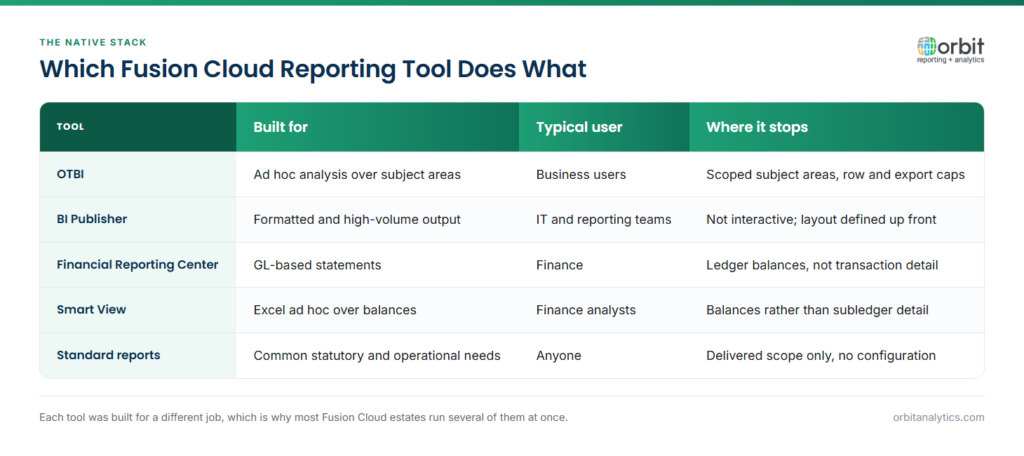
Four tools ship inside Fusion Cloud, and each was built for a different job:
- OTBI: Ad hoc and operational analysis over pre-built subject area models, the default for self-service inside Fusion.
- BI Publisher: Formatted, high-volume, and statutory output where layout is prescribed.
- Financial Reporting Center and Smart View: GL-based statements and Excel-based ad hoc analysis over balances, the finance team’s usual home.
- Account Analysis and standard reports: Delivered reports covering common statutory and operational needs without configuration.
What Native Oracle Cloud ERP Reporting Leaves Out
- Cross-module and cross-pillar reporting. OTBI subject areas are scoped, and a question spanning Financials, SCM, and HCM often has no single subject area that answers it.
- Export limits and row caps. OTBI analyses and spreadsheet exports are capped, which is a hard stop for reconciliation work at transaction volume.
- Real-time operational reporting. Some subject areas read from structures refreshed on a schedule, so “current” is not always current.
- Blending with non-Oracle sources. Fusion Cloud reporting reads Fusion Cloud. Combining it with a CRM, a warehouse, or a legacy EBS estate falls outside the native tools.
A Module-by-Module View of Common Reporting Requests
| Module | The request native tools handle least well |
| Financials | GL drilldown from balance to source transaction, and trial balance at transaction volume |
| Procurement | Spend and supplier analysis joining purchase orders, invoices, and payments |
| Supply Chain | Inventory position and order fulfilment across sites in one view |
| HCM alongside ERP | Headcount and labour cost read together with GL actuals, across two pillars |
Orbit Analytics answers all four from live Fusion Cloud data, with GL drilldown to the underlying transaction and cross-module spend and inventory reporting, supported by 1,000+ pre-built reports and 200+ pre-built connectors.
How to Extend Oracle Cloud ERP Reporting Beyond the Native Modules
- Start from pre-built data models and report libraries rather than building subject-area logic again from scratch.
- Give finance an Excel-native path. Refreshable ERP data in Excel removes the export-and-rebuild cycle that consumes the close.
- Push Fusion data to a modern platform when the analytics roadmap needs it: Snowflake, Databricks, Redshift, or Azure, rather than accepting a single destination.
- Keep Oracle Cloud ERP as the system of record. The reporting layer reads it; it does not become a second version of the truth.
Orbit Analytics reads Fusion Cloud subledger and GL structures natively for Oracle Fusion Cloud reporting, with pre-built data models plus Excel-native and self-service access, which is what closes the cross-module and export-limit gaps without rebuilding the Oracle data model.
Oracle Cloud ERP Modules vs. Adjacent Oracle Terms
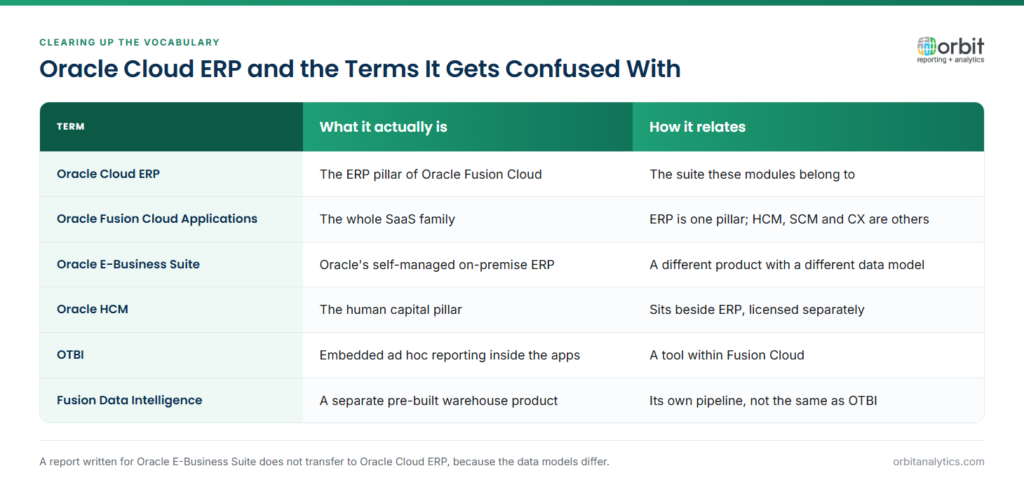
Oracle Cloud ERP and Oracle E-Business Suite are different products with different data models, so a report written for one does not transfer to the other. Oracle Fusion Cloud Applications is the wider family: Oracle Cloud ERP is its ERP pillar, and HCM and CX are separate pillars alongside it.
OTBI and Fusion Data Intelligence are also distinct. OTBI is the embedded ad hoc reporting layer inside the applications, while Fusion Data Intelligence is a separate, pre-built warehouse and analytics product with its own data pipeline.
Frequently Asked Questions
Q1. What are the main Oracle Cloud ERP modules?
Financials, Procurement, Supply Chain Management, Project Portfolio Management, Enterprise Performance Management, and Risk Management and Compliance. Each is licensed separately and most organizations enable them in phases.
Q2. What is the difference between Oracle Cloud ERP and Oracle Fusion?
Oracle Fusion Cloud Applications is the whole SaaS family. Oracle Cloud ERP is its ERP pillar. In everyday use the terms are treated as synonyms, but Fusion also covers HCM, SCM, and CX.
Q3. Is Oracle HCM part of Oracle Cloud ERP?
No. HCM is a separate pillar sold and licensed separately, though it shares the same platform and interface. This matters for reporting, because reading HCM and ERP data together crosses a pillar boundary.
Q4. What are the limitations of OTBI in Oracle Cloud ERP?
OTBI is scoped to pre-built subject areas, so questions spanning several modules may have no subject area that serves them. It also applies row and export caps, and some subject areas read from structures refreshed on a schedule rather than in real time.
Q5. Can you report across multiple Oracle Cloud ERP modules at once?
Sometimes with native tools, where a subject area spans the modules involved. Where none does, cross-module reporting needs a layer above Fusion Cloud that reads the shared data model directly and joins across module boundaries.
Q6. What is the difference between OTBI and BI Publisher?
OTBI is for interactive, ad hoc analysis over subject areas, aimed at business users. BI Publisher produces formatted, print-ready and high-volume output from a data model, aimed at statutory and operational documents where layout is prescribed.
The modules share one data model, so the limit on cross-module reporting is the tooling rather than the data. Request a demo to see how Orbit Analytics reports across every Oracle Cloud ERP module from live Fusion Cloud data.
