
Search “ERP Excel” and the results split into two worlds. One group is looking for a free spreadsheet template to run a small business: purchase orders, inventory, simple invoicing. The other is a finance team at an enterprise running Oracle Fusion Cloud, looking for a way to pull live ERP data into Excel without breaking month-end close.
Both groups are technically searching for the same thing, and neither is wrong. But the products, costs, and decisions involved are completely different.
This guide walks through both meanings of ERP Excel and explains when a business outgrows one approach and needs to move to the other. It is written for operations and finance leaders weighing the trade-offs.
What is ERP Excel?
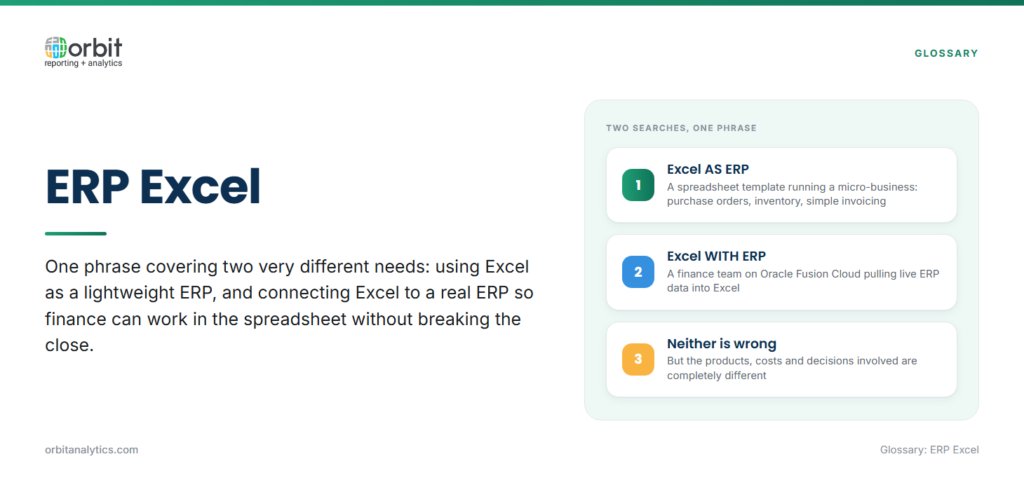
ERP Excel describes any workflow that combines enterprise resource planning data with Microsoft Excel. The phrase covers two very different scenarios.
Two approaches: Excel AS ERP vs Excel WITH ERP
- Excel AS ERP: Excel is the ERP. The business runs purchase orders, inventory, sales, and basic accounting in spreadsheets. There is no separate system.
- Excel WITH ERP: The business already has an ERP (Oracle, NetSuite, SAP, Microsoft Dynamics) and uses Excel as a reporting layer connected to it. The spreadsheet pulls data; the ERP stays the source of truth.
Who uses each approach
| Approach | Fits | Typical scale |
| Excel-as-ERP | Startups, micro-businesses | Handful of customers, no compliance burden |
| Excel-with-ERP | Companies on a real ERP | Businesses with more than 30 employees |
Option 1: Using Excel as a basic ERP
How Excel-based ERP systems work
The setup is straightforward. A workbook holds customer records, supplier records, an item master, and a transactions sheet. Formulas calculate running balances, inventory levels, and outstanding invoices. Each user updates the file or works from a shared copy.
Common Excel ERP templates
Off-the-shelf templates exist for finance (GL, AP, AR), inventory (stock levels, reorder points), and sales (quotes, orders, invoices). Template providers like Someka and Vertex42 sell pre-built workbooks for under $100.
Pros: low cost, familiar interface
- Cost: A template costs less than a single user-licence for a real ERP.
- Ownership and training: Almost every business already owns Excel and users are already trained on the interface.
- No project overhead: No implementation timeline, no consultants, no go-live.
Cons: data silos, manual entry, scalability limits
- Manual entry errors: Hand-keyed data introduces mistakes that compound across reports.
- Broken version control: When multiple people edit the same file, the latest version becomes impossible to identify.
- No audit trail: There is no log of who changed what and when.
- Data silos: Each workbook is independent, so inventory in one file does not know about sales in another.
When Excel-as-ERP stops working
Signs you have outgrown spreadsheet-based systems
Look for these warning signs:
- The workbook is too slow to open or recalculate.
- Two people overwrite each other’s edits in the same session.
- The year-end audit takes weeks because nobody can reconstruct the trail.
- Finance spends more time fixing data than analysing it.
Data integrity and version control issues
The deeper problem is integrity. Once a spreadsheet crosses a few hundred thousand rows, formulas break, references shift, and nobody trusts the totals. With no audit log, you cannot tell when or by whom a number changed.
The hidden cost of manual processes
The licence cost looks cheap until you count the analyst hours spent rekeying data, reconciling versions, and explaining variances. Past 30 employees, the people cost dwarfs the licence saving.
Option 2: Connecting your ERP to Excel
How ERP-Excel integration works
In this model, Excel is a reporting front-end on top of a real ERP. A connector pulls live data into the workbook, refreshing on demand or on a schedule. Users keep the familiar spreadsheet interface while finance keeps a single source of truth in the ERP.
Methods: exports, ODBC, APIs, add-ins
Several methods exist, from least to most modern:
| Method | Offers | Trade-off |
| Manual CSV exports | Works with any ERP | Constant rework |
| ODBC / database | Supports automation | Needs IT setup |
| REST / SOAP APIs | Programmatic access | Development effort |
| Purpose-built add-ins | Native ribbon, pre-built reports | Tool licence |
Purpose-built Excel reporting for Oracle ERP add-ins like Orbit Analytics XL Edge sit directly inside the Excel ribbon, letting users build live reports against Oracle Fusion Cloud or EBS without writing code. With over 1,000 pre-built reports and connectors to Fusion Cloud, EBS, NetSuite, and PeopleSoft, this shortens what would be a multi-month integration project to a few days.
Benefits: real-time data, preserved formatting, automation
The benefits compound:
- Live ERP data without manual exports.
- Preserved formatting: Existing templates keep their layout when data refreshes.
- Scheduled refresh: Reports refresh overnight so finance walks into a current dashboard each morning.
- Single source of truth: The ERP remains authoritative even though analysis happens in Excel.
Comparing the two approaches
| Factor | Excel AS ERP | Excel WITH ERP |
| Best for | Small businesses, startups | Growing or enterprise companies |
| Data source | Manual entry | Live ERP connection |
| Real-time? | No | Yes |
| Scalability | Limited | Enterprise-grade |
| Data integrity | Risk of errors | Single source of truth |
| Cost | Low (templates only) | ERP plus integration tool |
How to connect your ERP system to Excel
Follow these four steps to move from a manual workflow to live ERP-to-Excel reporting:
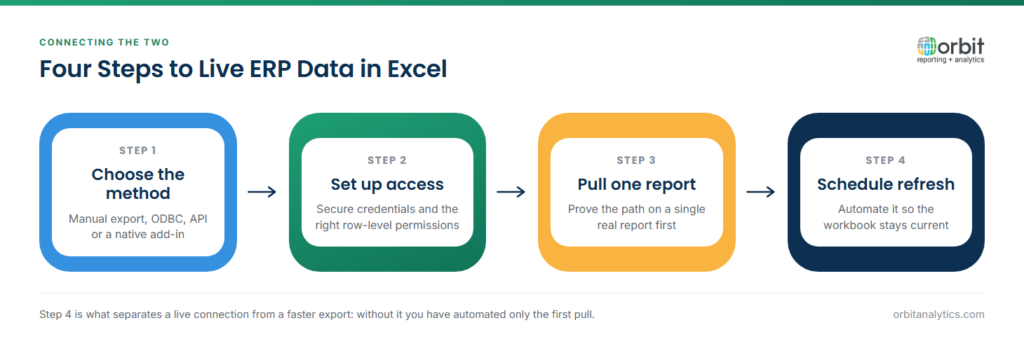
- Choose your connection method. Decide between native exports, ODBC, REST APIs, or a purpose-built add-in. For Oracle ERP, an add-in like XL Edge or GL Sense ships with pre-built reports for general ledger, AP, AR, and projects.
- Set up secure access. Configure service accounts, scope read-only permissions, and route access through your identity provider. Production credentials should never live in a personal workbook.
- Pull your first report. Start with a single report (trial balance, AR ageing, or open POs are common starting points). Validate totals against the ERP screen before rolling out.
- Schedule automatic refreshes. Once the report is trusted, schedule it overnight and add a freshness indicator so users know when the data was last updated.
Best practices for ERP Excel reporting
A handful of practices keep the model sustainable:
- Treat Excel as a presentation layer, not a database. Calculations belong upstream in the ERP or BI tool. Excel should display, not transform.
- Balance self-service with IT oversight. Self-service Excel reporting only works when IT controls the underlying connections, certifies data sources, and audits queries. Orbit Analytics supports this with role-based access on Oracle ERP, so finance users build their own reports while IT keeps governance intact.
- Document data sources. Every report should declare its source: which ERP tables, which filters, which refresh schedule. Without documentation, every personnel change becomes a knowledge transfer crisis.
Frequently Asked Questions
Q1. Can Excel be used as an ERP system?
Excel can serve as a basic ERP for very small businesses with simple needs, a handful of customers, low transaction volume, and no compliance burden. Once a business adds inventory tracking, multi-user access, or audit requirements, a dedicated ERP becomes necessary.
Q2. How do I connect my ERP to Excel?
You can connect Excel to ERP through native exports, ODBC drivers, REST APIs, or purpose-built add-ins. For Oracle ERP specifically, ribbon-based add-ins let users build live reports inside Excel without writing code or running manual exports.
Q3. What is the difference between Excel-as-ERP and ERP-to-Excel?
Excel-as-ERP means using spreadsheets to run business operations directly, with manual data entry. ERP-to-Excel means using Excel as a reporting front-end on top of an existing ERP, with live data pulled from the ERP.
Q4. Can I pull live data from Oracle ERP into Excel?
Yes, Oracle Fusion Cloud and EBS expose data through REST APIs, BI Publisher, and database views. Purpose-built tools simplify this with pre-built connectors and ready-made reports, so finance teams skip the integration build.
Q5. How do I automate ERP data refreshes in Excel?
Most enterprise reporting add-ins support scheduled refresh, the workbook updates on a defined cadence (overnight is common) without manual intervention. Schedules can be tied to month-end calendars so reports auto-refresh after close.
Q6. Is it secure to connect ERP to Excel?
Yes, when set up correctly. Use read-only service accounts, route access through your identity provider, scope permissions narrowly, and audit usage. Enterprise tools certified to ISO 27001 standards add another layer of governance.
The right erp excel approach depends on where your business sits today and where it is heading. Startups can start with templates; growing companies need a live connection that keeps Excel honest. Request a demo to see how Orbit Analytics connects Oracle ERP to Excel with live data, pre-built reports, and enterprise-grade governance.
