
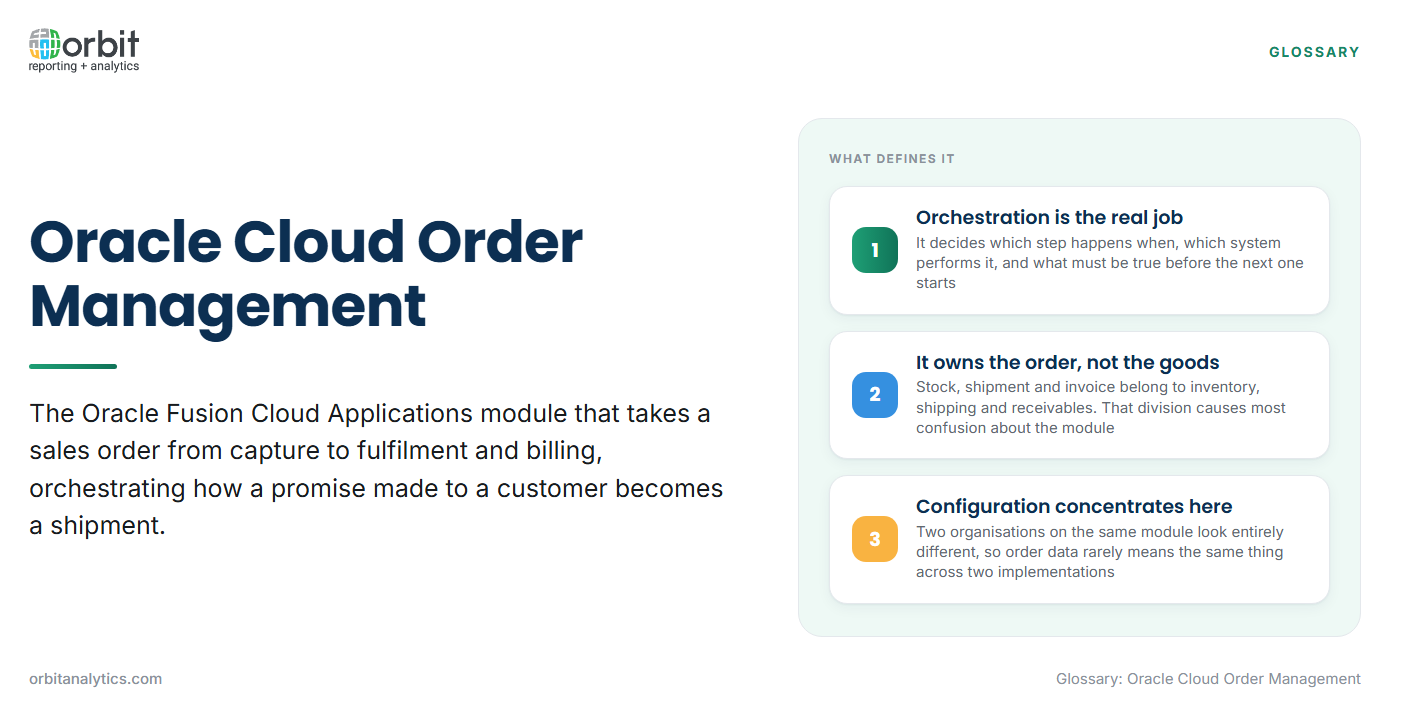
Oracle Cloud Order Management is the Oracle Fusion Cloud Applications module that takes a sales order from the moment it is captured to the point it is fulfilled and billed. Its real job is orchestration: deciding how a promise made to a customer becomes a shipment, and keeping the two in step when something changes.
It owns the order, the rules that move it forward, and the record of what happened at each step. It does not own the stock, the shipment or the invoice, which belong to inventory, shipping and receivables. That division causes most confusion about the module, and it is why almost no useful question about orders is answerable from this module alone.
Order management and customer service teams work in it daily, alongside planners watching promised dates and finance staff tracing billing questions. It sits inside the wider suite mapped out on the Oracle Cloud ERP modules page.
Where It Sits in Order-to-Cash
Order-to-cash runs from a customer’s intention to buy through to cash collected. This module occupies the middle of that chain.
- Before the order reaches it: A quote or opportunity in a sales system, a contract or price agreement, and customer and item master data that already exists.
- What it owns: Capture, validation, pricing, availability checking, scheduling, orchestration through fulfilment, and change management.
- After it hands over: Shipping confirms what physically left, receivables raises the invoice, and the ledger records the accounting.
The chain is discussed as one because a problem in one part surfaces as a symptom in another: a pricing error at capture becomes an invoice dispute weeks later.
The Order Lifecycle It Manages
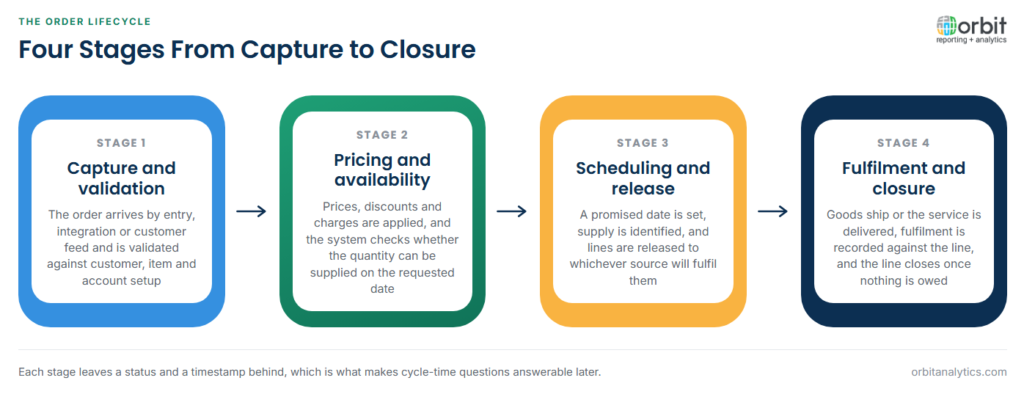
A sales order passes through four broad stages, however a given organisation has configured them.
- Capture and validation. The order arrives by manual entry, integration from a sales or e-commerce system, or a customer feed, and is validated against customer, item and account setup.
- Pricing and availability. Prices, discounts and charges are applied, and the system checks whether the quantity can be supplied on the requested date.
- Scheduling and release. A promised date is set, supply is identified, and lines are released to whichever source will fulfil them.
- Fulfilment and closure. The goods ship or the service is delivered, fulfilment is recorded against the line, and the line closes once nothing further is owed.
Each stage leaves a status and a timestamp behind, which is what makes cycle-time questions answerable later.
Orchestration and Fulfilment Rules
An orchestration process is the defined sequence of steps an order line follows from release to closure: which step happens when, which system performs it, and what must be true before the next one starts.
- Splitting a line across sources: One quantity can be satisfied from more than one warehouse, or partly from stock and partly from a purchase, each part tracked separately.
- Holds and exceptions: A credit hold, a pricing approval or a stock shortage pauses a line at a defined point rather than failing the order.
- Change orders: A quantity, date or address change mid-flight has to reach work already under way, which may mean reversing a reservation.
Configuration concentrates here. Two organisations on the same module look entirely different to their users, because their orchestration rules, holds and change policies differ. Order data rarely means the same thing across two implementations.
How It Connects to Inventory and Shipping
The connection to inventory is the promise. When availability is checked, the module asks what can be supplied and by when, and the answer becomes the date given to the customer. Reservation then holds specific supply against the line, allocation assigns the stock that will satisfy it, and shipping takes over at the physical handover, confirming what actually left.
Two flows complicate this. A drop ship order is fulfilled directly by a supplier, without goods passing through the organisation’s own warehouse. A back-to-back order triggers supply created specifically for that order and reserved to it. In both, the line waits on something that does not yet exist, so reporting follows the supply document as well as the order.
How It Connects to Receivables and the Ledger
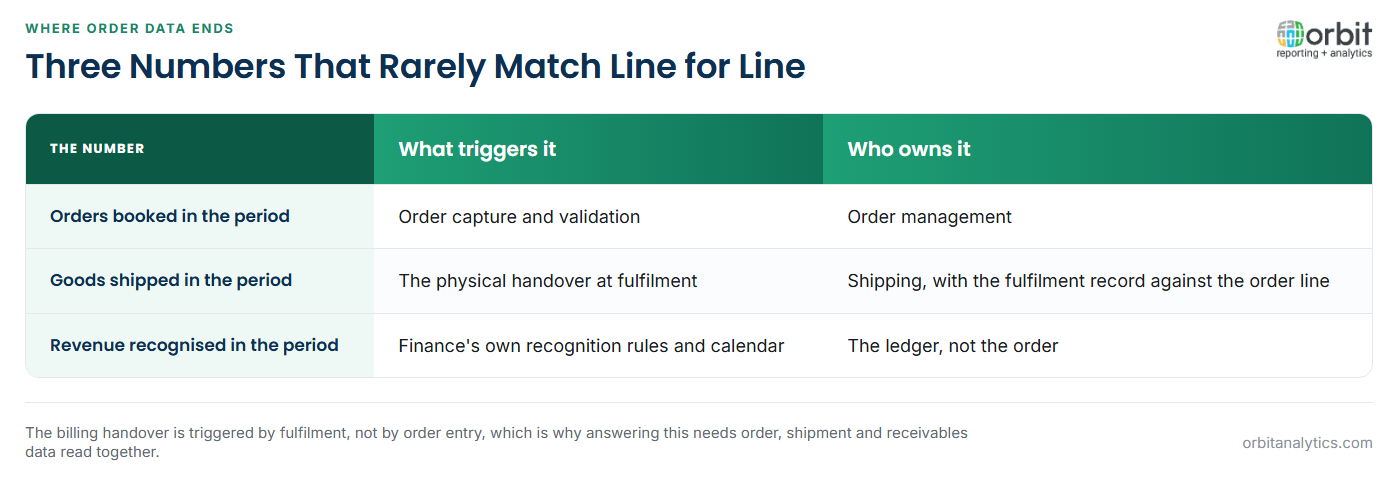
The billing handover is triggered by fulfilment, not by order entry. Once a line is fulfilled, billing-relevant information passes to receivables, which creates the invoice and owns it from that point. Revenue recognition belongs to finance, on finance’s own rules and calendar.
This is where order data stops and finance data starts, and the boundary creates a standing reconciliation question. Orders booked in a period, goods shipped in it, and revenue recognised in it are three numbers that rarely match line for line. Answering that means reading order, shipment and accounts receivable reports together.
The Data It Produces
The module generates three layers of data, and they grow at different rates.
| Layer | What it holds | Reporting use |
| Order header | Customer, order date, order type, currency, overall status | Volume, mix and customer analysis |
| Order line | Item, quantity, price, requested and promised dates, status | Margin, fill rate and date performance |
| Fulfilment record | What was scheduled, reserved, shipped and when | Cycle time, split and exception analysis |
Status against timestamp is the pairing that matters. A status alone says where an order is now; a status with the time it was reached answers how long a stage takes.
Order history grows quickly, because every line, split and status change adds records. What survives a cloud migration is usually less than expected: open orders move, closed history often does not. Orbit Analytics is used to retain and report on order history that outlives the source system, so a year-on-year comparison does not end at the migration date.
What Reporting Against Order Management Involves
The questions are practical: where is this order, how much did we book this month, how often do we ship on the promised date, and why does the order book not agree with revenue.
Almost none can be answered inside the module. Shipping dates live with shipping, invoice status with receivables, cost with inventory and revenue with the ledger, so one answer usually spans several modules. Orbit Analytics joins those sources through Oracle Fusion Cloud reporting that reads live Fusion data across modules, so an order question is answered once rather than reconciled from several extracts.
Load matters too. Operational reporting needs current data and is queried constantly by users chasing single orders, while period-end analysis reads large volumes of history. Running both against the transactional system puts analytical load where order entry happens.
Order Management, Inventory and Receivables Compared
The three are commonly conflated, because one business event touches all of them.
| Module | Responsible for | Holds the answer to |
| Order Management | The order, its rules, and its progress to fulfilment | What was ordered, promised, changed or held |
| Inventory | Stock, reservation, allocation and movement | What was available, reserved and physically shipped |
| Receivables | Invoices, credits, collections and customer balances | What was billed, disputed and paid |
An order that appears unbilled may be an order, shipping or invoicing problem; which step stalled decides which module holds the answer.
Frequently Asked Questions
Q1. What is Oracle Cloud Order Management?
It is the Oracle Fusion Cloud Applications module that manages a sales order from capture through to fulfilment and billing handover. Its central function is orchestration: applying the rules that move a line forward and keeping the promise aligned with fulfilment.
Q2. What is an orchestration process in Oracle Order Management?
It is the defined sequence of steps an order line follows from release to closure: which step happens when, which system performs it, and what must be true first. Most configuration effort concentrates here.
Q3. What triggers an invoice from a sales order?
Fulfilment does, not order entry. Once a line is fulfilled, billing-relevant information passes to receivables, which creates and owns the invoice. Revenue recognition then follows finance’s rules rather than the order’s status.
Q4. What is a back-to-back order?
It is an order where supply is created specifically to satisfy it and reserved to it, rather than taken from stock. Reporting on one follows the supply document as well as the order line.
Q5. Why does reporting on orders span several modules?
Because the order record holds only part of the story. Shipping dates sit with shipping, cost with inventory, invoice status with receivables and revenue with the ledger.
Order questions rarely stop at the order, and answering them means reading fulfilment, billing and ledger data alongside it. Orbit Analytics reports live across Oracle Fusion Cloud and EBS modules with drill-down from any figure to the transactions behind it. Request a demo to see it against your own order-to-cash data.
