
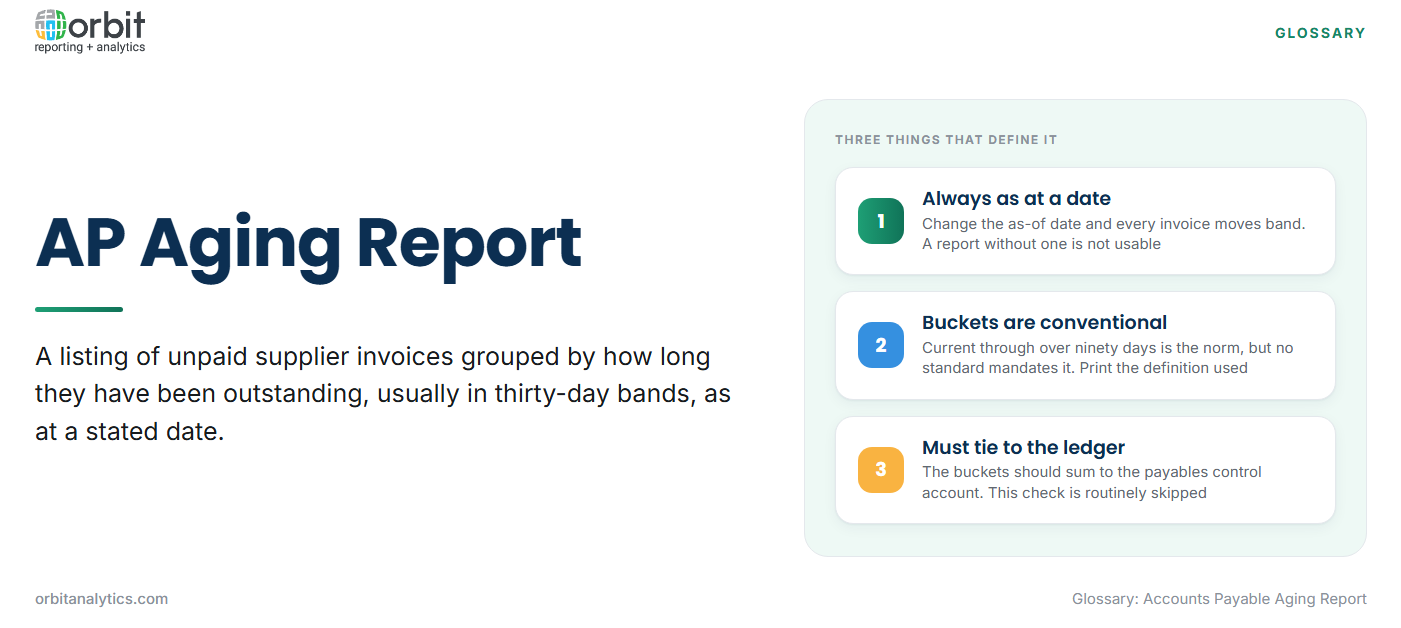
An accounts payable aging report lists every unpaid supplier invoice and groups the outstanding amounts by how long they have been outstanding, usually in thirty-day bands. It answers two questions at once: how much the organization owes, and how overdue that money is. A single total payables figure cannot distinguish between a balance that is entirely current and one where a third is more than ninety days late, and those two positions call for very different action.
The report is always run as at a specific date. Change the as-of date and every invoice moves between buckets, which is why an aging report without a stated date is not usable.
The standard aging buckets
The bands below are conventional rather than mandated by any standard, so the bucket definition should be printed on the report itself.
| Bucket | Meaning | What it usually signals |
| Current | Not yet due under agreed terms | Normal operation |
| 1 to 30 days | Recently past due | Processing delay or approval bottleneck |
| 31 to 60 days | Materially late | Cash constraint or an unresolved query |
| 61 to 90 days | Seriously overdue | Dispute, or an invoice nobody owns |
| Over 90 days | At risk | Supply interruption risk, possible write-back candidate |
What an AP aging report contains
- Supplier and supplier site: the same supplier may trade through several sites with different terms, and aggregating them hides real problems.
- Invoice number, invoice date and payment terms: terms are what convert an invoice date into a due date.
- Outstanding amount by bucket: the invoice balance placed in exactly one band.
- Currency and entity context: transaction currency alongside the reporting currency, plus the legal entity or ledger.
A short example shows the shape. One supplier with 12,000 current, 4,000 in the 1 to 30 band and 9,000 sitting over 90 days is a more urgent conversation than a supplier with 25,000 entirely current, even though the first owes less in total.
How to read an AP aging report
Read the distribution before the total. Concentration matters: a single supplier holding most of the over-90 balance is a supply risk rather than an accounting problem, and it usually resolves with a phone call rather than a payment run.
Drift is the second thing to look for. Comparing this month’s report against last month’s shows whether balances are moving from current into the late bands, which is an early indicator of either a cash constraint or a breakdown in invoice approval. Disputed invoices are the third pattern. They tend to sit untouched in the oldest bucket because nobody wants to pay them and nobody has closed the query, so they quietly inflate the aging profile.
Invoice date aging and due date aging give different answers. Aging from the invoice date measures how long the document has existed. Aging from the due date measures how late payment actually is. For managing supplier relationships the due date basis is the meaningful one, and mixing the two across periods makes trend comparison worthless.
What the report is used for
- Cash flow planning and payment runs: deciding what to pay this week and what can wait without breaching terms.
- Supplier relationship management: identifying which relationships are being damaged by late payment before the supplier raises it.
- Discount capture and late fee avoidance: early settlement discounts expire, and the aging report is where the opportunity is visible.
- Audit and period end support: the report substantiates the payables balance and highlights old items that need review.
How to run an AP aging report in Oracle
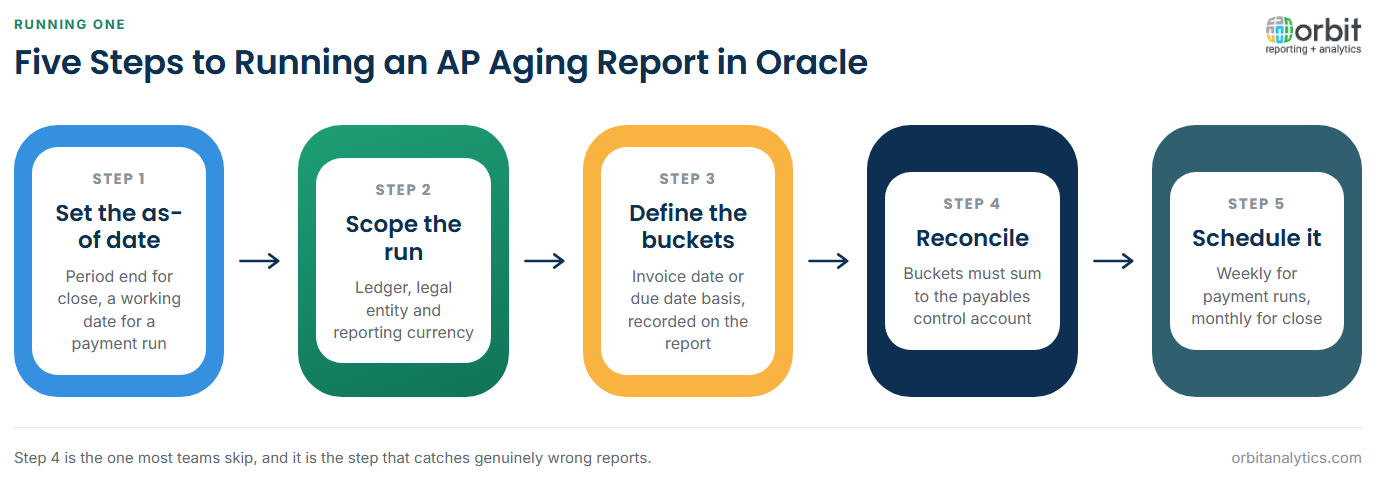
- Set the as-of date. Everything in the report depends on it. Period end is the usual choice, but a mid-period date is valid for a payment run.
- Select ledger, entity and currency. Decide whether to report in transaction currency, ledger currency, or both.
- Define the bucket structure. Confirm whether aging runs from invoice date or due date, and record which was used.
- Reconcile to the AP trial balance. The sum of the aging buckets must equal the payables control account. This step is routinely skipped and is the one that catches real errors.
- Schedule and distribute. Weekly during the payment cycle, monthly for close, delivered to the people who act on it.
Running this in Oracle E-Business Suite or Fusion Cloud is straightforward until multiple ledgers or currencies are involved, at which point the standard reports need stitching together. Orbit Analytics provides operational reporting that produces one aging view across ledgers from live ERP data, on a schedule, without an export step.
Common problems with AP aging reports
Aging from the wrong date is the most common fault, and it is usually invisible because the report still looks reasonable. Unapplied prepayments and credit memos are the second: a credit sitting unmatched against an invoice makes the supplier appear to owe more than it does, and both figures age independently.
Multi-currency restatement differences cause apparent movement that has nothing to do with payment behaviour, because a balance revalued at a new rate changes without any transaction occurring. The most serious problem is a report that cannot be reconciled to the ledger at all, which usually means the report is reading a different data set than the control account. Building the report over live Oracle data rather than a periodic extract removes that class of failure. Orbit Analytics runs automated reporting on a fixed schedule so the reconciliation becomes a routine check rather than an investigation.
AP aging vs. AR aging vs. the AP trial balance
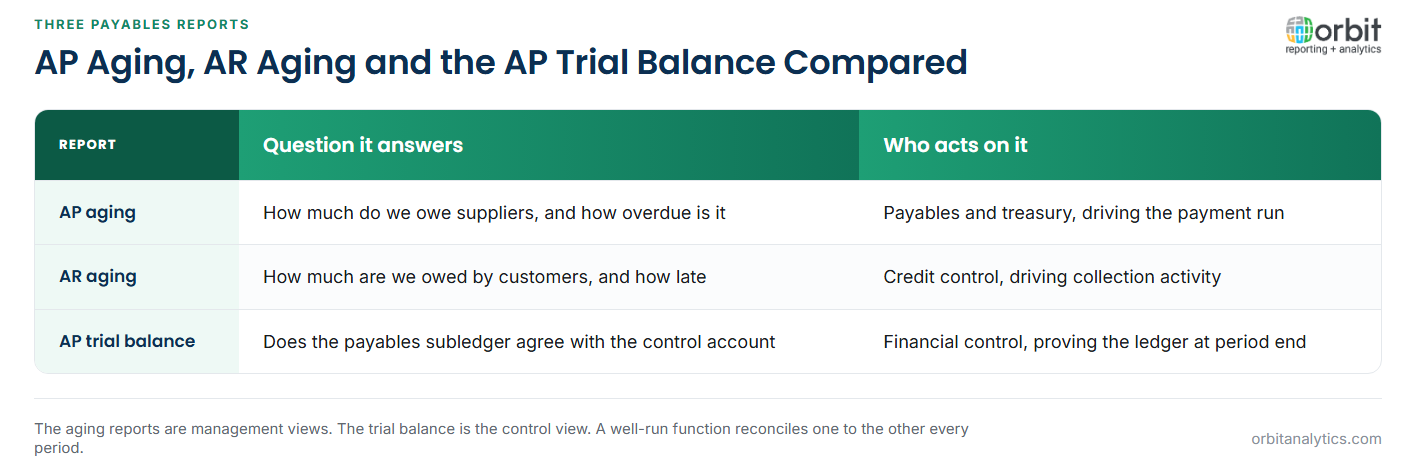
These three reports are often requested interchangeably and answer different questions. The AP aging report looks outward at what the organization owes its suppliers, and it drives payment decisions. The AR aging report is its mirror image, covering what customers owe the organization, and it drives collection activity. The two use the same bucket logic but belong to different teams and different risks.
The AP trial balance is a different kind of report altogether. It proves that the payables subledger agrees with the general ledger control account at a point in time. It carries no aging dimension and says nothing about lateness. In practice the aging report is the management view and the trial balance is the control view, and a well-run payables function reconciles one to the other every period.
Frequently Asked Questions
Q1. What is an accounts payable aging report?
It is a listing of unpaid supplier invoices grouped by how long they have been outstanding, typically in thirty-day bands. It shows both the total owed and how overdue that total is, as at a specific date.
Q2. What are the standard AP aging buckets?
Current, 1 to 30 days, 31 to 60 days, 61 to 90 days, and over 90 days. These bands are conventional rather than standardized, so the definition used should be stated on the report.
Q3. What is the difference between AP aging and AR aging?
AP aging covers what the organization owes suppliers and supports payment decisions. AR aging covers what customers owe the organization and supports collections. The bucket logic is the same; the direction and the owning team are not.
Q4. What is the difference between invoice date and due date aging?
Invoice date aging measures how long the invoice has existed. Due date aging measures how late the payment is against agreed terms. Due date aging is the more meaningful basis for managing suppliers.
Q5. Why does an AP aging report need to reconcile to the trial balance?
Because the aging buckets should sum to the payables control account in the general ledger. If they do not, either the report is reading incomplete data or transactions exist in one place and not the other.
Q6. How are credit memos treated in AP aging?
An unapplied credit memo ages as its own item and can distort the picture, because the supplier appears to be owed more than the net position. Applying credits against invoices before running the report avoids this.
Getting a reliable aging profile depends on reading live payables data rather than a stale extract. Orbit Analytics delivers scheduled aging reports across Oracle EBS and Fusion Cloud entities with drill-down from any bucket to the individual invoices. Request a demo to see it on your own payables data.
