
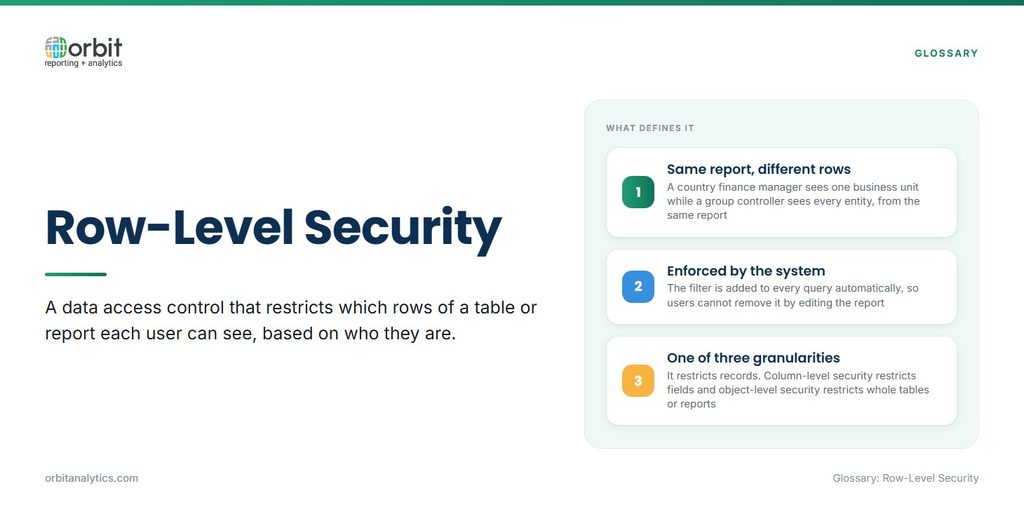
Row-level security (RLS) is a data access control that restricts which rows of a table or report each user can see, based on who they are. Two people can open the same report and see different records: a UK finance manager sees UK business unit transactions, while a group controller sees every entity.
The filter is enforced by the system, not written into the report. The database, warehouse or reporting tool adds a condition to every query automatically, so a user cannot remove it by editing a filter or building a new report. It is one part of a wider data security model that also covers authentication, encryption and field-level controls.
How Row-Level Security Works
Every row-level security implementation follows the same basic sequence, whatever the platform.
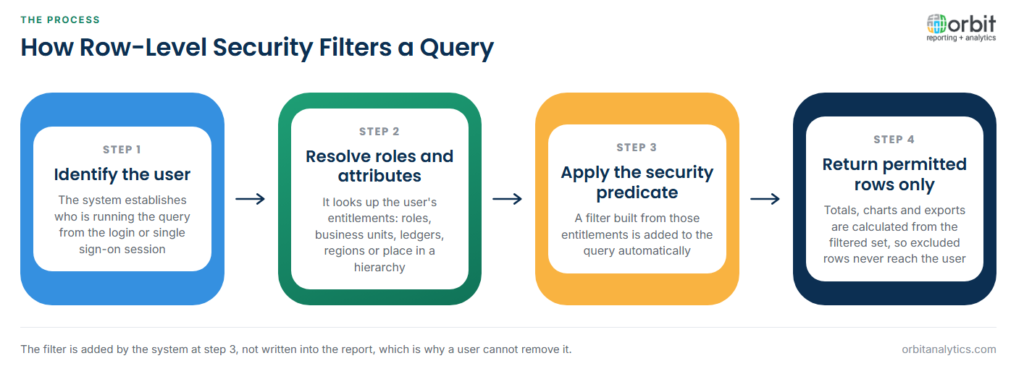
- Identify the user. The system establishes who is running the query, usually from the login or single sign-on session.
- Resolve roles and attributes. It looks up what that user is entitled to: roles, business units, ledgers, cost centers, regions or a place in a management hierarchy.
- Apply the security predicate. A filter condition built from those entitlements is added to the query, such as limiting rows to the user’s permitted business units.
- Return only the permitted rows. Totals, charts and exports are calculated from the filtered set, so the user never receives the excluded rows.
Filters are defined in three common ways:
- Static role-based filters: a fixed condition attached to a role, such as “EMEA sales sees EMEA rows.”
- Dynamic filters: the condition is read from the user’s own attributes, so one rule covers every region without a role per region.
- Hierarchy-based access: managers see their own rows and everything below them in an organization or cost center tree.
Where Row-Level Security Is Enforced
Row-level security can be applied at three points, and data often passes through all of them.
| Enforcement point | How it works | Main risk |
|---|---|---|
| Source application | The ERP restricts records by role, as Oracle Fusion does with data roles | Protection ends when data is extracted |
| Database or warehouse | Security policies filter rows for every tool that queries the table | Policies must be rebuilt and kept in step with the source |
| BI or reporting tool | Roles in the reporting model filter rows before display | Users who query the warehouse directly bypass it |
The safest designs enforce the rule as close to the data as possible and avoid maintaining a second, hand-built copy of it. Orbit Analytics approaches this by applying the security rules already defined in the source application to its reports, rather than asking administrators to recreate them in the reporting layer.
Why Row-Level Security Matters for Finance and ERP Data
- Business units, ledgers and legal entities: multi-entity groups need local teams to see their own figures without exposing other entities’ results before consolidation.
- Payroll and personal data: HR and payroll tables hold salaries and personal details that privacy rules require restricting to authorized staff.
- Segregation of duties: limiting what each user can see supports the control frameworks auditors test, alongside limiting what each user can change.
- Self-service reporting: without row filters, opening reporting to more users means building a separate report for every audience.
These controls sit within broader data governance, which defines who owns each dataset and who decides the access rules.
Row-Level Security in Oracle Fusion and EBS
Oracle ERP applications already contain detailed row-level security. In Oracle Fusion Cloud, a job role defines what a user can do, and data access defines where: assignments tie the role to specific business units, ledgers, inventory organizations or other dimensions. Data security policies then decide which records each role can reach, and OTBI reports respect those rules automatically.
In Oracle EBS, the equivalent comes from responsibilities combined with security profiles. Multi-Org access control limits users to the operating units assigned to their security profile, GL data access sets control which ledgers and balancing segments are visible, and HR security profiles restrict employee records by organization or position.
Because these rules are maintained by the ERP team as part of user provisioning, they are the most accurate statement of who should see what. That is why reusing them downstream is safer than redefining them.
Carrying Oracle Data Security Into Reporting
The difficulty starts when data leaves Oracle. A CSV export, a BI Cloud Connector extract or a warehouse load carries the rows but not the rules, so a table that was filtered by business unit inside Fusion arrives in the warehouse with every row visible.
Teams then either rebuild the policies by hand in the warehouse and BI tool, which drifts as users change roles, or restrict the whole dataset to a small group, which defeats self-service. Orbit Analytics addresses this in Oracle Fusion Cloud reporting with auto-sync on login, which imports data security profiles and business application roles from the source so that reports enforce the same rules users already have in Oracle. The same principle applies to EBS, where operating unit and ledger access should survive the move into any downstream report.
Common Pitfalls With Row-Level Security
Most failures sit not in the filter itself but in what surrounds it.
- Leakage through totals: a report can hide rows but still show a grand total that includes them, letting users infer restricted figures.
- Performance on large tables: complex predicates, especially hierarchy lookups, add work to every query and need indexing or pre-computed access tables.
- Policies that drift from the source: hand-maintained rules fall out of step when people join, move or leave, and the gap is rarely noticed until an audit.
- Untested edge cases: users with no assignments should see nothing, not everything, and that default needs to be verified.
Row-Level vs. Column-Level vs. Object-Level Security
Row-level security is one of three granularities of access control, and most organizations combine all three.
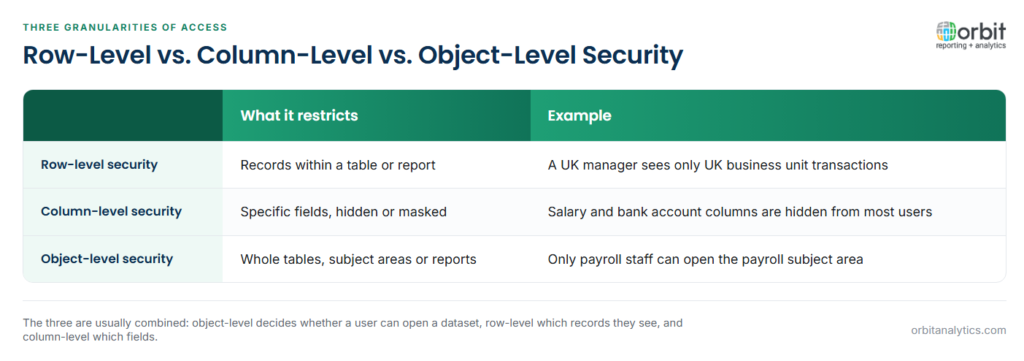
Row-level security restricts records. Everyone sees the same columns, but only the rows they are entitled to, such as transactions for their own business unit.
Column-level security restricts fields. Everyone may see the same rows, but sensitive columns such as salary, bank account or tax identifier are hidden or masked for users without clearance.
Object-level security restricts whole tables, subject areas or reports. A user without access to the payroll subject area cannot open it at all, regardless of rows or columns.
A payroll report might use all three: object-level security limits the subject area to HR, row-level security limits each HR partner to their own division, and column-level security masks bank details for everyone except payroll administrators.
Frequently Asked Questions
Q1. What is row-level security in simple terms?
It is a rule that shows each user only the rows of data they are allowed to see. Two people can run the same report and get different results based on their role or assignments.
Q2. What is the difference between row-level and column-level security?
Row-level security filters which records a user sees. Column-level security hides specific fields, such as salary, while leaving the rows visible.
Q3. What is dynamic row-level security?
It is row-level security where the filter is driven by the user’s own attributes, such as their assigned region or business unit, rather than a fixed rule per role. One rule then covers every user.
Q4. How does Oracle Fusion restrict data by business unit?
Fusion combines a user’s job role with data access assignments, such as specific business units or ledgers. Data security policies use those assignments to filter the records the user can reach, including in OTBI reports.
Q5. Can row-level security be bypassed through exports?
Inside a properly secured system, exports contain only the filtered rows. The risk is data extracted outside the system, where the rows arrive without the rules unless security is rebuilt or inherited downstream.
Row-level security only works if the rules follow the data into every report. Orbit Analytics carries Oracle Fusion Cloud and EBS security into reporting, so users see what Oracle already allows. Request a demo to see it with your own roles.
