
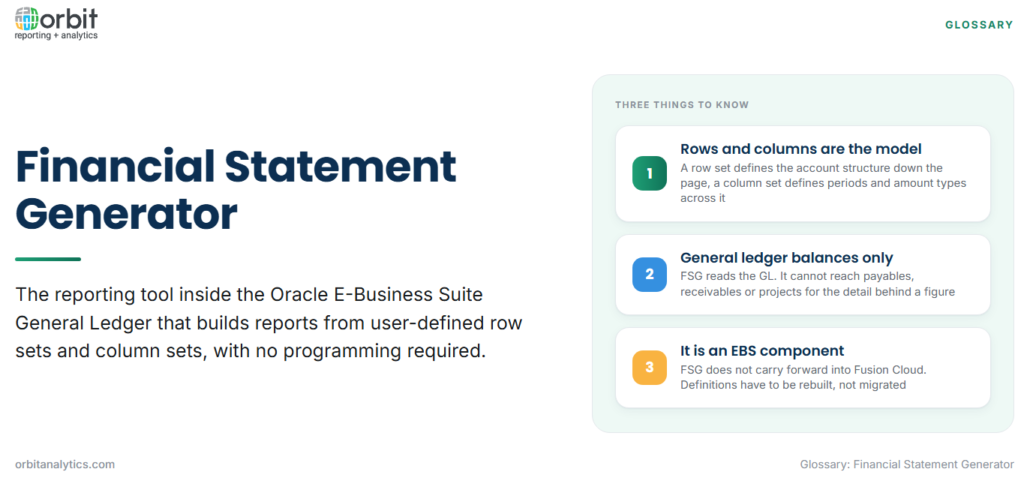
The financial statement generator, almost always shortened to FSG, is a reporting tool built into the General Ledger module of Oracle E-Business Suite. It lets a finance user define a report by describing its structure rather than by writing code: which accounts form each row, which periods or amount types form each column, and how the two intersect. FSG then reads general ledger balances and renders the result.
It is worth being precise about the name, because “financial statement generator” is sometimes used loosely to mean any tool that produces statements. Within an Oracle context it refers to this specific component, and the concepts below (row sets, column sets, content sets) are FSG’s own vocabulary.
The building blocks of an FSG report
Five objects combine into a report definition, and almost every FSG question comes down to which one is being described.
- Row sets: define what appears down the left of the report. Each row points at an account range or a calculation, and rows can be totalled and indented to form a statement structure.
- Column sets: define what appears across the top, usually periods, amount types such as actual or budget, and variance calculations between them.
- Content sets: produce many versions of the same report in one run, typically one per cost centre or company, by overriding segment values.
- Row orders: control the sequence in which detail rows are ranked or sorted within the report.
- Display sets: suppress or reveal specific rows and columns without altering the underlying definition.
How an FSG report is assembled
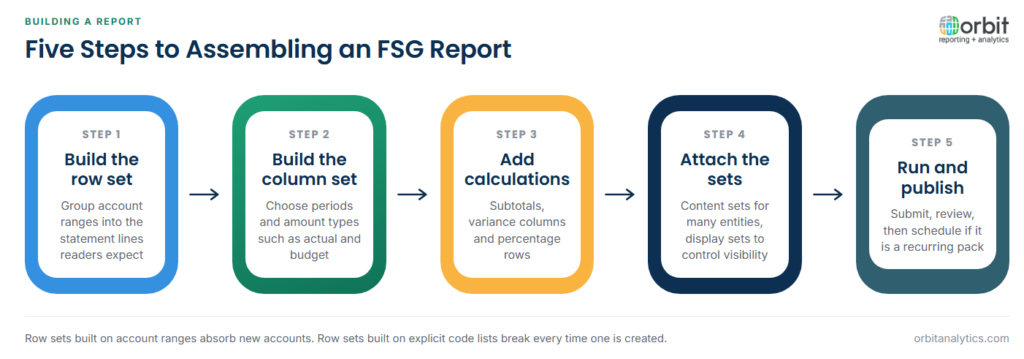
- Define the row set from account ranges. Group natural accounts into the statement lines a reader expects, such as Revenue, Cost of Sales and Operating Expenses.
- Define the column set and periods. Choose the amount types and time buckets, for example current period actual, year to date actual and full year budget.
- Apply calculations and totals. Add subtotals, variance columns and percentage calculations at the row or column level.
- Attach content and display sets. Decide whether one run should produce many entity versions, and which lines are visible.
- Run, review and publish. Submit the report, review the output, and schedule it if it forms part of a recurring pack.
What FSG is typically used for
FSG is at its strongest producing recurring, structured general ledger reports where the format must stay identical from period to period. Statutory balance sheets and income statements are the classic case, because the presentation is fixed and the requirement is reliability rather than flexibility.
Management reporting packs are the second common use, particularly where the same report must be produced for many cost centres or legal entities, which is exactly what content sets exist for. Budget versus actual variance reporting is the third, since column sets handle actual, budget and variance columns natively. Multi-company and consolidated views are also built in FSG in many organizations, though this is where its constraints start to show.
The known limits of FSG
These limits are the reason most people search for this term, so they are worth stating plainly.
- General ledger balances only. FSG reads the GL. It cannot reach into payables, receivables or projects for the transaction detail behind a balance.
- Text-oriented output. Output formats are dated compared with modern reporting tools, and formatting control is limited.
- Specialist maintenance. Row and column sets are maintained by people who know the chart of accounts intimately, and that knowledge tends to sit with one or two individuals.
- Limited drill-down. Moving from a reported figure to the underlying subledger detail generally means leaving the report and running a separate enquiry.
- Performance on large structures. Complex row sets over a large chart of accounts with many content set iterations can take a long time to run.
FSG and the move to Oracle Fusion Cloud
FSG is an E-Business Suite component and does not carry forward into Oracle Fusion Cloud. Fusion uses a different reporting stack, with Financial Reporting Studio and Smart View for statement production and OTBI for operational analysis, so existing row and column sets cannot simply be migrated across. They have to be reproduced in the new tooling, and the account structure they depend on may itself have changed during the move.
This matters most for organizations running both systems at once, which is common during a phased transition. Orbit Analytics provides Oracle EBS reporting that reads both EBS and Fusion Cloud, so a group statement can be produced across entities on either platform without waiting for every entity to land on the same system.
Practices that keep FSG reports maintainable
Range definitions are where most long-term pain originates. A row set built on explicit lists of account codes breaks every time a new account is created, whereas one built on well-chosen ranges absorbs the change. Naming conventions matter more than they appear to: a library of row sets called RS1 through RS40 is unusable by anyone except its author.
Calculations should be documented outside the tool. FSG holds the formula but not the reason for it, and the reason is what a successor needs. Finally, FSG output should be reconciled to the trial balance every period. A statement that no longer ties to the ledger has usually lost an account range that was quietly added months earlier. Teams that layer a reporting tool over the general ledger, such as Orbit Analytics with its general ledger reporting, get that reconciliation continuously rather than as a period-end exercise.
How FSG compares with other Oracle reporting options
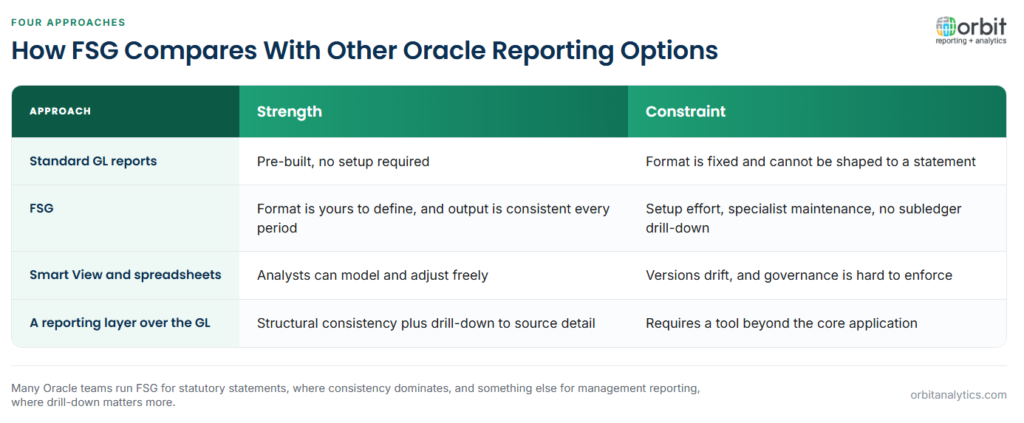
Standard general ledger reports are pre-built and require no setup, but their format is fixed. FSG’s advantage is precisely that the format is yours to define, at the cost of the setup effort and the maintenance burden that follows.
Smart View and spreadsheet-based reporting move the work into Excel, which suits analysts who want to model and adjust freely. The trade-off is governance: a spreadsheet pack drifts, and different versions circulate. FSG output is centrally defined and therefore consistent, but it is not interactive.
Modern reporting layers that sit over the general ledger aim to keep FSG’s structural discipline while removing its two biggest constraints, adding subledger drill-down and readable output formats. In practice many Oracle organizations run FSG for statutory statements, where consistency dominates, and something else for management reporting, where drill-down and speed matter more.
Frequently Asked Questions
Q1. What is a Financial Statement Generator in Oracle?
FSG is a reporting tool inside the Oracle E-Business Suite General Ledger. It builds reports from user-defined row sets and column sets that read general ledger balances, without requiring any programming.
Q2. What are row sets and column sets in FSG?
A row set defines what appears down the report, usually account ranges grouped into statement lines with totals. A column set defines what appears across it, usually periods, amount types such as actual or budget, and variance calculations.
Q3. What is a content set in FSG?
A content set produces multiple versions of one report in a single run by overriding a segment, most often producing one report per cost centre, company or legal entity.
Q4. Is FSG available in Oracle Fusion Cloud?
No. FSG is an E-Business Suite component. Fusion Cloud uses a different reporting stack, so FSG definitions have to be rebuilt rather than migrated.
Q5. Can FSG drill down to subledger detail?
Not directly. FSG reports general ledger balances, so moving from a figure to the payables or receivables transactions behind it normally means running a separate enquiry.
Q6. How do you reconcile an FSG report to the trial balance?
Sum the account ranges used in the row set and compare the result against the same accounts on the trial balance for the period. A difference usually means an account has been created outside every defined range.
Running FSG for statutory reporting while needing drill-down for management questions leaves most Oracle teams maintaining two systems. Orbit Analytics reads live EBS and Fusion Cloud balances in one reporting layer with detail behind every figure. Request a demo to see it against your chart of accounts.
