
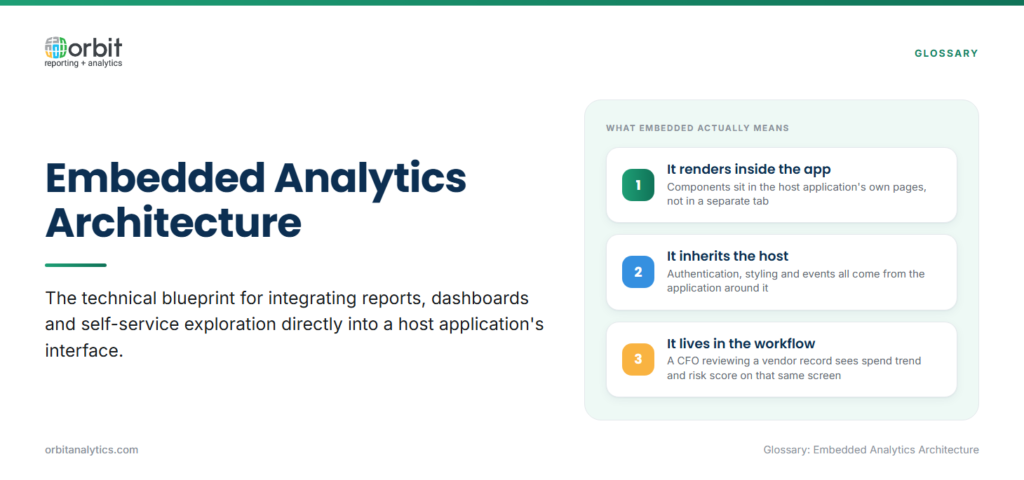
Embedded analytics architecture is the technical blueprint for integrating reports, dashboards, and self-service exploration directly into a host application’s interface. Analytics components render inside the app’s own pages, inherit its authentication and styling, and respond to its events.
Standalone analytics lives in a separate URL and session. Embedded analytics lives inside the workflow: a CFO reviewing a vendor record in an AP app sees the spend trend, payment-term variance, and risk score on the same screen.
Architecture matters because embedded analytics carries constraints standalone BI does not. Multi-tenant SaaS apps need row-level isolation between customers. Customer-facing dashboards need to load in under two seconds. The wrong decisions early are expensive to undo later.
Why embedded analytics architecture matters
A well-designed embedded analytics architecture gives the host application four payoffs at once:
- Smoother user experience: Reports open in the same page with the same login and theme, so adoption rises and users avoid context-switching.
- Differentiated product features: Data-driven views (vendor risk, payment-term variance, fulfillment scores) live inside the workflow rather than in a separate tool.
- Faster decisions: End users act on insights in the same screen where the transaction happens, compressing the cycle from question to action.
- New revenue line: For commercial SaaS, premium analytics, predictive scores, custom reports, and write-back commonly ship as a paid tier on top of the base subscription.
The user-experience win is immediate, the monetization win compounds. Premium analytics frequently sits behind a paid tier, and the same architecture powers both base and premium, so the marginal cost of monetization is mostly packaging.
What are the key components of embedded analytics architecture?
A complete architecture has five components working together:
- Data layer and integration: pipelines that bring source data (ERP, CRM, transactional databases) into a query-ready store.
- Analytics engine: the query, aggregation, and semantic-modeling layer that turns rows into measures and dimensions.
- Visualization and UI components: charts, tables, filters, and drill controls rendered inside the host application.
- Security and multi-tenancy: authentication delegation, row-level security, tenant isolation, and audit logging.
- API and SDK layer: the programmable surface the host app uses to embed components, pass context, and respond to user actions.
The components are not interchangeable. Decisions in the data layer constrain what the engine can do, which constrains what the UI can render quickly. Architecture starts at the data layer.
What are common embedded analytics architecture patterns?
Four patterns dominate, and most deployments combine two or three:
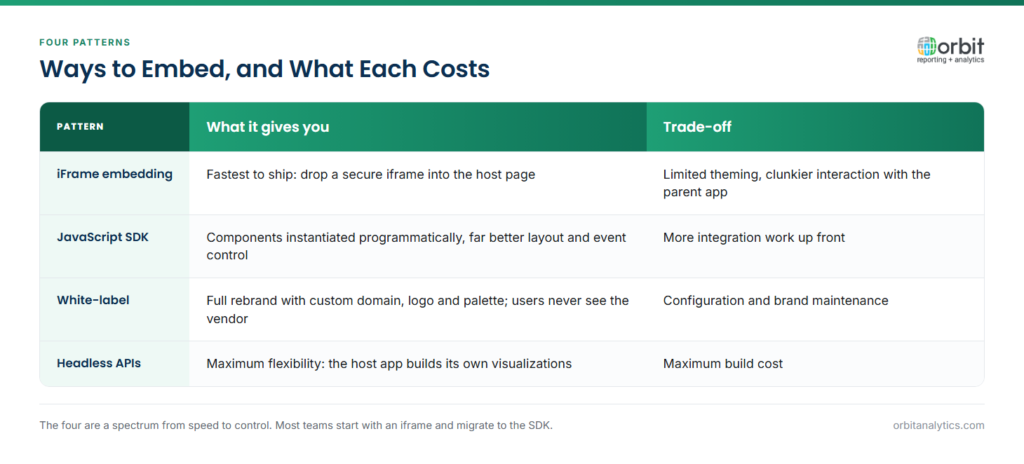
- iFrame embedding: fastest to ship: drop a secure iframe into the host page. Trade-off is limited theming and clunkier interaction with the parent app.
- JavaScript SDK integration: the host app loads an analytics SDK and instantiates components programmatically. More integration work, far better control over layout and event handling.
- White-label solutions: the platform is fully rebranded with custom domain, logo, and palette so end users never see the vendor.
- Headless analytics APIs: the engine ships only as APIs; the host app builds its own visualizations on top. Maximum flexibility, maximum build cost.
The practical question is which pattern fits the host app’s existing front-end stack. Orbit Analytics supports all four through its embedded reporting solutions, so teams can start with an iframe proof-of-concept and graduate to SDK or white-label deployment without changing the underlying data model.
What are the benefits of embedded analytics?
The headline benefit is engagement. Industry studies routinely report 40%+ increases in user interaction with data when analytics moves into the host application. People use what is in front of them.
The benefits split into three categories:
- Higher engagement: 40%+ lift in data interaction is typical, because users see the chart inside the workflow they already use.
- Reduced context switching: A purchasing manager who sees vendor risk and spend trend on the vendor record makes the call in the existing screen, so decision velocity compounds across thousands of micro-moments.
- New revenue stream: For SaaS vendors, premium dashboards and advanced analytics sit behind paid tiers, with one architecture powering both base and premium.
What challenges exist with embedded analytics architecture?
Three challenges show up repeatedly across embedded deployments:
- Performance under load: Customer-facing dashboards have to load in under two seconds; internal Oracle ERP extensions have less strict but still real budgets. The fix is upstream: pre-aggregated marts, indexed columns, materialized views, and clean separation between transactional and analytical workloads. A purpose-built data pipeline does the heavy work once so dashboards stay responsive.
- Multi-tenant security: A B2B SaaS embedding analytics for hundreds of tenants needs guaranteed row-level isolation, so tenant A never sees tenant B’s data even if a query is misconstructed. Enforce isolation at the data layer with row-level security tied to the host app’s auth token, not at the UI.
- Customization versus maintenance: Every customer-specific dashboard tweak is a future support cost. The cleaner architecture exposes parametrized, themeable components and resists one-off forks.
What are embedded analytics architecture best practices?
Four habits separate sustainable embedded deployments from ones that get rebuilt at scale:
- Design for multi-tenancy from day one: Retrofitting tenant isolation onto a single-tenant architecture is painful. Pick the tenant model (pool, silo, or hybrid) before writing the first dashboard.
- Optimize for performance at scale: Build pre-aggregated tables for the queries dashboards will actually run, cache aggressively, push filters to indexed columns, and profile under realistic concurrency.
- Implement strong security: SSO delegation from the host app, row-level security tied to the user’s tenant and role, signed embed tokens, and audit logs on every report view.
- Plan for white-labeling: Even if the first deployment uses a default theme, the second customer will want their colors and logo. Theming variables and configurable navigation pay for themselves quickly.
How do you build embedded analytics architecture?
A realistic rollout follows four steps:
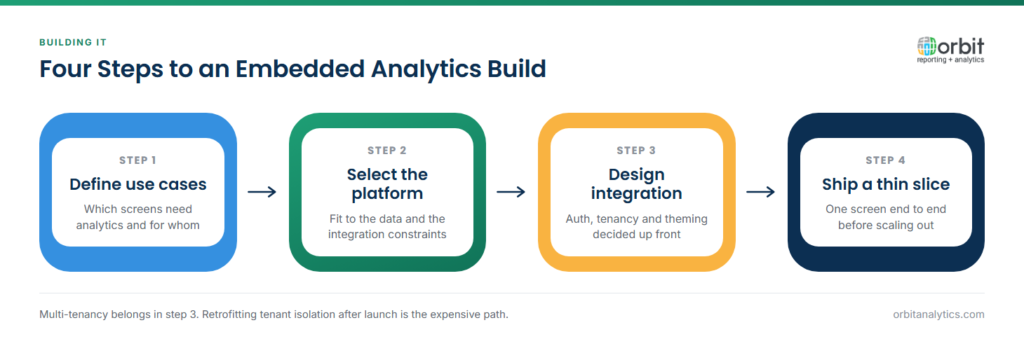
- Define use cases and requirements. Who is the embedded user? What decisions are they making? What latency, customization, and security guarantees does the host application need? Vague requirements produce architectures that are expensive to change.
- Select the platform that fits the data and integration constraints. For Oracle ERP shops, the deciding factor is how well the platform speaks Fusion Cloud, EBS, NetSuite, and PeopleSoft schemas. Orbit Analytics ships 200+ pre-built connectors and 1,000+ pre-built reports tuned for Oracle, with embedding APIs that drop into existing front-end stacks.
- Design the integration architecture. Choose the embedding pattern, the authentication flow, the theming model, and the refresh strategy. Each decision constrains the next.
- Implement a thin slice end-to-end. Validate the performance budget under realistic load, then iterate on filters, drill paths, and customization before scaling across the rest of the app.
Frequently Asked Questions
Q1. What is embedded analytics architecture in simple terms?
It is the technical design behind dashboards and reports that live inside another application. Instead of opening a separate BI tool, users see charts and tables in the app they are already using. The architecture covers data pipelines, the analytics engine, security, and UI components.
Q2. How does embedded analytics differ from standalone BI?
Standalone BI runs as its own product, separate URL, separate login, separate UX. Embedded analytics runs inside another application, inheriting its authentication, theme, and workflow. The user-experience difference is that embedded analytics never asks the user to context-switch.
Q3. What is multi-tenant analytics architecture?
Multi-tenant architecture supports many customers from a single deployment while guaranteeing strict data isolation between them. Row-level security policies tied to the authenticated tenant ID ensure that one customer’s query can never return another customer’s rows.
Q4. Can embedded analytics connect to Oracle ERP?
Yes. The common pattern uses pre-built connectors to Oracle Fusion Cloud, EBS, NetSuite, or PeopleSoft, with a data pipeline that lands curated tables in a query-ready store. Embedded components then query that store, so dashboards stay responsive on transactional ERP volumes.
Q5. How do you secure embedded analytics?
Delegate authentication from the host application using SSO or signed tokens, enforce row-level security at the data layer (not the UI), scope every API call to the authenticated user and tenant, and log every report view for audit.
Q6. What is headless analytics?
Headless analytics is a pattern where the analytics engine ships only as APIs, query, metadata, exports, and the host application builds its own UI on top. It gives maximum flexibility at the cost of more build work, and is most common when the host app has strict design requirements.
Ready to put embedded analytics architecture to work inside your app or Oracle ERP extension? Request a demo to see how Orbit Analytics delivers the connectors, semantic model, embedding APIs, and multi-tenant security to ship embedded analytics on Oracle data without rebuilding the stack.
