
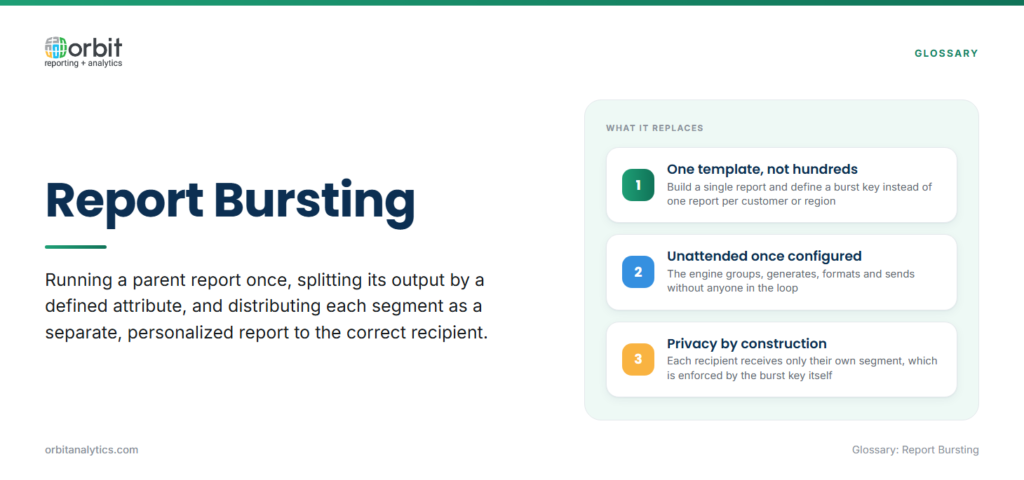
Report bursting is the process of running a parent report once, splitting its output by a defined attribute, and distributing each segment as a separate, personalized report to the correct recipient. Instead of designing one report per customer or per region, a team builds a single template, defines a burst key, and lets the reporting engine produce hundreds of customized outputs in one execution.
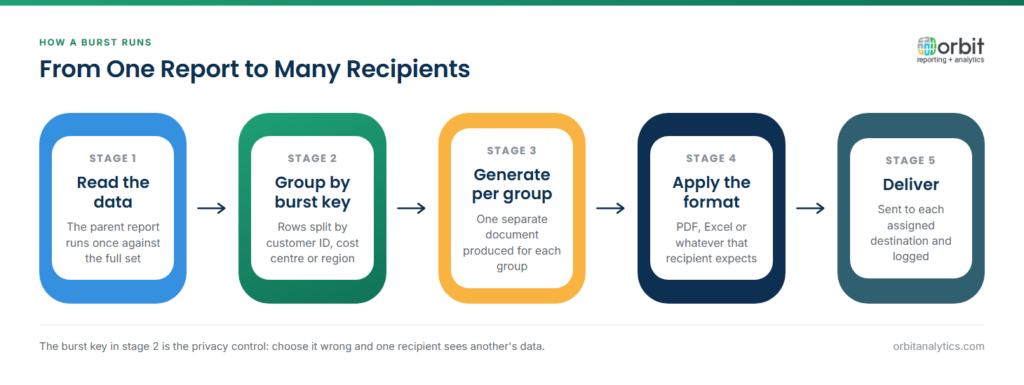
In a typical workflow, the engine reads the dataset, groups rows by the burst key (such as customer ID or cost center), generates a separate document for each group, applies the right output format, and sends each document to its assigned destination. The whole cycle is unattended once configured.
It helps to separate bursting from simple scheduling. Report scheduling runs the same report at a fixed time and sends one output to one inbox or folder. Bursting also runs on a schedule, but it produces many outputs from one execution and routes each to a different recipient. Scheduling handles cadence; bursting handles personalization and routing.
Why is Report Bursting Important?
Most enterprise reporting workloads are not single-recipient. A monthly statement run touches every active customer. A weekly sales pack goes to every regional manager. Doing this manually, or by cloning report definitions, is slow and error-prone.
Bursting collapses the work to one template and one schedule. That has four practical effects:
- Removes manual splitting from analyst calendars, often hours per cycle.
- Enforces data privacy because each recipient only ever receives their own segment.
- Guarantees on-time delivery during close cycles and statement runs when timing is contractual.
- Produces an audit trail of who got what.
What Are the Key Components of Report Bursting?
Five components decide whether a bursting setup is reliable at scale: the burst key, recipient mapping, delivery channels, output formats, and the bursting engine itself.
- Burst key. The column or expression that defines how rows are grouped, customer ID, region code, cost center, supplier number, or manager ID. The burst key is the single most important design choice because it determines the granularity of personalization.
- Recipient mapping. A lookup that connects each burst key value to one or more delivery addresses. Most enterprises source this from the ERP customer master, HR records, or a vendor directory rather than maintaining a separate list.
- Delivery channels. Email, secure FTP/SFTP, a customer portal, a network share, or a webhook to a downstream system. Mature setups support multiple channels in one run.
- Output formats. PDF for statements and compliance documents, Excel for analyst recipients who need to manipulate the data, CSV for system-to-system feeds, and HTML for in-browser viewing.
- Bursting engine. The platform that orchestrates everything, running the report, splitting by burst key, applying templates, choosing formats, and dispatching deliveries.
Orbit Analytics provides automated report bursting capabilities that handle all five components in one platform. Teams define the burst key against live Oracle Fusion or EBS data, map recipients from the ERP customer or HR master, and route outputs across email, SFTP, and portal channels, with delivery confirmation tracked per recipient.
What Are Common Report Bursting Use Cases?
A few patterns recur across Oracle ERP shops:
| Use case | Burst key | Typical channel |
| Customer invoices and statements | Customer ID | Email (PDF) |
| Regional sales reports | Territory or region code | Email or portal, with self-service reporting drill-down |
| Manager performance reports | Cost center or reporting hierarchy | Email (PDF or Excel) |
| Vendor and supplier communications | Supplier ID | SFTP or email |
The common thread is that the data lives in one system, the structure is identical across recipients, and the only thing that changes is the slice.
What Are the Benefits of Report Bursting?
Four benefits show up consistently:
- Speed: A single bursting job replaces hours of manual splitting and emailing, often a 90%+ reduction in distribution time for high-volume runs.
- Privacy: Each recipient only ever sees their own data, which closes a common data-privacy gap in spreadsheet-based distribution.
- Scale: The same template that serves 100 recipients serves 10,000 without redesign.
- Auditability: Every dispatch is logged, giving audit teams a verifiable record of what was sent, when, and to whom.
What Challenges Come with Report Bursting?
The hard parts of bursting are operational, not conceptual. Recipient lists drift as customers, employees, and vendors change, so the mapping has to refresh from the ERP, not from a static spreadsheet. Email bounces, SFTP timeouts, and portal failures need to be detected and retried automatically. Different recipients sometimes need different output formats. And formatting has to hold up across all recipients without manual cleanup per output.
Mature implementations handle these with live ERP-driven recipient lookup, automatic retry logic with exponential backoff, per-recipient format rules driven from the recipient master, and pre-flight tests against a sample subset before each production run.
What Are Report Bursting Best Practices?
Four habits separate reliable bursting setups from fragile ones:
- Refresh recipient lists from the ERP customer or HR master on every run instead of maintaining a static distribution list.
- Turn on per-delivery confirmation so the audit trail records actual receipt, not just dispatch.
- Run the report against a sample of five to ten burst keys before pointing it at the full population, especially after template changes.
- Build retry-and-alert logic into every delivery channel so a single SMTP outage doesn’t lose a batch.
How Do You Implement Report Bursting?
A workable rollout has four steps:
- Identify which reports are good bursting candidates: high-recipient-count, repeatable, and personalized by a clean key.
- Define the burst key and source the recipient mapping from the system of record.
- Configure the delivery channels and per-recipient format rules.
- Schedule the job, monitor the first few runs closely, and turn on alerts for failures.
For Oracle ERP customers, Orbit Analytics delivers this as an enterprise bursting platform with pre-built connectors to Oracle Fusion Cloud, EBS, PeopleSoft, and NetSuite, so the burst key, recipient lookup, and output template all run against live ERP data with no separate warehouse to maintain. Bursting jobs run alongside the rest of the operational reporting workload on the same platform.
Frequently Asked Questions
Q1. What is report bursting in simple terms?
Report bursting takes a single report run and splits it into many personalized versions, one per recipient, then delivers each one automatically. Instead of building a separate report for every customer or manager, you build one template, define how to split the output, and let the platform handle the rest.
Q2. How does report bursting differ from report scheduling?
Scheduling controls when a report runs and sends one output to one destination. Bursting also runs on a schedule, but it produces multiple personalized outputs from a single execution and routes each to a different recipient. Most enterprise platforms combine both.
Q3. What is a burst key in reporting?
A burst key is the column or expression that defines how a report’s rows get grouped into separate output files. Customer ID, region code, cost center, supplier number, and reporting manager are common burst keys.
Q4. Can report bursting work with Oracle ERP data?
Yes. Modern bursting platforms read directly from Oracle Fusion Cloud, EBS, PeopleSoft, and NetSuite, and source recipient mappings from the same ERP customer or HR master that owns the data. This keeps recipient lists current without separate maintenance.
Q5. Is report bursting secure for sensitive data?
Yes, when configured correctly. Each recipient only sees the rows tied to their burst key, which prevents the data leakage common in spreadsheet-based distribution. Mature platforms add encryption in transit, delivery confirmation, and full audit logs of every dispatch.
Q6. How many recipients can report bursting handle?
Enterprise bursting platforms routinely run jobs with tens of thousands of recipients in a single execution. The practical limit depends on the delivery channel, email throughput and SFTP capacity usually matter more than the bursting engine itself.
Ready to remove manual report distribution from your Oracle ERP close and statement cycles? Request a demo to see how Orbit Analytics handles enterprise-scale bursting across Oracle Fusion, EBS, and NetSuite with full audit trails.
