
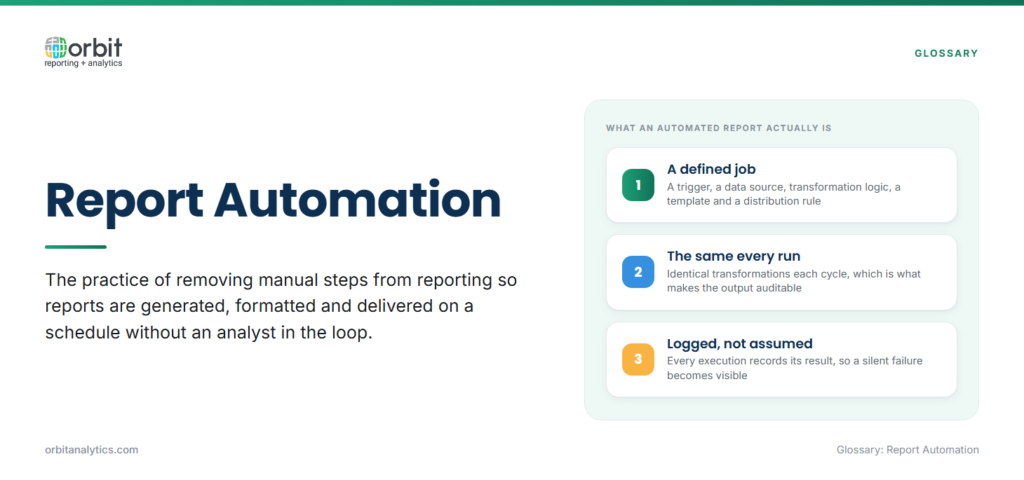
Report automation is the practice of removing manual steps from the reporting process so that reports are generated, formatted, and delivered without an analyst in the loop. Once configured, the system pulls data on a schedule, applies the same transformations every time, renders the report in the right format, and pushes it to the right recipients through the right channel.
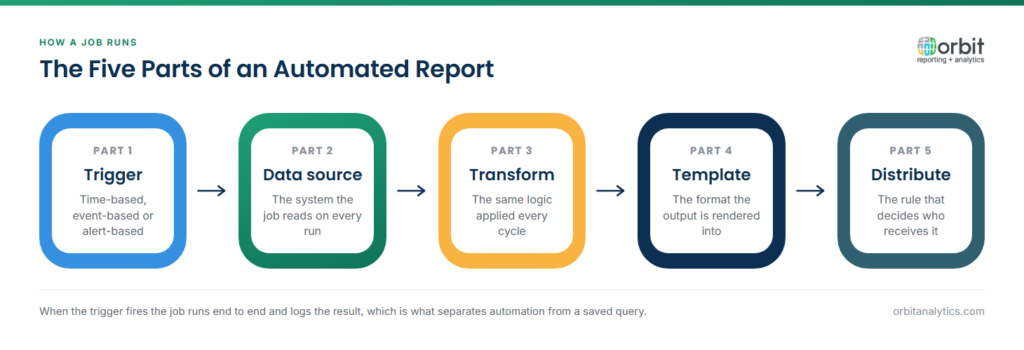
Mechanically, an automated report runs as a defined job. The job has a trigger (time-based, event-based, or alert-based), a data source, a transformation logic, a template, and a distribution rule. When the trigger fires, the job executes end to end and logs the result.
The contrast with manual reporting is stark. A manual workflow depends on a person remembering to do something, doing it the same way each time, and being available on the day it is due. An automated workflow does not.
Why is Report Automation Important?
The benefits compound across cost, quality, and decision speed:
- Time savings: Industry surveys put savings on recurring reports at 35-60%. Multiplied across a finance team running 30 monthly reports, that recovers weeks of analyst capacity each quarter.
- Lower cost: Fewer hours on rote work and lower error-correction overhead translate directly into reduced operating spend.
- Higher accuracy: Automated jobs do not transpose digits, miss a tab, or forget to refresh a pivot, so error rates drop materially.
- Predictable cadence: Reports run on schedule, so leaders get the same numbers at the same time every cycle and operating reviews stay predictable.
- Faster decisions: When a daily ops report shows up at 7 a.m. instead of mid-afternoon, the decisions it informs happen seven hours earlier.
Key Components of Report Automation
Five technical pieces have to be in place for automation to hold up at enterprise scale:
- Data integration and ETL: Reports cannot be automated if the underlying data extraction is not. That means pre-built connectors to source systems (Oracle Fusion Cloud, EBS, NetSuite, downstream warehouses), incremental refresh logic, and a place to land curated tables. Orbit Analytics provides report scheduling and automation on top of 200+ pre-built Oracle ERP connectors, so the extraction layer is solved out of the box.
- Report scheduling: A scheduler decides when each job runs, daily at 6 a.m., every Monday, the third business day of the month, or whenever a specific event fires.
- Distribution and delivery: Output has to land where the consumer expects it, including email, FTP folders, cloud drives, Slack, or embedded reporting inside the recipient’s existing application. Multi-channel distribution is what separates real automation from a scheduled-PDF feature.
- Alert-based reporting: Modern automation triggers reports on thresholds, when inventory drops below a level, when DSO crosses 45 days, when exception counts spike. That converts reporting from a calendar exercise into an early-warning system.
- Document bursting: A single report definition produces hundreds of personalized PDFs, one per branch, region, or supplier, each with only that recipient’s data. Bursting makes large-scale personalized reporting feasible.
Benefits of Report Automation
The compounding effect is the real story:
- Higher-value analyst work: Time freed from recurring work flows into investigative analysis, forecasting, and business partnering.
- Consistency: The same logic runs every time, so numbers reconcile across reports without manual rework.
- Auditability: Every run is logged, every transformation is versioned, and there is a clear answer to “where did this number come from?”
Common Report Automation Use Cases
Several patterns show up across nearly every enterprise:
- Financial close reporting: Trial balances, variance analyses, and consolidated P&Ls on a monthly cadence, often paired with Fusion financial reporting for Oracle Cloud customers.
- Operational dashboards: Daily production, inventory, and order-fulfillment reports refreshed before the morning standup.
- Sales and pipeline reports: Weekly forecast rollups, win/loss summaries, and rep activity scorecards.
- Compliance and audit reports: SOX control evidence, regulatory filings, and internal audit packs with full lineage.
Each is a strong candidate because the format is stable, the cadence is regular, and the cost of human error is high.
Challenges with Report Automation
Three failure modes account for most stalled programmes:
- Treating automation as configuration, not engineering: Setup is more complex than the demo videos suggest. Data has to be cleaned, definitions reconciled, templates standardized, and edge cases handled.
- Ignoring data quality: Automation amplifies whatever it is fed. A bad mapping that an analyst would have caught by eye will run silently for months.
- Over-automation: Automating reports that nobody reads just locks in waste.
The way through is to validate data quality first, automate the highest-volume recurring reports before the long tail, and build in exception handling and monitoring from day one.
Report Automation Best Practices
A handful of practices separate programmes that stick from those that drift:
- Start with high-volume, stable reports: Pick the reports that consume the most analyst hours and have stable definitions. Skip the ones that change layout every cycle.
- Validate data quality before going live: Wrong numbers delivered automatically are worse than no automation at all.
- Run in parallel for one cycle: Compare the automated output to the manual process for at least one cycle, then cut over.
- Monitor every run: Log success and row counts, and alert when a job fails.
- Iterate on usage: Retire reports nobody opens and reallocate the capacity to higher-value outputs.
How to Get Started with Report Automation
Follow this sequence to move from a manual baseline to a working automation programme:
- Inventory recurring reports. List every recurring report your team produces, how often, who builds it, and how long it takes. The 80/20 will jump out, usually a dozen reports consume the bulk of analyst time.
- Choose a platform that covers the full lifecycle. You need extraction, transformation, scheduling, rendering, and distribution in one place. Orbit Analytics covers all five for Oracle ERP environments, including document bursting and alert-based triggers, replacing the patchwork of scripts and email rules most teams currently rely on.
- Define schedules and recipients. Map each report to a trigger, a distribution channel, and a recipient list, then configure the job.
- Run in parallel for one cycle. Validate the automated output against the manual process before retiring the legacy workflow.
- Cut over and measure ROI. Track analyst hours reclaimed per report per cycle and report savings back to the business.
Frequently Asked Questions
Q1. What is report automation in simple terms?
Report automation replaces the manual steps in producing a report, pulling data, formatting, sending, with a configured job that runs on its own. Once set up, the report is generated and delivered without an analyst doing the work each time.
Q2. How does report automation work?
A scheduler triggers a job that pulls data from defined sources, applies the same transformations every run, renders the output in the configured format, and pushes it to recipients through email, FTP, cloud storage, or an embedded portal.
Q3. How much time can report automation save?
Most enterprises see 35-60% time savings on recurring reports once automation is in place. The savings scale with report volume and the stability of report definitions.
Q4. Can I automate reports from Oracle ERP systems?
Yes. Oracle Fusion Cloud, EBS, NetSuite, and PeopleSoft all expose data through their respective interfaces, and platforms with pre-built Oracle connectors can automate extraction, transformation, scheduling, and distribution without custom integration work.
Q5. What is report bursting?
Report bursting is a technique where one report definition is split into many personalized outputs, one per region, branch, supplier, or customer, each containing only that recipient’s slice of data. It is essential for large-scale personalized reporting.
Q6. How do I measure report automation ROI?
Track analyst hours reclaimed per report per cycle, multiply by fully loaded hourly cost, and add the value of faster decisions and reduced error correction. Most programs pay back within one or two reporting cycles for high-volume reports.
Automating the reporting process is one of the highest-ROI investments a finance or operations team can make. Orbit Analytics combines Oracle ERP connectors, a scheduler, multi-channel distribution, and document bursting in a single platform built for enterprise reporting. Request a demo to see how report automation can run end-to-end on your data.
