
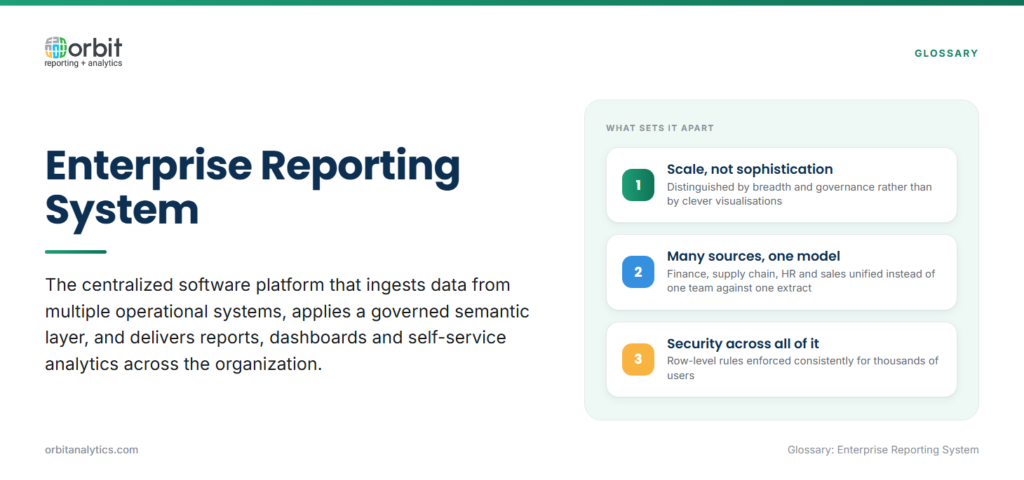
An enterprise reporting system is the centralized software platform that ingests data from multiple operational systems, applies a governed semantic layer, and delivers reports, dashboards, and self-service analytics to users across the organization. It is distinguished by scale, governance, and breadth rather than by the sophistication of any one chart.
The difference from a departmental reporting tool is structural. A departmental tool serves one team and one data source: Excel against an export, a Tableau workbook against a finance extract. An enterprise system unifies finance, supply chain, HR, and sales data, enforces row-level security across all of them, and supports thousands of users without falling over.
Within the broader BI stack, the enterprise reporting system is the layer responsible for trusted, repeatable reporting. Advanced analytics, data science, and ad hoc exploration sit on top of it but rely on its semantic definitions and governed data.
Why Organizations Need Enterprise Reporting Systems
Four pressures push organizations from departmental tools to a centralized platform:
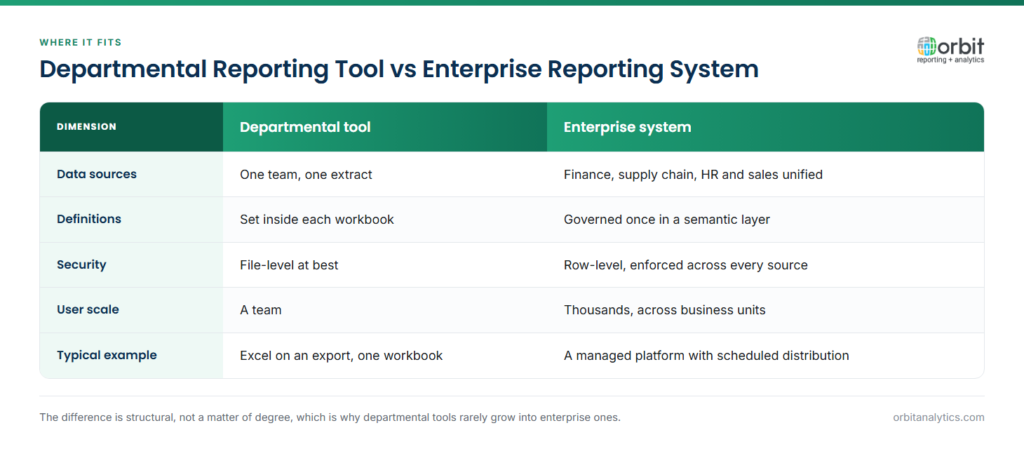
- Data silos. When each function picks its own tool, the numbers stop agreeing. The CFO’s revenue and the COO’s revenue diverge by 2% and an hour goes into reconciling them. A centralized system enforces one definition.
- Single source of truth. Once the semantic layer is in place, every report inherits the same calculation for gross margin, headcount, or DSO. Reports become arguments about decisions, not arguments about data.
- Compliance and audit. SOX, IFRS, and industry-specific regulators expect documented lineage from source transaction to published number. Enterprise reporting systems provide that lineage natively; departmental tools rarely can.
- Executive decision-making. A board cannot make capital-allocation calls on numbers it does not trust. Trusted enterprise reporting is the precondition for confident leadership decisions.
Key Features of an Enterprise Reporting System
A platform earns the “enterprise” label when it delivers five capabilities together:
- Multi-source data integration. Native connectors to Oracle Fusion Cloud, EBS, PeopleSoft, NetSuite, Salesforce, Workday, and cloud warehouses such as Snowflake or BigQuery.
- Centralized report management. A single catalogue of certified reports, with version control, ownership, and retirement workflows.
- Role-based access and security. Row-level and column-level security that mirrors ERP entitlements so a regional controller sees only their region.
- Scheduled distribution. Reports delivered by email, portal, or secure share on a predictable cadence, with bursting by recipient.
- Self-service report creation. Business users build their own reports against certified datasets without writing SQL.
Orbit Analytics ships with 200+ pre-built connectors for Oracle and surrounding enterprise systems, plus 1,000+ pre-built reports tuned for Fusion Cloud and EBS modules. That cuts the integration project that normally consumes the first six months of an enterprise reporting rollout down to weeks.
Types of Enterprise Reports
Enterprise systems serve five broad report categories:
- Operational reporting drives front-line work: open AR, cycle counts, production yield, ticket queues.
- Financial reports close the books: P&L, balance sheet, cash flow, consolidation schedules.
- Executive dashboards are real-time scorecards with 8 to 15 KPIs and drill paths.
- Compliance reports are the auditable outputs required by SOX, IFRS, GDPR, and industry regulators.
- Ad hoc and custom reports cover the questions no template anticipates.
A capable system handles all five from the same platform without duplicating the data layer.
Benefits of an Enterprise Reporting System
The platform pays back in four ways:
- Consistent definitions. The reconciliation tax that drains finance and ops time every period disappears once metrics are defined once and reused everywhere.
- Faster report development. Connectors, semantic layer, and templates are already in place, so building a new report is a configuration task, not a project.
- Stronger data governance. Access controls, lineage, and audit logs live in one place rather than scattered across departmental tools.
- Cross-unit scale. The system extends across business units without requiring a separate stack for each acquisition or new geography.
Challenges in Enterprise Reporting Implementation
The challenges are real but manageable:
- Data quality. Issues surface as soon as sources are unified, so the project has to budget time for cleansing before broad rollout.
- User adoption. Adoption depends on training and visible quick wins, not on tool selection alone.
- Standardization versus flexibility. The answer is a governed core of certified reports surrounded by a self-service layer rather than picking one extreme.
- Report sprawl. Sprawl creeps in over time, which makes a retirement workflow as important as the build workflow.
Enterprise Reporting System Architecture
A modern enterprise reporting system has four layers stacked cleanly:
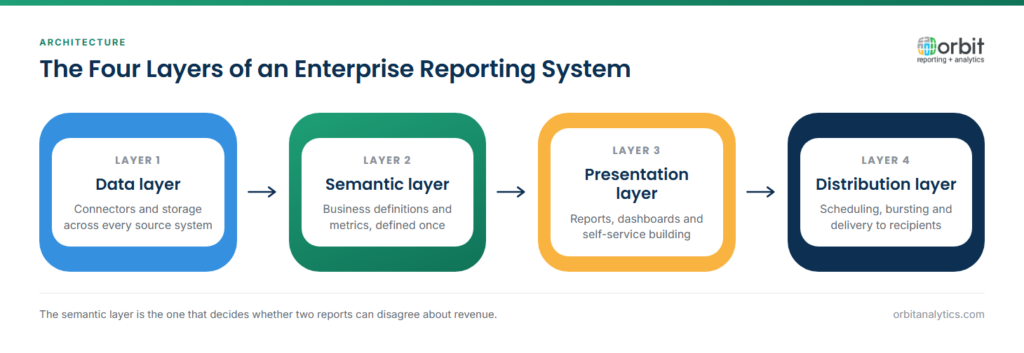
- Data layer. Sources and integration: ERP, HCM, CRM, data warehouse. The platform should support both bulk loads and change-data-capture for near-real-time freshness.
- Semantic layer. Business definitions: metrics, hierarchies, calculations. This is where revenue is defined once and used everywhere.
- Presentation layer. Reports, dashboards, and analyses delivered through web, mobile, and Excel.
- Distribution layer. Scheduling, bursting, alerting, and secure sharing.
Skipping any layer creates technical debt. Many failed BI projects fail in the semantic layer, not the visualization layer.
How to Evaluate an Enterprise Reporting System
Four criteria separate strong platforms from weak ones for an Oracle ERP shop:
- Data source compatibility. The system should connect natively to your ERP modules, not through a brittle export-and-load chain. Ask for a live demo against your own Fusion or EBS instance.
- Self-service capability. Evaluate whether business users, not just analysts, can build a report. A platform that requires SQL or a developer for every change is not enterprise-ready in 2026.
- Total cost of ownership. Sticker price is one component; the project cost of building connectors, semantic models, and reports usually dwarfs licence fees. Pre-built content materially reduces TCO.
- Vendor focus and roadmap. A specialist enterprise business intelligence platform built for Oracle ERP delivers depth that a generic horizontal BI tool cannot match. Orbit Analytics is purpose-built for Oracle environments, ISO 27001 certified, and used by 150,000+ users across Fusion Cloud, EBS, NetSuite, and PeopleSoft deployments. For Oracle shops, that focus translates directly into faster deployment and fewer custom builds.
Cross-check against analyst evaluations and customer references, especially from organizations of similar size and complexity to yours.
Frequently Asked Questions
Q1. What is the difference between an enterprise reporting system and a BI tool?
An enterprise reporting system is the broader platform that handles data integration, governance, scheduled distribution, and self-service reporting at organizational scale. A BI tool is typically the visualization and analysis layer that sits on top. Most modern enterprise reporting systems include BI capabilities, but not every BI tool meets the enterprise requirements around governance and scale.
Q2. What features should an enterprise reporting system have?
At minimum: multi-source data integration, a governed semantic layer, role-based security, scheduled distribution, and self-service report creation. Enterprise-grade platforms also offer audit logging, lineage, version control, and high availability. For Oracle ERP shops, pre-built connectors and reports for Fusion and EBS are decisive.
Q3. What data sources can enterprise reporting systems connect to?
The strongest platforms support Oracle Fusion Cloud, EBS, PeopleSoft, NetSuite, SAP, Salesforce, Workday, ServiceNow, and cloud warehouses such as Snowflake, Databricks, BigQuery, and Redshift. Pre-built connectors matter because each custom integration is a project that delays time to value.
Q4. How long does it take to implement an enterprise reporting system?
A traditional implementation built from scratch can take 9 to 18 months. Platforms that ship with pre-built connectors and a curated semantic layer for the target ERP typically deliver a first production wave in 8 to 12 weeks, with broader rollouts over the following two quarters.
Q5. Can enterprise reporting systems handle real-time data?
Yes. Modern platforms combine bulk loads for history with change-data-capture or direct query for near-real-time refresh. For most finance use cases, hourly or sub-hourly is sufficient; for operational dashboards in supply chain or contact-center work, sub-minute latency is achievable on properly sized infrastructure.
Q6. Can enterprise reporting systems support self-service?
Yes, and they should. The current generation pairs governed, certified reports with a self-service layer where business users build their own analyses against trusted datasets. The combination is what closes the gap between IT-built reports and business-built spreadsheets.
Ready to consolidate reporting across your Oracle ERP estate on a single trusted platform? Request a demo to see how Orbit Analytics delivers enterprise reporting for Fusion Cloud, EBS, and NetSuite environments.
