
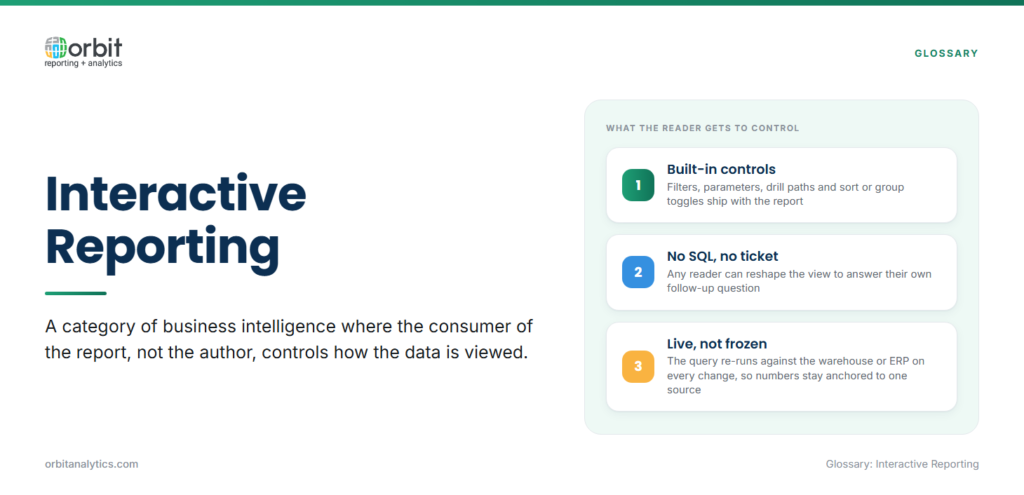
Interactive reporting is a category of business intelligence where the consumer of the report, not the author, controls how the data is viewed. The report ships with built-in controls (filters, parameters, drill paths, sort and group toggles) that let any reader reshape the view to answer their own questions, without writing SQL and without commissioning a new report.
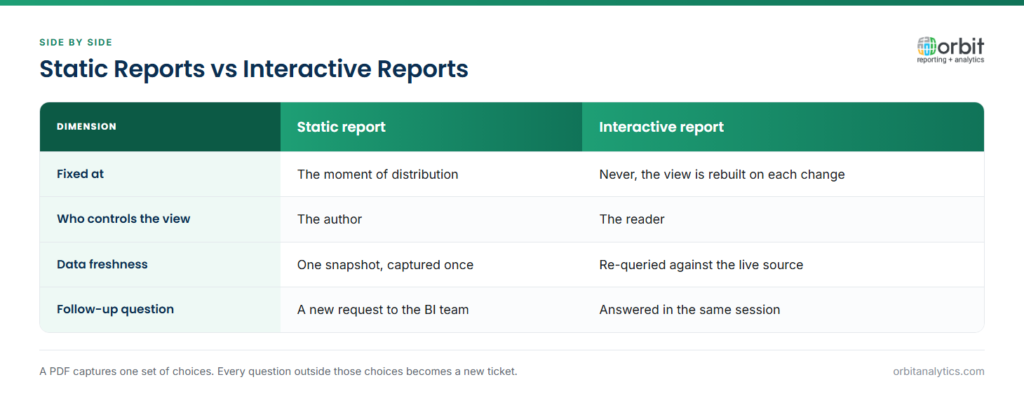
Static reports are fixed at the moment of distribution: a PDF or a printed page captures one set of choices. Interactive reports are live: the underlying query refreshes against your data warehouse or ERP each time the user changes a filter, so the numbers stay anchored to a single source of truth.
The shift to interactive reporting has been driven by three things, cheaper compute, browser-native BI tools, and a finance and operations workforce that expects Excel-like behavior on every screen. What used to require a developer is now a column-header click.
Why organizations need interactive reporting
Most BI teams sit on a multi-week backlog of report requests. The majority are minor: a different date range, an added cost center, a swap from supplier code to supplier name. Interactive reporting solves the problem at the source, because one well-designed report covers dozens of variations when the user controls those variations.
The payoff splits cleanly by audience:
- For business users: Faster answers and the freedom to follow a trail of thought. A sales VP looking at pipeline by region can drill into the rep, then the deal, then the activity history without leaving the report.
- For the BI team: A smaller queue and fewer one-off SQL scripts to maintain. Routine variance analysis stops landing in the backlog.
- For decision quality: Patterns static reports hide become visible when users pivot a number against time, geography, product, and customer in one view.
Key features of interactive reports
A report is genuinely interactive when it gives users the following controls:
- Filters and parameters: dropdowns, date ranges, and search boxes that narrow the data without re-running the report manually.
- Drill-down and drill-through: click a summary number to expand it into its components, or jump from a chart to the underlying transactions.
- Sorting and grouping: column-header sorts, multi-level grouping, and ad-hoc subtotals.
- Export and share: push the current view to Excel, PDF, or a scheduled email, preserving the filters the user applied.
In Oracle ERP environments, the most valuable interaction is drill-to-transaction. Orbit Analytics builds this into its Oracle EBS reporting and analytics so a user clicking a GL balance lands directly on the journal lines, AP invoices, or requisitions that produced it, with no separate query.
Benefits of interactive reporting
Interactive reporting changes who can answer a question. When the controls live inside the report, business users get self-service without needing to learn a query language. The BI team stops being the bottleneck for routine variance analysis.
Speed matters most at month-end. A controller closing the books can investigate a $400K accrual swing in minutes by filtering on cost center, drilling into journal source, and grouping by preparer, instead of emailing the AP manager and waiting overnight. Engagement improves measurably when the report responds to clicks: people come back to dashboards they can interrogate.
Common challenges with interactive reporting
The same flexibility that makes interactive reports useful can make them slow or confusing if the design is wrong. Three issues come up most often:
- Performance under filter churn: Reports that query millions of rows on every filter change get slow fast. The fix is to pre-aggregate at the data layer and push filters to indexed columns, not to add more compute. A well-architected data pipeline does this work upstream so dashboards stay responsive.
- User overwhelm: Designers who expose every column and every filter at once leave users staring at the screen. The cleaner pattern is to ship two or three meaningful filters by default and tuck the rest behind an “advanced” panel.
- Data security and row-level access: These matter even more in interactive mode, because users can recompose views in ways the author did not anticipate. Apply object-level and row-level security at the data layer, not the report layer.
Interactive reporting use cases
The format adapts to almost any function:
- Sales: pipeline analysis with region, segment, and stage filters; drill from a rep to deals to activity history.
- Finance: budget-vs-actual with drill-down from variance to cost center to journal line.
- HR: workforce demographics sliced by location, grade, and tenure for headcount planning.
- Operations: inventory analysis by plant, part family, and supplier with drill into on-hand vs reserved positions.
Best practices for interactive reporting
Four habits separate interactive reports that get used from ones that get abandoned:
- Design starts with the question, not the data. Sketch the three or four decisions the report is supposed to support (variance investigation, headcount planning, supplier scorecards) and pick the filters and drills that lead to those decisions.
- Limit filter options to choices that make sense for the audience. A regional sales report does not need a corporate-cost-center filter visible.
- Optimize query performance at the data layer. Pre-aggregated marts and indexed dimensions matter more than dashboard tuning, because heavy joins and aggregations belong upstream.
- Provide guided exploration paths. Default views, suggested drills, and breadcrumbs help new users find the answer without learning the tool first.
How to get started with interactive reporting
A practical rollout follows four steps:
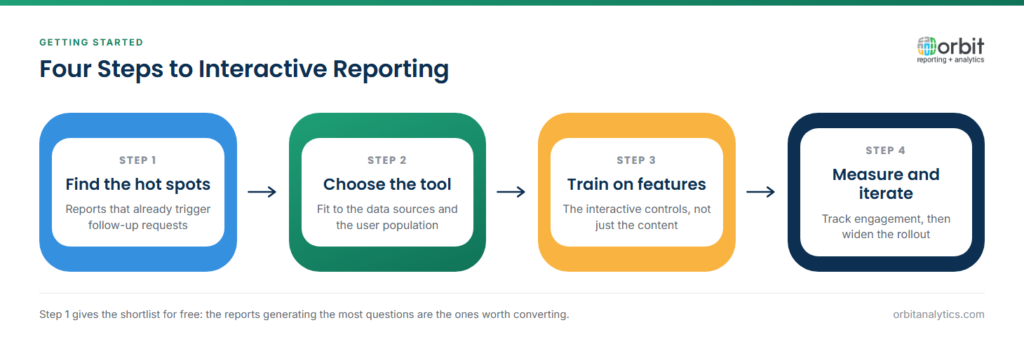
- Identify reports that already trigger follow-up requests. Anything generating more than one or two “can you re-run this with…” emails per cycle is a candidate for an interactive version.
- Choose a tool that fits the data sources and the user population. For Oracle ERP shops, the deciding factor is usually how well the tool understands Fusion or EBS schemas out of the box. Orbit Analytics provides self-service reporting on top of 1,000+ pre-built reports and 200+ pre-built connectors, giving finance and operations users interactive Oracle data without a separate semantic-modeling project.
- Train users on the interactive features, not just the report content. Filters, drills, and exports are the value; the report subject is the context.
- Measure engagement and iterate. Track which reports get re-opened, which filters get used, and where users abandon. Use that to retire what’s unused and improve what’s working.
Frequently Asked Questions
Q1. What is interactive reporting in simple terms?
Interactive reporting is a report you can change while you read it. Instead of a fixed PDF, you get filters, drill-downs, and sort controls so you can ask follow-up questions and see the answer immediately, without commissioning a new report.
Q2. What is the difference between interactive and static reports?
Static reports capture one set of choices at the moment they are generated and freeze them; interactive reports run live against the data each time you change a filter or drill into a number. Static is for distribution and archive; interactive is for exploration and decisions.
Q3. What is drill-down in interactive reporting?
Drill-down is the ability to click a summary number, say, total Q3 spend, and expand it into its components, such as spend by category, then by supplier, then by purchase order. In Oracle ERP environments, drill-down usually ends at the transaction or journal-line level.
Q4. Do you need technical skills for interactive reporting?
No. Interactive reports are designed for business users. The author needs to know the data; the reader only needs to know the questions they want to ask. Most interactions are clicks and dropdowns rather than queries.
Q5. Can interactive reports be shared?
Yes. Most platforms let users export the current view to Excel or PDF, schedule it by email, or share a link that preserves the applied filters. Sharing the underlying interactive report, not just a snapshot, is what keeps everyone on the same source of truth.
Q6. Is interactive reporting the same as a dashboard?
They overlap but are not identical. A dashboard is usually a curated single-screen summary of KPIs; an interactive report is a deeper view of a specific subject area. Dashboards typically link out to interactive reports for follow-up analysis.
Ready to give your Oracle ERP users the freedom to explore their own data? Request a demo to see how Orbit Analytics delivers interactive reporting on Fusion Cloud, EBS, NetSuite, and PeopleSoft with pre-built drill paths to transaction detail.
