
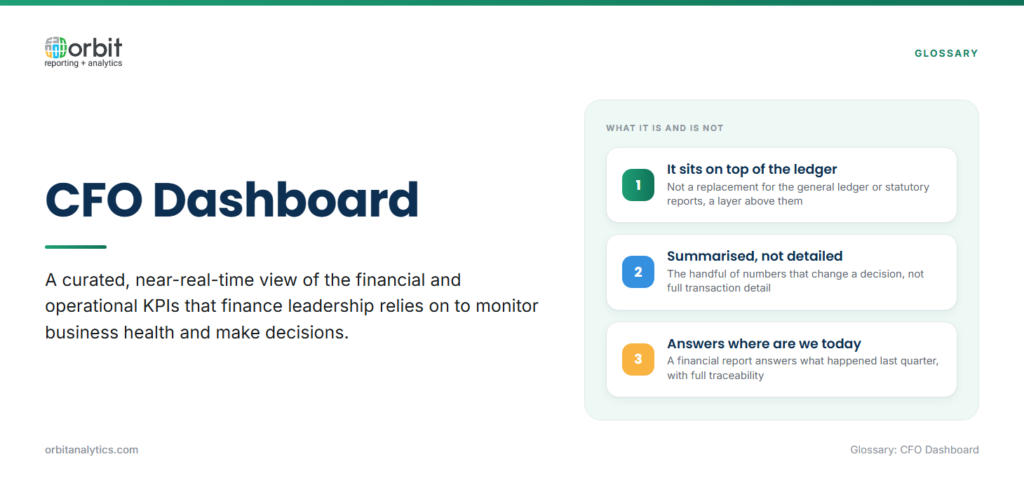
A CFO dashboard is a curated, near-real-time view of the financial and operational KPIs that the chief financial officer and finance leadership team rely on to monitor business health and make decisions. It is not a replacement for the general ledger or statutory reports. It sits on top of those systems and surfaces the handful of numbers that matter day to day.
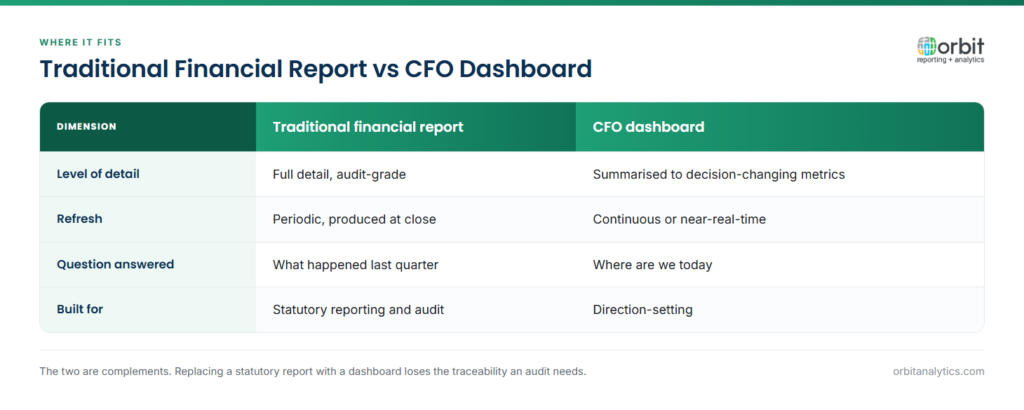
A traditional financial report is detailed, periodic, and audit-grade. A CFO dashboard is summarized, refreshed continuously, and built for direction-setting. The first answers “what happened last quarter” with full traceability; the second answers “where are we today” in seconds.
Real-time refresh is what turns a static management pack into a working tool. When revenue, cash, and DSO are current, the CFO can react to a slowdown the same week, not in the next reporting cycle.
Why Do CFOs Need Executive Dashboards?
A well-built executive dashboard earns its place in three ways:
- Instant visibility into financial health. Cash position, revenue, margin, working capital, and budget variance live on a single page, with drill-down to the underlying transactions when something looks off.
- Strategic decision support. When the leadership team is debating a hiring freeze, a price change, or a new market, the CFO can answer with current numbers rather than a week-old spreadsheet.
- Better board and stakeholder communication. A consistent set of metrics, refreshed on a known cadence, removes the back-and-forth around which version of the number is correct.
Essential Metrics for a CFO Dashboard
Most effective CFO dashboards track 7 to 10 strategic KPIs grouped into a few themes:
- Revenue and profitability: total revenue, growth rate, gross margin, EBITDA, net income, and revenue by segment or product line.
- Cash flow and liquidity: operating cash flow, free cash flow, cash on hand, days cash on hand, and a 13-week rolling cash forecast.
- Working capital: days sales outstanding (DSO), days payable outstanding (DPO), days inventory outstanding (DIO), and the cash conversion cycle.
- Budget vs. actual variance: variance by department or cost center, year-to-date budget consumption, and forecast vs. plan.
- Financial ratios: current ratio, quick ratio, debt-to-equity, and return on capital employed.
Orbit Analytics ships pre-built financial dashboards that read directly from Oracle GL, AR, AP, and FA, so these metrics are wired to live ledger data rather than to a stale extract. That matters when the variance you are explaining changes between Monday’s prep call and Tuesday’s board meeting.
CFO Dashboard Design Best Practices
Three design rules separate dashboards that get used from dashboards that get ignored:
- Focus on strategic metrics, not operational detail. If a number does not change a CFO’s decision, it does not belong on the home screen, link to it instead.
- Use visual indicators sparingly. Red, amber, green tiles for variance thresholds, sparklines for trend, and a single chart per quadrant. Enable drill-down on every tile so the CFO can move from a margin number to the underlying invoices in two or three clicks.
- Keep it uncluttered. A page with six well-chosen KPIs beats a page with twenty competing ones every time.
What Information Should a CFO Dashboard Display?
The home view typically anchors on four blocks:
- Financial performance overview: Revenue, margin, EBITDA YTD vs. plan.
- Current cash position with a short-horizon forecast.
- Operational metrics that move finance: Orders, shipments, headcount.
- Risk or compliance indicators: Covenant headroom, overdue AR.
The goal is one screen that answers “are we on plan, do we have cash, and is anything breaking” without any scrolling.
Common Challenges with CFO Dashboards
Three challenges show up in nearly every implementation:
- Data integration. Finance data lives in the GL, but the drivers of those numbers, orders, projects, headcount, inventory, live in other modules and sometimes in non-Oracle systems. A dashboard that pulls only from GL will tell you what happened, not why.
- Balancing summary and detail. Executives want a one-screen view, but they also want to drill into a specific cost center the moment a number looks wrong.
- Keeping data fresh. Manual exports and copy-paste workflows mean the dashboard is always at least a day behind reality.
The fix is direct, governed connectivity to Oracle ERP and other source systems. A layer like Orbit Data Pipeline handles the extraction, scheduling, and refresh end-to-end, and data management governs the master data so segment, entity, and account hierarchies stay consistent across every tile.
CFO Dashboard Examples by Industry
CFO dashboards look different by sector, even when the underlying metric set overlaps:
- Manufacturing: cost of goods sold, gross margin by product line, inventory turns, plant-level variance.
- Retail: revenue per square foot, same-store sales growth, inventory aging, gross margin return on investment.
- Services: utilization rate, billable hours, revenue per consultant, deferred revenue.
- Multi-entity: consolidated P&L, intercompany eliminations, FX impact, entity-level contribution.
The metric set should match how the CFO actually thinks about the business, not a generic template.
How to Build a CFO Dashboard
Building a useful cfo dashboard is less about the visualization tool and more about disciplined design. Five steps cover the work:
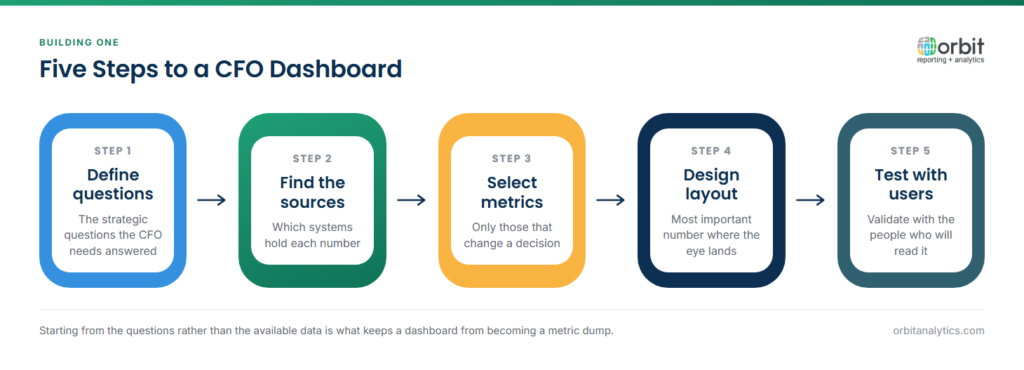
- Define the strategic questions. Sit with the CFO and list the 10 questions they ask most often. Those become the KPIs.
- Identify the data sources. Map each KPI to the system of record, usually Oracle Fusion or EBS GL, AR, AP, and supporting modules.
- Select the metrics. Trim to 7 to 10. Anything else moves to a secondary tab.
- Design the layout. Four quadrants: performance, cash, operations, risk. Drill-down from every tile.
- Test with stakeholders. Run a two-week pilot. Remove tiles that no one clicks.
Orbit Analytics offers GL Sense for financial dashboards, a pre-built CFO dashboard layer connected to Oracle General Ledger that ships with the standard finance metric set already wired up. For Oracle Fusion customers specifically, the Fusion financial reporting library covers consolidations and statutory views off the same data model.
Frequently Asked Questions
Q1. What is a CFO dashboard?
A CFO dashboard is a curated, near-real-time view of the financial and operational KPIs that a chief financial officer uses to monitor business health and make decisions. It consolidates revenue, margin, cash, working capital, and variance metrics onto a single screen with drill-down to underlying transactions.
Q2. What metrics should be on a CFO dashboard?
Most effective dashboards track 7 to 10 strategic KPIs across revenue and profitability, cash flow and liquidity, working capital, budget vs. actual variance, and key financial ratios. Add a small set of operational metrics that materially impact finance, such as orders, shipments, and headcount.
Q3. What is the difference between a CFO dashboard and financial reports?
Financial reports are detailed, periodic, and audit-grade, built for compliance and historical analysis. A CFO dashboard is summarized, continuously refreshed, and built for direction-setting. The two complement each other rather than compete.
Q4. How often should a CFO dashboard update?
For most companies, daily refresh is the right baseline, with cash and AR aging refreshed multiple times per day. Real-time refresh is valuable for cash and revenue but rarely needed for headcount, depreciation, or other slow-moving metrics.
Q5. Can a CFO dashboard connect to Oracle ERP?
Yes. Modern dashboard platforms ship with pre-built connectors to Oracle Fusion Cloud, EBS, NetSuite, and PeopleSoft GL, AR, AP, and FA modules. The connector handles extraction and refresh, so the dashboard reads current ledger data without manual exports.
Q6. How many metrics should a CFO dashboard have?
Aim for 7 to 10 KPIs on the home screen. Anything more pushes the dashboard from a decision tool toward a report. Secondary views can hold the deeper drill-downs.
Ready to give your finance team a live view of the metrics that matter? Request a demo to see how Orbit Analytics delivers pre-built CFO dashboards on top of your Oracle ERP.
